Get Fabric or SQL Certified for Free.
Get certified for free when you join Fabric Data Days 2026 and dive into Fabric, Power BI, SQL, AI, and other essential data skills.
Join now- Power BI forums
- Get Help with Power BI
- Desktop
- Service
- Report Server
- Power Query
- Mobile Apps
- Developer
- DAX Commands and Tips
- Custom Visuals Development Discussion
- Health and Life Sciences
- Power BI Spanish forums
- Translated Spanish Desktop
- Training and Consulting
- Instructor Led Training
- Dashboard in a Day for Women, by Women
- Galleries
- Data Stories Gallery
- Themes Gallery
- Contests Gallery
- QuickViz Gallery
- Quick Measures Gallery
- Visual Calculations Gallery
- Fabric Apps Gallery
- Notebook Gallery
- Translytical Task Flow Gallery
- TMDL Gallery
- R Script Showcase
- Webinars and Video Gallery
- Ideas
- Custom Visuals Ideas (read-only)
- Issues
- Issues
- Events
- Upcoming Events
July 28 - August 9 | Final Round of the Power BI Dataviz World Championships. This is your chance. Learn more
- Power BI forums
- Forums
- Get Help with Power BI
- Desktop
- Re: Internal Error connecting PowerBI to MySQL dat...
- Subscribe to RSS Feed
- Mark Topic as New
- Mark Topic as Read
- Float this Topic for Current User
- Bookmark
- Subscribe
- Printer Friendly Page

- Mark as New
- Bookmark
- Subscribe
- Mute
- Subscribe to RSS Feed
- Permalink
- Report Inappropriate Content
Internal Error connecting PowerBI to MySQL database
Hello,
I am currently trying to connect a dashboard I designed with a MySQL database holding the data currently. However, I keep receiving this error: Details: "An error happened while reading data from the provider: 'Internal connection fatal error. Error state: 18'".
Is this an issue with PowerBI's side or the host's side and is there a way to fix this?
Thank you.

- Mark as New
- Bookmark
- Subscribe
- Mute
- Subscribe to RSS Feed
- Permalink
- Report Inappropriate Content
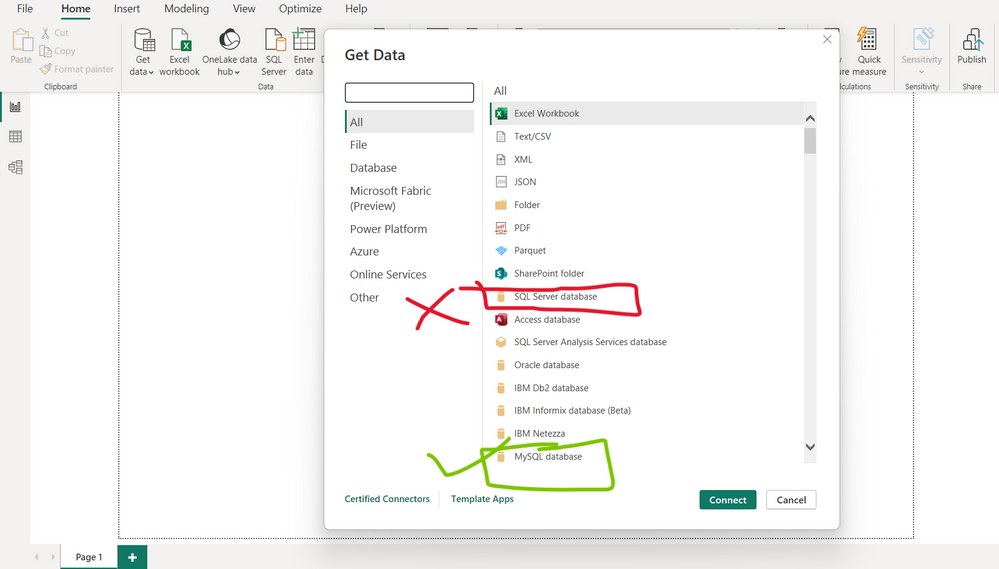
It's possibe that you accidentally selected sql server database instead of mySQL database inside Power BI's Get Data window. Pay attention to this and select the right database for it to work. This was the fix for me.

- Mark as New
- Bookmark
- Subscribe
- Mute
- Subscribe to RSS Feed
- Permalink
- Report Inappropriate Content
Fixing an Error: Power BI Connection with MySQL or Azure Database
#Azure
#PowerBI
#MySQL
This article is intended to help people who are facing the same problem I had when trying to connect Power BI to a MySQL or SQL Server database.
If you encountered the following errors, or even after doing exactly what Power BI asks—downloading and installing the connector—and it still doesn’t work, below are the screenshots and the solution.
First, the following message appears for you:
image
You click on Learn more, follow all the procedures, install the connector, and even then it does not work.
The latest version downloaded is this one: net-8.1.0.msi
image
The problem may be related to several factors, such as compatibility, operating system version, among others.
I searched some forums, and the issue can often be fixed by downloading older versions.
I downloaded the version most recommended by them; it worked at first, but later other errors appeared.
So the tip I give is: you need to test different versions and see which one works best on your computer.
I will write down the errors, post the screenshots, and show the recommended versions and which one worked on my computer.
You should test these first—it helps you avoid wasting too much time. If it doesn’t work, then you can download other versions.
In the next posts, I will leave the link.
Below is another version I installed, which worked but later showed another error:
image
If these other errors appear, follow what was explained and it will be resolved.
Example 1:
Details: "We were unable to find a database provider with the invariant name 'MySql.Data.MySqlClient'."
Example 2:
image
The version that worked perfectly for me was: net-8.0.32.msi
image
After that, the connection with the database worked perfectly.
image
Here is the link to download several versions:
https://downloads.mysql.com/archives/c-net/
image
If anyone is having this difficulty, I hope this helped, because it took quite a lot of my time until I managed to fix it.
Source of the solution:
Corrigindo erro: Conexão do power BI com Banco de Dados MySQL ou Azure | Wenderes Cunha | Azure | Po...
- Mark as New
- Bookmark
- Subscribe
- Mute
- Subscribe to RSS Feed
- Permalink
- Report Inappropriate Content
To solve the error message "An error happened while reading data from the provider: 'Internal connection fatal error. Error state: 18'", you can try the following steps:
- Go to File tab on the ribbon in PowerBI Desktop, then click on About and check the PowerBI version. Update PowerBI if it is not the latest version.
- Download and Install MYSQL connect - MySQL :: Download Connector/NET
- If the PowerBI version is already the latest, click on the dropdown arrow below the Transform Data button, then click on Data source settings and Global Permissions.
- Consider using a server name instead of an IP address to connect to SQL server.
Note: Make sure to restart your running applications so everything get loaded. (Don't Ignore this)
- Mark as New
- Bookmark
- Subscribe
- Mute
- Subscribe to RSS Feed
- Permalink
- Report Inappropriate Content
- Mark as New
- Bookmark
- Subscribe
- Mute
- Subscribe to RSS Feed
- Permalink
- Report Inappropriate Content
Thanks. Help a lot. The error is a simple thing. NEED READ, correctly

- Mark as New
- Bookmark
- Subscribe
- Mute
- Subscribe to RSS Feed
- Permalink
- Report Inappropriate Content
This and the step above:
Download and Install MYSQL connect - MySQL :: Download Connector/NET
You need the drivers to connect and then make sure you are connecting to the right DB. Had the same issue and was solved after downloading .NET and choosing Other Sources and selecting mySQL from the list.
The other thing you might want to check is that you are choosing signing in with database credentials and not Windows. That is found on the left when entering the password.

- Mark as New
- Bookmark
- Subscribe
- Mute
- Subscribe to RSS Feed
- Permalink
- Report Inappropriate Content
I tried with mysql server, having the same issue

- Mark as New
- Bookmark
- Subscribe
- Mute
- Subscribe to RSS Feed
- Permalink
- Report Inappropriate Content
Did you get solution to this having same error


- Mark as New
- Bookmark
- Subscribe
- Mute
- Subscribe to RSS Feed
- Permalink
- Report Inappropriate Content
Hi @DrinkableRiver ,
In your scenario, are you able to connect to the MySQL database in MySQL workbench? Please ensure that MySQL workbench is installed in the same machine as Power BI Desktop.
If the connection is successful in MySQL workbench, use same connection string and make sure that you use Database credential in Power BI Desktop to connect to the MySQL database, and you can review this blog about connecting to MySQL in Power BI Desktop.
If this post was helpful may I ask you to mark it as solution and give it some kudos?
Have a nice day!
BR,
Josef
- Mark as New
- Bookmark
- Subscribe
- Mute
- Subscribe to RSS Feed
- Permalink
- Report Inappropriate Content
Thank you for responding.
Unfortunately, even after trying those methods I am still receiving the same error.
Do you know of any other potential solutions perhaps?

- Mark as New
- Bookmark
- Subscribe
- Mute
- Subscribe to RSS Feed
- Permalink
- Report Inappropriate Content
Have you found any solution for this issue? I am able to connect to the Azure MySQL using Workbench but I am getting the same error as yours while connecting the PowerBI data source to Azure MySQL

Helpful resources

FabCon & SQLCon – Barcelona 2026
Join us in Barcelona for FabCon and SQLCon, the Fabric, Power BI, SQL, and AI community event. Save €200 with code FABCMTY200.

Fabric Community Sticker Challenge - Barcelona 2026
If you love stickers, then you will definitely want to check out our community sticker challenge, Barcelona edition!

Power BI Monthly Update - July 2026
Check out the July 2026 Power BI update to learn about new features.

Power BI DataViz World Championships - June 2026
A new Power BI DataViz World Championship is coming this June! Don't miss out on submitting your entry.

| User | Count |
|---|---|
| 30 | |
| 28 | |
| 25 | |
| 24 | |
| 16 |


| User | Count |
|---|---|
| 48 | |
| 32 | |
| 17 | |
| 16 | |
| 16 |


