Get certified for free when you join Fabric Data Days 2026 and dive into Fabric, Power BI, SQL, AI, and other essential data skills.
Join nowJuly 7 - July 17 | Round 2 of the Power BI Dataviz World Championships. Don't miss your chance! Learn more
Hello,
Report description:
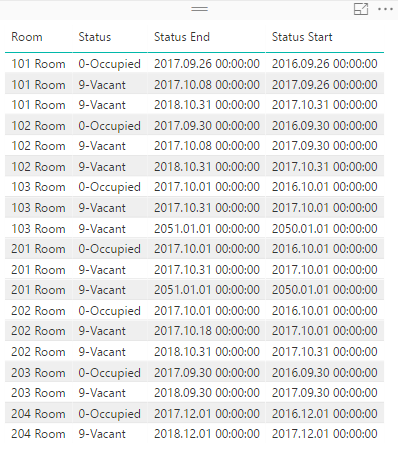
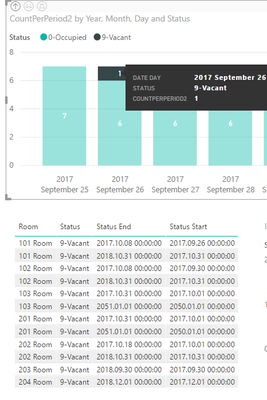
I have Rooms data, columns: [Room],[Status],[Status Start];[Status End];
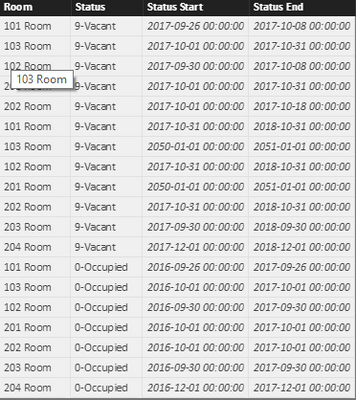
I have Date table which has NO Relationship to Rooms Table.
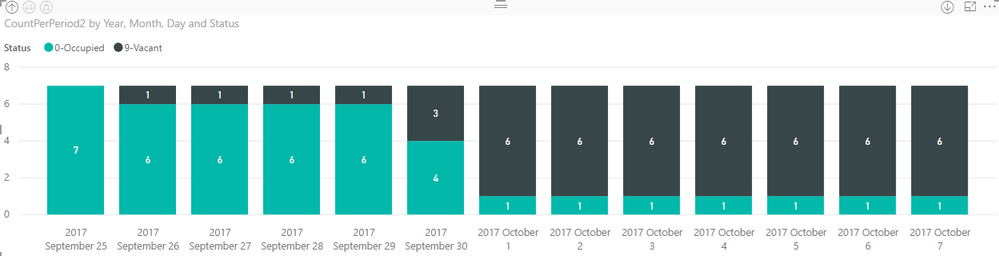
There is a measure to count Rooms in Period per Status (link😞
CountPerPeriod2 = CALCULATE(COUNT(Table2[Room]);
FILTER(Table2; ([Status Start] <= LASTDATE('Date'[Date])
&& [Status End] > FIRSTDATE('Date'[Date]))))
And there are two visuals:
Problem and requirement:
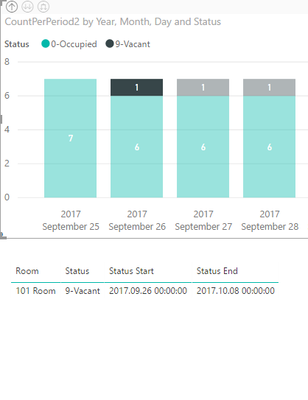
When the specific date and status is selected in Chart, Table should show ony selected Rooms.
Now Table shows all Rooms for selected Status ignoring date filter:
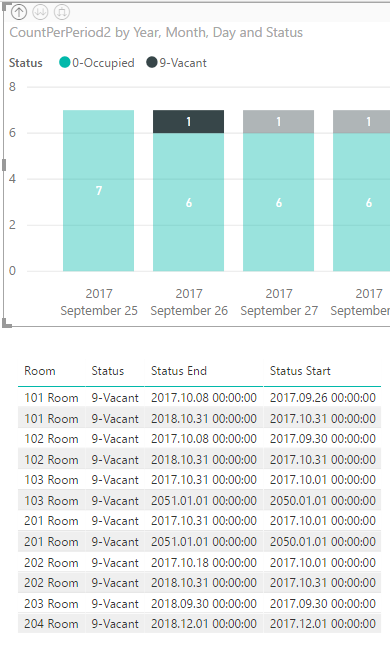
I guess it is because Date and Rooms has NO Relationship.
But this measure requires NO Relationship.
Is it possible to overcome this issue?
Solved! Go to Solution.
Thank you for the guidance, your comment about Visual level filter helped.
However measure was not correct. This part in IfAvailable measure:
CALCULATE(MAX ( Table2[Status Start] ))
takes MAX of [Status Start], but in those cases then selected day has more than one room available MAX is wrong function to use.
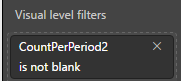
I found simplier solution to this. In table create Visual level filter of the main measure and set it to "is not blank":
Solution
Working
Your measure is to calculate count of Vacant/Occupied rooms over a full calendar. It should not have relationship to Date table. So it will always ignore Date[Date] filter. In your scenario, you can create a measure to check if a room is available:
IfAvailable =
IF (
CALCULATE ( MAX ( Table[Status_Start] ) ) < MAX ( date[date] )
&& CALCULATE ( MAX ( Table[Status_End] ) ) > MAX ( date[date] ),
0,
1
)
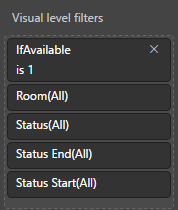
Then add a Visual Level filter on your table visual with above measure. Set IfAvailable is 1.
Regards,
Thank you for the guidance, your comment about Visual level filter helped.
However measure was not correct. This part in IfAvailable measure:
CALCULATE(MAX ( Table2[Status Start] ))
takes MAX of [Status Start], but in those cases then selected day has more than one room available MAX is wrong function to use.
I found simplier solution to this. In table create Visual level filter of the main measure and set it to "is not blank":
Solution
Working
Thank you for answer.
I created new measure:
IfAvailable =
IF (
CALCULATE ( MAX ( Table2[Status Start] ) ) < MAX ( 'Date'[Date] )
&& CALCULATE ( MAX ( Table2[Status End] ) ) > MAX ( 'Date'[Date] );
0;
1
)Attached Visual filter to table:
Visual Filter
After this I don't get desired result:
Error in filter
Table should show only one Row.
@v-sihou-msft can you recheck IfAvailable measure logic is it correct?
Join us in Barcelona for FabCon and SQLCon, the Fabric, Power BI, SQL, and AI community event. Save €200 with code FABCMTY200.
Join Fabric Data Days 2026: 60 days of free live/on-demand sessions, challenges, study groups, and certification opportunities.
| User | Count |
|---|---|
| 22 | |
| 22 | |
| 18 | |
| 17 | |
| 13 |
| User | Count |
|---|---|
| 61 | |
| 52 | |
| 47 | |
| 40 | |
| 38 |