This is best Fabric, Power BI, SQL and AI community event. How do we know? The last event sold out! Save €200 with code FABCMTY200.
Register nowA new Data Days event is coming soon! This time we’re going bigger than ever. Fabric, Power BI, SQL, AI and more. Don't miss out.
Hi,
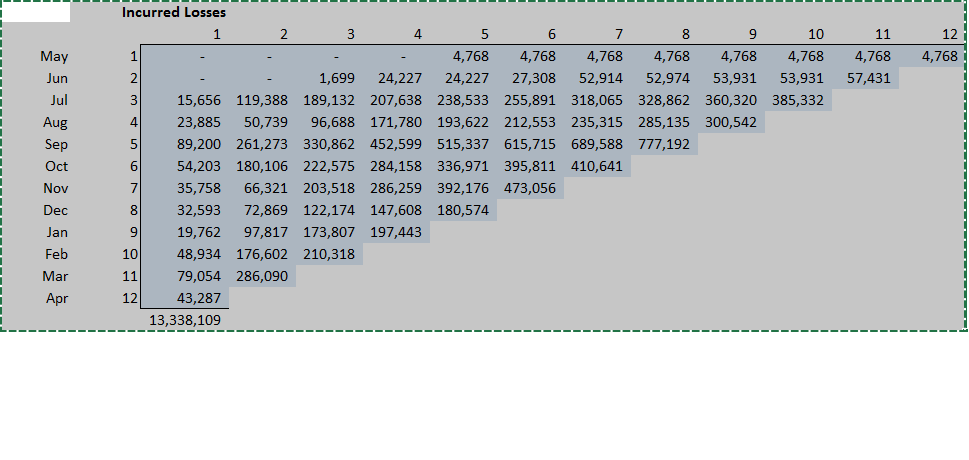
I was wondering if anyone has had any success in creating insurance Loss triangles in PowerBi? A typical claims loss triangle would show how losses develop over time for each period they were written in. eg...
Easy enough to create in Excel but I'm struggling in PowerBI and I can't find any custom visualisations.
Any advice greatly appreaciated, thanks
Solved! Go to Solution.
Hi @PowerPaddy,
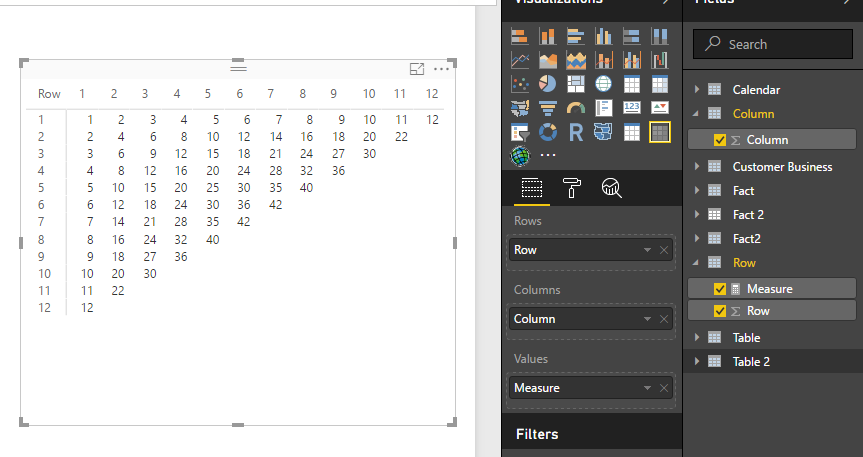
It is possible to create triangular matrix visual in power, you can refer to below sample to achieve your requirement.
Prerequisite: matrix preview visual, two table without relationship.
Measure:
Measure =
var current_Row=MAX('Row'[Row])
var current_Column=MAX('Column'[Column])
return
if(current_Row+current_Column<=13,current_Row*current_Column)
Regards,
Xiaoxin Sheng
Hi, might want to look at the follwoing blog -
https://insurancedatainsights.blog/2024/02/16/insurance-triangles-in-power-bi/
Hi @PowerPaddy,
It is possible to create triangular matrix visual in power, you can refer to below sample to achieve your requirement.
Prerequisite: matrix preview visual, two table without relationship.
Measure:
Measure =
var current_Row=MAX('Row'[Row])
var current_Column=MAX('Column'[Column])
return
if(current_Row+current_Column<=13,current_Row*current_Column)
Regards,
Xiaoxin Sheng
Check out the May 2026 Power BI update to learn about new features.
Sign up to receive a private message when registration opens and key events begin.
If you have recently started exploring Fabric, we'd love to hear how it's going. Your feedback can help with product improvements.
| User | Count |
|---|---|
| 29 | |
| 28 | |
| 25 | |
| 20 | |
| 14 |
| User | Count |
|---|---|
| 53 | |
| 47 | |
| 29 | |
| 20 | |
| 19 |