cancel
Showing results for 
Search instead for 
Did you mean: 

The Power BI Data Visualization World Championships is back! Get ahead of the game and start preparing now! Learn more

Reply
Anonymous
Not applicable

Insert Unknown Date into Calendar Table

Hi,


I need to create a calendar table that has a row for the unknown dates.

It needs to look like this:
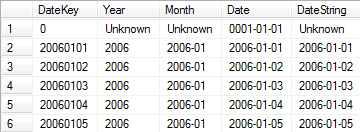
dw-dimdate.png


I was able to create a calendar table with the code below, but I can not find a way to add this additional line.

Can you help me?


Calendar = 
ADDCOLUMNS (
CALENDAR (DATE(YEAR(NOW())-1;1;1); DATE(YEAR(TODAY());MONTH(TODAY());DAY(TODAY())));
"DateAsInteger"; FORMAT ( [Date]; "YYYYMMDD" );
"Year"; YEAR ( [Date] );
"Monthnumber"; FORMAT ( [Date]; "MM" );
"YearMonthnumber"; FORMAT ( [Date]; "YYYY/MM" );
"YearMonthShort"; FORMAT ( [Date]; "YYYY/mmm" );
"MonthNameShort"; FORMAT ( [Date]; "mmm" );
"MonthNameLong"; FORMAT ( [Date]; "mmmm" );
"DayOfWeekNumber"; WEEKDAY ( [Date] );
"DayOfWeek"; FORMAT ( [Date]; "dddd" );
"DayOfWeekShort"; FORMAT ( [Date]; "ddd" );
"Quarter"; "Q" & FORMAT ( [Date]; "Q" );
"YearQuarter"; FORMAT ( [Date]; "YYYY" ) & "/Q" & FORMAT ( [Date]; "Q" )
)
1 ACCEPTED SOLUTION
CrisYan
Resolver III
Resolver III

You could do something like

Calendar = 
VAR C1 = ADDCOLUMNS (
CALENDAR (DATE(YEAR(NOW())-1;1;1); DATE(YEAR(TODAY());MONTH(TODAY());DAY(TODAY())));
"DateAsInteger"; FORMAT ( [Date]; "YYYYMMDD" );
"Year"; YEAR ( [Date] );
"Monthnumber"; FORMAT ( [Date]; "MM" );
"YearMonthnumber"; FORMAT ( [Date]; "YYYY/MM" );
"YearMonthShort"; FORMAT ( [Date]; "YYYY/mmm" );
"MonthNameShort"; FORMAT ( [Date]; "mmm" );
"MonthNameLong"; FORMAT ( [Date]; "mmmm" );
"DayOfWeekNumber"; WEEKDAY ( [Date] );
"DayOfWeek"; FORMAT ( [Date]; "dddd" );
"DayOfWeekShort"; FORMAT ( [Date]; "ddd" );
"Quarter"; "Q" & FORMAT ( [Date]; "Q" );
"YearQuarter"; FORMAT ( [Date]; "YYYY" ) & "/Q" & FORMAT ( [Date]; "Q" )
)

VAR C2 = 
ROW(
"Date";0;
"DateAsInteger"; 0;
"Year"; 0;
"Monthnumber"; 0;
"YearMonthnumber"; 0;
"YearMonthShort"; 0;
"MonthNameShort"; 0;
"MonthNameLong";0;
"DayOfWeekNumber"; 0;
"DayOfWeek";0;
"DayOfWeekShort"; 0;
"Quarter"; 0;
"YearQuarter"; 0
)

RETURN UNION (C1;C2)

Replace the zeros in C2 with the desirable values of that row, and be aware with the Data type of each column.


Regards!

View solution in original post

2 REPLIES 2
CrisYan
Resolver III
Resolver III

You could do something like

Calendar = 
VAR C1 = ADDCOLUMNS (
CALENDAR (DATE(YEAR(NOW())-1;1;1); DATE(YEAR(TODAY());MONTH(TODAY());DAY(TODAY())));
"DateAsInteger"; FORMAT ( [Date]; "YYYYMMDD" );
"Year"; YEAR ( [Date] );
"Monthnumber"; FORMAT ( [Date]; "MM" );
"YearMonthnumber"; FORMAT ( [Date]; "YYYY/MM" );
"YearMonthShort"; FORMAT ( [Date]; "YYYY/mmm" );
"MonthNameShort"; FORMAT ( [Date]; "mmm" );
"MonthNameLong"; FORMAT ( [Date]; "mmmm" );
"DayOfWeekNumber"; WEEKDAY ( [Date] );
"DayOfWeek"; FORMAT ( [Date]; "dddd" );
"DayOfWeekShort"; FORMAT ( [Date]; "ddd" );
"Quarter"; "Q" & FORMAT ( [Date]; "Q" );
"YearQuarter"; FORMAT ( [Date]; "YYYY" ) & "/Q" & FORMAT ( [Date]; "Q" )
)

VAR C2 = 
ROW(
"Date";0;
"DateAsInteger"; 0;
"Year"; 0;
"Monthnumber"; 0;
"YearMonthnumber"; 0;
"YearMonthShort"; 0;
"MonthNameShort"; 0;
"MonthNameLong";0;
"DayOfWeekNumber"; 0;
"DayOfWeek";0;
"DayOfWeekShort"; 0;
"Quarter"; 0;
"YearQuarter"; 0
)

RETURN UNION (C1;C2)

Replace the zeros in C2 with the desirable values of that row, and be aware with the Data type of each column.


Regards!

Anonymous
Not applicable

It worked exactly as I wanted it, thanks!


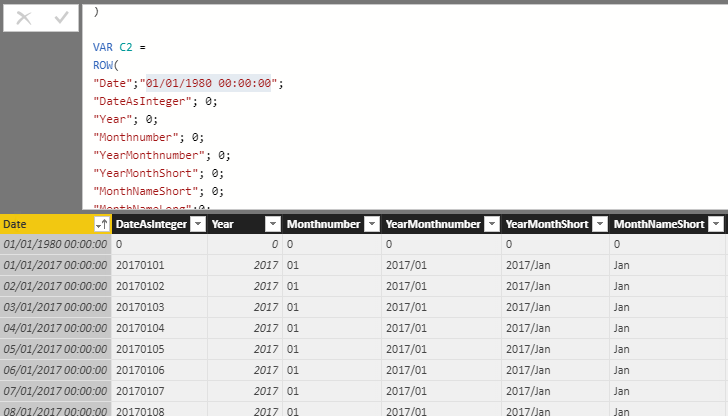
This is the result.


Capturar.PNG

Helpful resources

Announcements
Power BI DataViz World Championships

Power BI Dataviz World Championships

The Power BI Data Visualization World Championships is back! Get ahead of the game and start preparing now!

December 2025 Power BI Update Carousel

Power BI Monthly Update - December 2025

Check out the December 2025 Power BI Holiday Recap!

FabCon Atlanta 2026 carousel

FabCon Atlanta 2026

Join us at FabCon Atlanta, March 16-20, for the ultimate Fabric, Power BI, AI and SQL community-led event. Save $200 with code FABCOMM.