Join us at FabCon Atlanta from March 16 - 20, 2026, for the ultimate Fabric, Power BI, AI and SQL community-led event. Save $200 with code FABCOMM.
Register now!View all the Fabric Data Days sessions on demand. View schedule
Hi,
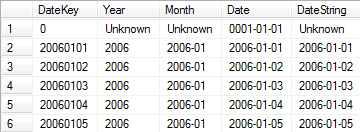
I need to create a calendar table that has a row for the unknown dates.
It needs to look like this:
I was able to create a calendar table with the code below, but I can not find a way to add this additional line.
Can you help me?
Calendar = ADDCOLUMNS ( CALENDAR (DATE(YEAR(NOW())-1;1;1); DATE(YEAR(TODAY());MONTH(TODAY());DAY(TODAY()))); "DateAsInteger"; FORMAT ( [Date]; "YYYYMMDD" ); "Year"; YEAR ( [Date] ); "Monthnumber"; FORMAT ( [Date]; "MM" ); "YearMonthnumber"; FORMAT ( [Date]; "YYYY/MM" ); "YearMonthShort"; FORMAT ( [Date]; "YYYY/mmm" ); "MonthNameShort"; FORMAT ( [Date]; "mmm" ); "MonthNameLong"; FORMAT ( [Date]; "mmmm" ); "DayOfWeekNumber"; WEEKDAY ( [Date] ); "DayOfWeek"; FORMAT ( [Date]; "dddd" ); "DayOfWeekShort"; FORMAT ( [Date]; "ddd" ); "Quarter"; "Q" & FORMAT ( [Date]; "Q" ); "YearQuarter"; FORMAT ( [Date]; "YYYY" ) & "/Q" & FORMAT ( [Date]; "Q" ) )
Solved! Go to Solution.
You could do something like
Calendar = VAR C1 = ADDCOLUMNS ( CALENDAR (DATE(YEAR(NOW())-1;1;1); DATE(YEAR(TODAY());MONTH(TODAY());DAY(TODAY()))); "DateAsInteger"; FORMAT ( [Date]; "YYYYMMDD" ); "Year"; YEAR ( [Date] ); "Monthnumber"; FORMAT ( [Date]; "MM" ); "YearMonthnumber"; FORMAT ( [Date]; "YYYY/MM" ); "YearMonthShort"; FORMAT ( [Date]; "YYYY/mmm" ); "MonthNameShort"; FORMAT ( [Date]; "mmm" ); "MonthNameLong"; FORMAT ( [Date]; "mmmm" ); "DayOfWeekNumber"; WEEKDAY ( [Date] ); "DayOfWeek"; FORMAT ( [Date]; "dddd" ); "DayOfWeekShort"; FORMAT ( [Date]; "ddd" ); "Quarter"; "Q" & FORMAT ( [Date]; "Q" ); "YearQuarter"; FORMAT ( [Date]; "YYYY" ) & "/Q" & FORMAT ( [Date]; "Q" ) ) VAR C2 = ROW( "Date";0; "DateAsInteger"; 0; "Year"; 0; "Monthnumber"; 0; "YearMonthnumber"; 0; "YearMonthShort"; 0; "MonthNameShort"; 0; "MonthNameLong";0; "DayOfWeekNumber"; 0; "DayOfWeek";0; "DayOfWeekShort"; 0; "Quarter"; 0; "YearQuarter"; 0 ) RETURN UNION (C1;C2)
Replace the zeros in C2 with the desirable values of that row, and be aware with the Data type of each column.
Regards!
You could do something like
Calendar = VAR C1 = ADDCOLUMNS ( CALENDAR (DATE(YEAR(NOW())-1;1;1); DATE(YEAR(TODAY());MONTH(TODAY());DAY(TODAY()))); "DateAsInteger"; FORMAT ( [Date]; "YYYYMMDD" ); "Year"; YEAR ( [Date] ); "Monthnumber"; FORMAT ( [Date]; "MM" ); "YearMonthnumber"; FORMAT ( [Date]; "YYYY/MM" ); "YearMonthShort"; FORMAT ( [Date]; "YYYY/mmm" ); "MonthNameShort"; FORMAT ( [Date]; "mmm" ); "MonthNameLong"; FORMAT ( [Date]; "mmmm" ); "DayOfWeekNumber"; WEEKDAY ( [Date] ); "DayOfWeek"; FORMAT ( [Date]; "dddd" ); "DayOfWeekShort"; FORMAT ( [Date]; "ddd" ); "Quarter"; "Q" & FORMAT ( [Date]; "Q" ); "YearQuarter"; FORMAT ( [Date]; "YYYY" ) & "/Q" & FORMAT ( [Date]; "Q" ) ) VAR C2 = ROW( "Date";0; "DateAsInteger"; 0; "Year"; 0; "Monthnumber"; 0; "YearMonthnumber"; 0; "YearMonthShort"; 0; "MonthNameShort"; 0; "MonthNameLong";0; "DayOfWeekNumber"; 0; "DayOfWeek";0; "DayOfWeekShort"; 0; "Quarter"; 0; "YearQuarter"; 0 ) RETURN UNION (C1;C2)
Replace the zeros in C2 with the desirable values of that row, and be aware with the Data type of each column.
Regards!
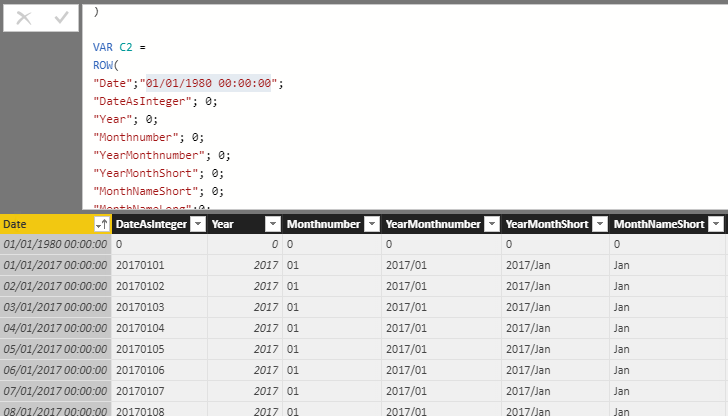
It worked exactly as I wanted it, thanks!
This is the result.
Check out the November 2025 Power BI update to learn about new features.
Advance your Data & AI career with 50 days of live learning, contests, hands-on challenges, study groups & certifications and more!