Get certified for free when you join Fabric Data Days 2026 and dive into Fabric, Power BI, SQL, AI, and other essential data skills.
Join nowTry your skills in the Power BI Dataviz World Championship! Round one ends June 26. Join now
All,
In a custom column, I'm attempting to divide two columns, [Committed] and [Actual] (fixed decimal numbers in the backend, as U.S. Currency), and attempting to get a [% to target] result. The end goal is to filter by these categories:
a. commited for $0, spent $0
b. commited for $0, spent >$0
c. committed >$0, spent $0
d. commited for $x, spent $y
Trying to divide, either by [A]/[B] or DIVIDE( ), I'm getting a mix of actual zeroes, NaNs, and infinities, and I haven't been able to use conditional columns or if/then statements to group them. Any help?
Hi @RMDNA,
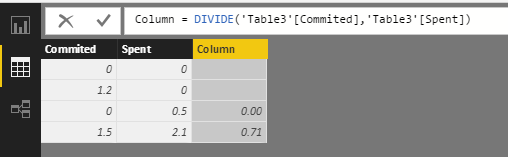
In my opinion, it should be three categories, as both a. and c. have the numerator 0 which can be treated as the same scenario. Based on my tested, use DIVIDE() function, it returns three kind of values, blank, zero and actual decimal.
If the above is not your required results, please share some sample data and screenshots about desired results for our analysis.
Best Regards,
Qiuyun Yu
Thanks. I also have the same issue. It's solved.
Can you post some sample data? Generally, if zeros are involved, use DIVIDE to avoid divide by zero errors. Additionally, use the erd parameter "alternateresult" option of the DIVIDE function to catch divide by zero and return what you want. Potentially wrap it all in an IF statement if necessary.
Don't miss out on Data Days, June 15 through August 7. Learn Fabric, Power BI, SQL, AI and more.
Check out the May 2026 Power BI update to learn about new features.
| User | Count |
|---|---|
| 22 | |
| 21 | |
| 21 | |
| 20 | |
| 13 |
| User | Count |
|---|---|
| 59 | |
| 53 | |
| 40 | |
| 31 | |
| 26 |