cancel
Showing results for 
Search instead for 
Did you mean: 

The Power BI Data Visualization World Championships is back! Get ahead of the game and start preparing now! Learn more

Reply
vkomarag
Helper III
Helper III

Individual and Cumulative in a single visual

Hi


For example on employee table, I need to show the number of employees in each department as well as total employees in a single visual.


I am able to do it in different visuals and keep side by side. Just checking if there is any possibility to keep them in a single visual.


Thanks

KVB

1 ACCEPTED SOLUTION


Hi @vkomarag,

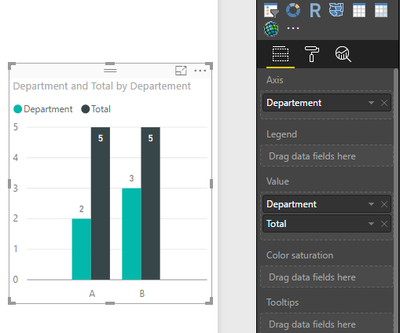
You can create two measure using the formula.

Department = COUNTA(Table1[Employee])
Total = CALCULATE ( COUNTA ( Table1[Employee] ), ALL (Table1 ) )

And select them as value field in bar chart. Please see the following screenshot, I use Cluster column chart, if you want to other bar chart, you can change it.

1.PNG

Thanks,
Angelia

View solution in original post

5 REPLIES 5
v-huizhn-msft
Microsoft Employee
Microsoft Employee

Hi @vkomarag,

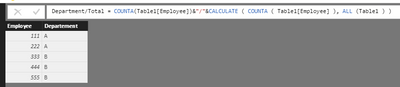
After test using the solution @dkay84_PowerBI posted using the following sample table.

1.PNG

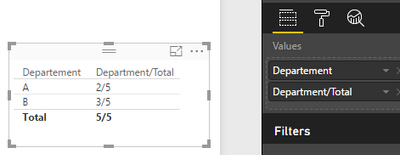
Then you get expected result.

2.PNG

If you still have problem, please share your sample data for further analysis.

Best Regards,
Angelia

Actually I need it in a bar chart in vertical representation.


Hi @vkomarag,

You can create two measure using the formula.

Department = COUNTA(Table1[Employee])
Total = CALCULATE ( COUNTA ( Table1[Employee] ), ALL (Table1 ) )

And select them as value field in bar chart. Please see the following screenshot, I use Cluster column chart, if you want to other bar chart, you can change it.

1.PNG

Thanks,
Angelia

Reid_Havens
Most Valuable Professional

Hi there,


You should be able to create a measure that concatenates two values. One for the total count of that column, and one for the count of rows of that department. It could look something like this:


Count of Employees

=COUNTA(Table[EmployeeID])


Count of ALL Employees

=
CALCULATE ( COUNTA ( Table[EmployeeID] ), ALL ( Table ) )


Concatenated Values

=
[Count of Employees] & " / " & [Count of ALL Employees] 


You can this use this on a single card style or other visual. Hope this helps! 

You can also use Tooltips to display the total on hover, where the actual components of the visual (i.e. columns or bars) show the value per department.  Lastly, you can use a stacked column with department as legend to visually show the total (height of column) and breakdown by department (colors).

Helpful resources

Announcements
Power BI DataViz World Championships

Power BI Dataviz World Championships

The Power BI Data Visualization World Championships is back! Get ahead of the game and start preparing now!

December 2025 Power BI Update Carousel

Power BI Monthly Update - December 2025

Check out the December 2025 Power BI Holiday Recap!

FabCon Atlanta 2026 carousel

FabCon Atlanta 2026

Join us at FabCon Atlanta, March 16-20, for the ultimate Fabric, Power BI, AI and SQL community-led event. Save $200 with code FABCOMM.