Join us at FabCon Atlanta from March 16 - 20, 2026, for the ultimate Fabric, Power BI, AI and SQL community-led event. Save $200 with code FABCOMM.
Register now!The Power BI Data Visualization World Championships is back! Get ahead of the game and start preparing now! Learn more
Hi all,
I was wondering whether there was a way of changing the format of the data so that only the bottom row's numbers show as a percentage, rather than each whole column.
Apologies if there is a basic solution to this - I've only just started using PBI!
Many thanks
updog
Solved! Go to Solution.
Hi @Anonymous,
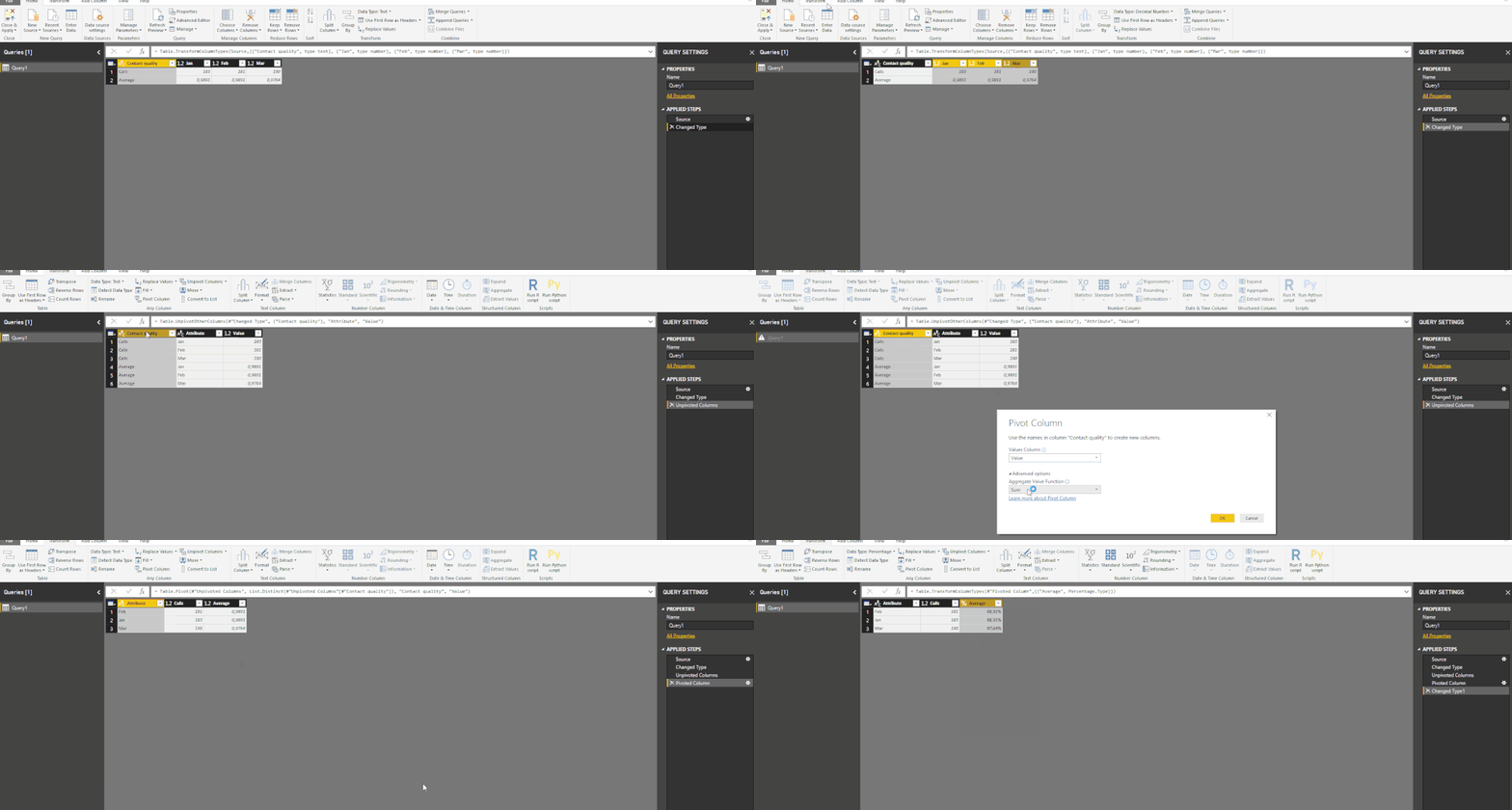
See below an image of how to do the unpivot and pivot on the query editor.
The selection of the columns for the unpivot should compreend all your months.
Regards,
MFelix
Regards
Miguel Félix
Proud to be a Super User!
Check out my blog: Power BI em PortuguêsHi, You can do a conditional formatting in DAX expression for any specific number format.
Try formatting 2 numbers seperately by creating 2 measures, then write a DAX expression using IF condition to use those 2 measures as per the row.
Hope this helps.
Kind Regards,
Azhar Sayyad
Hi @Anonymous,
The best way is to unpivot your columns and then Pivot by the Contact Quality.
Check below the M Code for some sample data:
let
Source = Table.FromRows(Json.Document(Binary.Decompress(Binary.FromText("i45Wck7MySlW0lEytDAGk4Yg0tJAKVYnWsmxLLUoMT0VKGKgZ2lhaYjGMDczUYqNBQA=", BinaryEncoding.Base64), Compression.Deflate)), let _t = ((type text) meta [Serialized.Text = true]) in type table [#"Contact quality" = _t, Jan = _t, Feb = _t, Mar = _t]),
#"Changed Type" = Table.TransformColumnTypes(Source,{{"Contact quality", type text}, {"Jan", type number}, {"Feb", type number}, {"Mar", type number}}),
#"Unpivoted Columns" = Table.UnpivotOtherColumns(#"Changed Type", {"Contact quality"}, "Attribute", "Value"),
#"Pivoted Column" = Table.Pivot(#"Unpivoted Columns", List.Distinct(#"Unpivoted Columns"[Contact quality]), "Contact quality", "Value"),
#"Changed Type1" = Table.TransformColumnTypes(#"Pivoted Column",{{"Average", Percentage.Type}})
in
#"Changed Type1"
Regards,
MFelix
Regards
Miguel Félix
Proud to be a Super User!
Check out my blog: Power BI em PortuguêsHi @Anonymous,
See below an image of how to do the unpivot and pivot on the query editor.
The selection of the columns for the unpivot should compreend all your months.
Regards,
MFelix
Regards
Miguel Félix
Proud to be a Super User!
Check out my blog: Power BI em PortuguêsCheck out the November 2025 Power BI update to learn about new features.
Advance your Data & AI career with 50 days of live learning, contests, hands-on challenges, study groups & certifications and more!
| User | Count |
|---|---|
| 58 | |
| 45 | |
| 42 | |
| 20 | |
| 18 |
| User | Count |
|---|---|
| 169 | |
| 109 | |
| 91 | |
| 55 | |
| 44 |