Join us at FabCon Atlanta from March 16 - 20, 2026, for the ultimate Fabric, Power BI, AI and SQL community-led event. Save $200 with code FABCOMM.
Register now!The Power BI Data Visualization World Championships is back! Get ahead of the game and start preparing now! Learn more
Hi All, I am configuring incremental refresh according to documentation https://docs.microsoft.com/en-us/power-bi/service-premium-incremental-refresh
The difference here is that our databases have the dates in the formats of YYYY-MM-DD HH:MM:SS as char data types. The hint in the document mentions to place this query in the filter step to convert to an integer: (x as datetime) => Date.Year(x)*10000 + Date.Month(x)*100 + Date.Day(x)
I am confused how to convert the parameters to fit them to my database.
Thank you in advance
Greetings
Marek
@marek123
You can refer io this video: https://guyinacube.com/2020/07/08/incremental-refresh-with-integers-in-power-bi/
________________________
If my answer was helpful, please consider Accept it as the solution to help the other members find it
Click on the Thumbs-Up icon if you like this reply 🙂
⭕ Subscribe and learn Power BI from these videos
⚪ Website ⚪ LinkedIn ⚪ PBI User Group
@marek123 , You have date in database or datekey?
Refer if this can help:https://www.fourmoo.com/2020/03/11/how-to-configure-incremental-refreshing-in-power-bi-with-datekey-...
Hi,
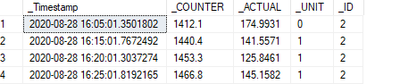
in the databse the date column is as following:
Thank you in advance for your help!
The Power BI Data Visualization World Championships is back! Get ahead of the game and start preparing now!
| User | Count |
|---|---|
| 39 | |
| 37 | |
| 33 | |
| 32 | |
| 29 |
| User | Count |
|---|---|
| 132 | |
| 88 | |
| 82 | |
| 68 | |
| 64 |