Join us at FabCon Atlanta from March 16 - 20, 2026, for the ultimate Fabric, Power BI, AI and SQL community-led event. Save $200 with code FABCOMM.
Register now!The Power BI Data Visualization World Championships is back! Get ahead of the game and start preparing now! Learn more
Can I apply Incremental Refresh for my CSV files that are located in OneDrive?
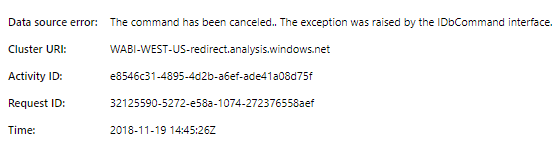
This is the reason why I asked, the scheduled refresh are failing because of this error:
Solved! Go to Solution.
Hi,
I had problems for weeks to set up the incremental refresh for my CSV-Files (which I combine) which are located in a sharepoint folder. Microsoft could help me out. In the end the solution was very simple. Everywhere in your code where it sais "Csv.Document" (for example Source = Csv.Document(Parameter1,[Delimiter=";", Columns=236, Encoding=65001, QuoteStyle=QuoteStyle.None]),) you have to add a "Binary.Buffer".
New code would look like this:
Source= Csv.Document(Binary.Buffer(Parameter1),[Delimiter=";", Columns=236, Encoding=65001, QuoteStyle=QuoteStyle.None]),
Since I did this the incremental refresh works for my CSV-Files located in Sharepoint.
Perhaps it helps you out, too.
Best regards
Marc
Okay, I just read, "it does not work on flat files" =(. I think I'm back to the old work-around DAX UNION!
Hi @ovetteabejuela,
I'm afraid that you're right. As document has listed , the Incremental refresh is supported only for workspaces on Premium capacity. Refresh policies are defined in Power BI Desktop; they are applied by refresh operations in the service.
Best Regards,
Cherry
The Power BI Data Visualization World Championships is back! Get ahead of the game and start preparing now!
| User | Count |
|---|---|
| 38 | |
| 37 | |
| 34 | |
| 31 | |
| 27 |
| User | Count |
|---|---|
| 136 | |
| 99 | |
| 73 | |
| 66 | |
| 65 |