Share feedback directly with Fabric product managers, participate in targeted research studies and influence the Fabric roadmap.
Sign up nowGet Fabric certified for FREE! Don't miss your chance! Learn more
Can I apply Incremental Refresh for my CSV files that are located in OneDrive?
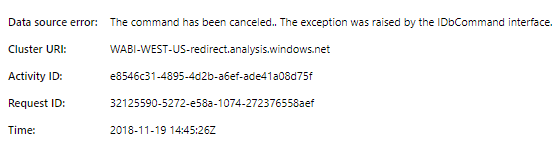
This is the reason why I asked, the scheduled refresh are failing because of this error:
Solved! Go to Solution.
Hi,
I had problems for weeks to set up the incremental refresh for my CSV-Files (which I combine) which are located in a sharepoint folder. Microsoft could help me out. In the end the solution was very simple. Everywhere in your code where it sais "Csv.Document" (for example Source = Csv.Document(Parameter1,[Delimiter=";", Columns=236, Encoding=65001, QuoteStyle=QuoteStyle.None]),) you have to add a "Binary.Buffer".
New code would look like this:
Source= Csv.Document(Binary.Buffer(Parameter1),[Delimiter=";", Columns=236, Encoding=65001, QuoteStyle=QuoteStyle.None]),
Since I did this the incremental refresh works for my CSV-Files located in Sharepoint.
Perhaps it helps you out, too.
Best regards
Marc
Okay, I just read, "it does not work on flat files" =(. I think I'm back to the old work-around DAX UNION!
Hi @ovetteabejuela,
I'm afraid that you're right. As document has listed , the Incremental refresh is supported only for workspaces on Premium capacity. Refresh policies are defined in Power BI Desktop; they are applied by refresh operations in the service.
Best Regards,
Cherry
Share feedback directly with Fabric product managers, participate in targeted research studies and influence the Fabric roadmap.
| User | Count |
|---|---|
| 63 | |
| 62 | |
| 42 | |
| 19 | |
| 16 |
| User | Count |
|---|---|
| 111 | |
| 104 | |
| 36 | |
| 28 | |
| 27 |