Join us at FabCon Atlanta from March 16 - 20, 2026, for the ultimate Fabric, Power BI, AI and SQL community-led event. Save $200 with code FABCOMM.
Register now!The Power BI Data Visualization World Championships is back! It's time to submit your entry. Live now!
Can I apply Incremental Refresh for my CSV files that are located in OneDrive?
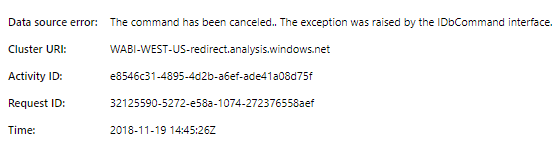
This is the reason why I asked, the scheduled refresh are failing because of this error:
Solved! Go to Solution.
Hi,
I had problems for weeks to set up the incremental refresh for my CSV-Files (which I combine) which are located in a sharepoint folder. Microsoft could help me out. In the end the solution was very simple. Everywhere in your code where it sais "Csv.Document" (for example Source = Csv.Document(Parameter1,[Delimiter=";", Columns=236, Encoding=65001, QuoteStyle=QuoteStyle.None]),) you have to add a "Binary.Buffer".
New code would look like this:
Source= Csv.Document(Binary.Buffer(Parameter1),[Delimiter=";", Columns=236, Encoding=65001, QuoteStyle=QuoteStyle.None]),
Since I did this the incremental refresh works for my CSV-Files located in Sharepoint.
Perhaps it helps you out, too.
Best regards
Marc
Okay, I just read, "it does not work on flat files" =(. I think I'm back to the old work-around DAX UNION!
Hi @ovetteabejuela,
I'm afraid that you're right. As document has listed , the Incremental refresh is supported only for workspaces on Premium capacity. Refresh policies are defined in Power BI Desktop; they are applied by refresh operations in the service.
Best Regards,
Cherry
The Power BI Data Visualization World Championships is back! It's time to submit your entry.
Check out the January 2026 Power BI update to learn about new features.
| User | Count |
|---|---|
| 71 | |
| 45 | |
| 34 | |
| 28 | |
| 23 |
| User | Count |
|---|---|
| 143 | |
| 121 | |
| 58 | |
| 40 | |
| 33 |