This is best Fabric, Power BI, SQL and AI community event. How do we know? The last event sold out! Save €200 with code FABCMTY200.
Register nowA new Data Days event is coming soon! This time we’re going bigger than ever. Fabric, Power BI, SQL, AI and more. Don't miss out.
I have two tables. I want a column or measure based on, if there are sales in INV_Type column then value of beginning inventory should be decreased based on Qty column. So if QTY column has 3 and INV_Type is sales then the beginning inventory should be reduced by 3. If INV_Type is out it should also decrease from beginning inventory ,if purchase or INN is there in INV_Type then it should add based on quantity column for each Item ID Type. It should be taking beginning inventory from second table. The CO_ID represents years. We can also fixed the beginning inventory for each item type like if we fix it to 100 for 2019 based on INV_Type it should keep on adding or subtracting. Please let me know if possible.
Thanks
Year ITEM_ID INV_ID QTY INV_TYPE CO_ID
|
ITEM_IDBEG_QTYCO_ID
|
Solved! Go to Solution.
Hi, @Hamdan1234
You can try the following methods.
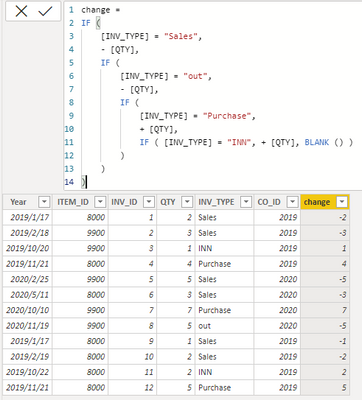
change =
IF (
[INV_TYPE] = "Sales",
- [QTY],
IF (
[INV_TYPE] = "out",
- [QTY],
IF (
[INV_TYPE] = "Purchase",
+ [QTY],
IF ( [INV_TYPE] = "INN", + [QTY], BLANK () )
)
)
)
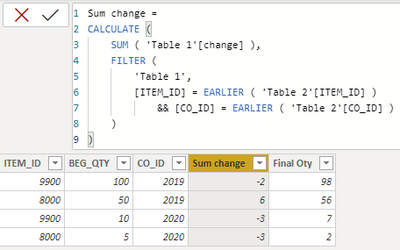
Sum change =
CALCULATE (
SUM ( 'Table 1'[change] ),
FILTER (
'Table 1',
[ITEM_ID] = EARLIER ( 'Table 2'[ITEM_ID] )
&& [CO_ID] = EARLIER ( 'Table 2'[CO_ID] )
)
)
Final Oty = [BEG_QTY]+[Sum change]
Best Regards,
Community Support Team _Charlotte
If this post helps, then please consider Accept it as the solution to help the other members find it more quickly.
Hi, @Hamdan1234
You can try the following methods.
change =
IF (
[INV_TYPE] = "Sales",
- [QTY],
IF (
[INV_TYPE] = "out",
- [QTY],
IF (
[INV_TYPE] = "Purchase",
+ [QTY],
IF ( [INV_TYPE] = "INN", + [QTY], BLANK () )
)
)
)
Sum change =
CALCULATE (
SUM ( 'Table 1'[change] ),
FILTER (
'Table 1',
[ITEM_ID] = EARLIER ( 'Table 2'[ITEM_ID] )
&& [CO_ID] = EARLIER ( 'Table 2'[CO_ID] )
)
)
Final Oty = [BEG_QTY]+[Sum change]
Best Regards,
Community Support Team _Charlotte
If this post helps, then please consider Accept it as the solution to help the other members find it more quickly.
Quick reminder that Power BI is a reporting tool, not a stock/inventory management tool.
What's the start date for your years? Jan 1st?
Check out the May 2026 Power BI update to learn about new features.
Sign up to receive a private message when registration opens and key events begin.
If you have recently started exploring Fabric, we'd love to hear how it's going. Your feedback can help with product improvements.
| User | Count |
|---|---|
| 29 | |
| 26 | |
| 25 | |
| 20 | |
| 14 |
| User | Count |
|---|---|
| 53 | |
| 47 | |
| 22 | |
| 19 | |
| 18 |