Don't miss your chance to take the Fabric Data Engineer (DP-600) exam for FREE! Find out how by attending the DP-600 session on April 23rd (pacific time), live or on-demand.
Learn moreNext up in the FabCon + SQLCon recap series: The roadmap for Microsoft SQL and Maximizing Developer experiences in Fabric. All sessions are available on-demand after the live show. Register now
I have two tables. I want a column or measure based on, if there are sales in INV_Type column then value of beginning inventory should be decreased based on Qty column. So if QTY column has 3 and INV_Type is sales then the beginning inventory should be reduced by 3. If INV_Type is out it should also decrease from beginning inventory ,if purchase or INN is there in INV_Type then it should add based on quantity column for each Item ID Type. It should be taking beginning inventory from second table. The CO_ID represents years. We can also fixed the beginning inventory for each item type like if we fix it to 100 for 2019 based on INV_Type it should keep on adding or subtracting. Please let me know if possible.
Thanks
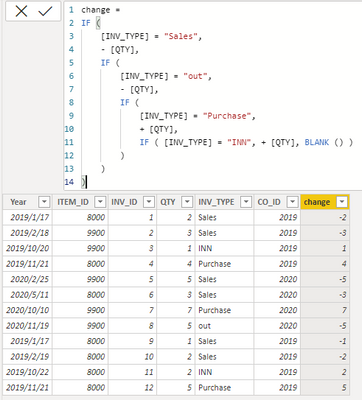
Year ITEM_ID INV_ID QTY INV_TYPE CO_ID
|
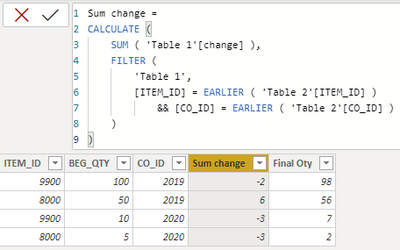
ITEM_IDBEG_QTYCO_ID
|
Solved! Go to Solution.
Hi, @Hamdan1234
You can try the following methods.
change =
IF (
[INV_TYPE] = "Sales",
- [QTY],
IF (
[INV_TYPE] = "out",
- [QTY],
IF (
[INV_TYPE] = "Purchase",
+ [QTY],
IF ( [INV_TYPE] = "INN", + [QTY], BLANK () )
)
)
)
Sum change =
CALCULATE (
SUM ( 'Table 1'[change] ),
FILTER (
'Table 1',
[ITEM_ID] = EARLIER ( 'Table 2'[ITEM_ID] )
&& [CO_ID] = EARLIER ( 'Table 2'[CO_ID] )
)
)
Final Oty = [BEG_QTY]+[Sum change]
Best Regards,
Community Support Team _Charlotte
If this post helps, then please consider Accept it as the solution to help the other members find it more quickly.
Hi, @Hamdan1234
You can try the following methods.
change =
IF (
[INV_TYPE] = "Sales",
- [QTY],
IF (
[INV_TYPE] = "out",
- [QTY],
IF (
[INV_TYPE] = "Purchase",
+ [QTY],
IF ( [INV_TYPE] = "INN", + [QTY], BLANK () )
)
)
)
Sum change =
CALCULATE (
SUM ( 'Table 1'[change] ),
FILTER (
'Table 1',
[ITEM_ID] = EARLIER ( 'Table 2'[ITEM_ID] )
&& [CO_ID] = EARLIER ( 'Table 2'[CO_ID] )
)
)
Final Oty = [BEG_QTY]+[Sum change]
Best Regards,
Community Support Team _Charlotte
If this post helps, then please consider Accept it as the solution to help the other members find it more quickly.
Quick reminder that Power BI is a reporting tool, not a stock/inventory management tool.
What's the start date for your years? Jan 1st?
If you have recently started exploring Fabric, we'd love to hear how it's going. Your feedback can help with product improvements.
A new Power BI DataViz World Championship is coming this June! Don't miss out on submitting your entry.
| User | Count |
|---|---|
| 44 | |
| 43 | |
| 38 | |
| 19 | |
| 15 |
| User | Count |
|---|---|
| 67 | |
| 66 | |
| 31 | |
| 28 | |
| 24 |