Get certified for free when you join Fabric Data Days 2026 and dive into Fabric, Power BI, SQL, AI, and other essential data skills.
Join nowData Days is here! Join us now for 60+ days of learning, challenges, and connection. Learn more
I have two tables. I want a column or measure based on, if there are sales in INV_Type column then value of beginning inventory should be decreased based on Qty column. So if QTY column has 3 and INV_Type is sales then the beginning inventory should be reduced by 3. If INV_Type is out it should also decrease from beginning inventory ,if purchase or INN is there in INV_Type then it should add based on quantity column for each Item ID Type. It should be taking beginning inventory from second table. The CO_ID represents years. We can also fixed the beginning inventory for each item type like if we fix it to 100 for 2019 based on INV_Type it should keep on adding or subtracting. Please let me know if possible.
Thanks
Year ITEM_ID INV_ID QTY INV_TYPE CO_ID
|
ITEM_IDBEG_QTYCO_ID
|
Solved! Go to Solution.
Hi, @Hamdan1234
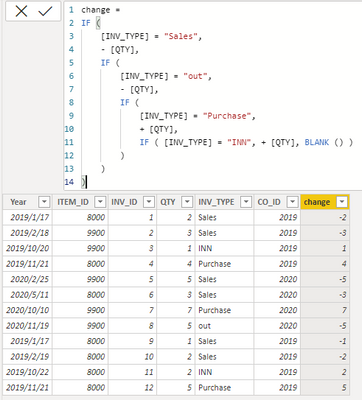
You can try the following methods.
change =
IF (
[INV_TYPE] = "Sales",
- [QTY],
IF (
[INV_TYPE] = "out",
- [QTY],
IF (
[INV_TYPE] = "Purchase",
+ [QTY],
IF ( [INV_TYPE] = "INN", + [QTY], BLANK () )
)
)
)
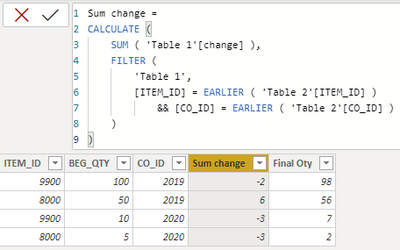
Sum change =
CALCULATE (
SUM ( 'Table 1'[change] ),
FILTER (
'Table 1',
[ITEM_ID] = EARLIER ( 'Table 2'[ITEM_ID] )
&& [CO_ID] = EARLIER ( 'Table 2'[CO_ID] )
)
)
Final Oty = [BEG_QTY]+[Sum change]
Best Regards,
Community Support Team _Charlotte
If this post helps, then please consider Accept it as the solution to help the other members find it more quickly.
Hi, @Hamdan1234
You can try the following methods.
change =
IF (
[INV_TYPE] = "Sales",
- [QTY],
IF (
[INV_TYPE] = "out",
- [QTY],
IF (
[INV_TYPE] = "Purchase",
+ [QTY],
IF ( [INV_TYPE] = "INN", + [QTY], BLANK () )
)
)
)
Sum change =
CALCULATE (
SUM ( 'Table 1'[change] ),
FILTER (
'Table 1',
[ITEM_ID] = EARLIER ( 'Table 2'[ITEM_ID] )
&& [CO_ID] = EARLIER ( 'Table 2'[CO_ID] )
)
)
Final Oty = [BEG_QTY]+[Sum change]
Best Regards,
Community Support Team _Charlotte
If this post helps, then please consider Accept it as the solution to help the other members find it more quickly.
Quick reminder that Power BI is a reporting tool, not a stock/inventory management tool.
What's the start date for your years? Jan 1st?
Don't miss out on Data Days, June 15 through August 7. Learn Fabric, Power BI, SQL, AI and more.
Check out the May 2026 Power BI update to learn about new features.
| User | Count |
|---|---|
| 23 | |
| 23 | |
| 21 | |
| 20 | |
| 15 |
| User | Count |
|---|---|
| 58 | |
| 55 | |
| 43 | |
| 30 | |
| 24 |