Join us at FabCon Atlanta from March 16 - 20, 2026, for the ultimate Fabric, Power BI, AI and SQL community-led event. Save $200 with code FABCOMM.
Register now!Learn from the best! Meet the four finalists headed to the FINALS of the Power BI Dataviz World Championships! Register now
I've created a table where I show data from two tables.
Table 1: Name and price.
Table 2: Quantities.
So I'm left with a view: Name, quantities, price.
I have generated a new column that multiplies the quantities by the price using: Total = SUM('ps_product'[price])*SUM('ps_stock_available'[quantity])
I do well the multiplication, but in the total of the column I see an amount that has nothing to do with it. LLevo days going around, looking for forums and I can't find how to solve it. Can anyone help me? I've tried both SUM and SUMX
Solved! Go to Solution.
Hi @Syndicate_Admin ,
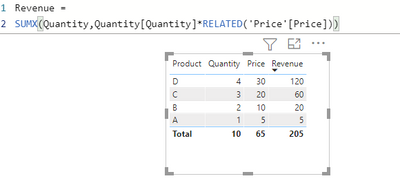
This formula using sumx and related should solve your problem.
I have 2 tables. One with Price, second with Quantiy.
Take a look and let me know if it helped!
Hi @Syndicate_Admin ,
This formula using sumx and related should solve your problem.
I have 2 tables. One with Price, second with Quantiy.
Take a look and let me know if it helped!
What if I have to multiply two measures?
Thanks Migasuke,
you have solved my issue I have spent half day trying to fix and googled myself to death, almost giving up.
My issue was a standard multiplication of Kilometers x emission factor = carbon created,
whereby the results was double the amount it should have been.
Your solution with SUMX & RELATED has fixed it.
LEGEND! Thanks again.
Yes, perfect, that's how it worked for me. Thank you so much!!!
Share feedback directly with Fabric product managers, participate in targeted research studies and influence the Fabric roadmap.
Check out the February 2026 Power BI update to learn about new features.
| User | Count |
|---|---|
| 53 | |
| 51 | |
| 39 | |
| 15 | |
| 14 |
| User | Count |
|---|---|
| 95 | |
| 78 | |
| 34 | |
| 28 | |
| 25 |