cancel
Showing results for 
Search instead for 
Did you mean: 

Next up in the FabCon + SQLCon recap series: The roadmap for Microsoft SQL and Maximizing Developer experiences in Fabric. All sessions are available on-demand after the live show. Register now

Reply
JakeJack
Frequent Visitor

Incorrect Row Subtotal when using coalesce

Hi all


I'm trying to create a cash flow using the matrix visual.  


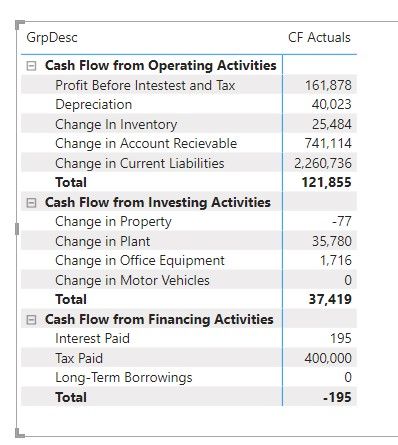
I have most things working except for subtotals - see below:
 

CF Subtotals.jpg

As you can see the subtotals For the Cash Flow from Operating Activities and Cash Flow from Financing Activities are incorrect.


The measures I'm using are:


CF Actuals = COALESCE([CF Value from PL],[CF BS Change])
 
CF Value from PL = IF([CF Select Category] in {209,3100,4000,705},[Total Value CY]*-1,[Total Value CY])
 
CF BS Change =
(IF([CF Select Category] in {209,3100,4000,705},[Balance Sum]*-1,[Balance Sum])-CALCULATE(IF([CF Select Category] in {209,3100,4000,705},[Balance Sum]*-1,[Balance Sum]),PARALLELPERIOD(Dates[CurDate],-1,MONTH)))
 
Total Value CY = sum('Sage PL'[val])*-1
 
Balance Sum = sum('Sage BS'[Val])
 
The reason I'm using the coalesce function is that the values are coming from 2 FACT table - 'Sage PL' and 'Sage BS'.
 
NB The subtotal are also not reflecting the change in sign either - the -195 should be 195.
 
Any help would be most appreciated .
 
Thanks
 
Jake 


1 ACCEPTED SOLUTION
DataInsights
Super User
Super User

@JakeJack,


One approach is to use SUMX to iterate the dimension table that is used in matrix rows. Example measure:


CF Actuals with Correct Totals =
SUMX ( VALUES ( DimTable[Column] ), [CF Actuals] )


Did I answer your question? Mark my post as a solution!

Proud to be a Super User!


View solution in original post

3 REPLIES 3
DataInsights
Super User
Super User

@JakeJack,


One approach is to use SUMX to iterate the dimension table that is used in matrix rows. Example measure:


CF Actuals with Correct Totals =
SUMX ( VALUES ( DimTable[Column] ), [CF Actuals] )


Did I answer your question? Mark my post as a solution!

Proud to be a Super User!


Many thanks - that worked a treat.  


It had me stumped so much that I was considering adding a specific cash flow FACT table.


Cheers


Jake

@JakeJack,


Glad to hear that worked, and that you avoided creating an additional fact table. 🙂


Did I answer your question? Mark my post as a solution!

Proud to be a Super User!


Helpful resources

Announcements
New to Fabric survey Carousel

New to Fabric Survey

If you have recently started exploring Fabric, we'd love to hear how it's going. Your feedback can help with product improvements.

Power BI DataViz World Championships carousel

Power BI DataViz World Championships - June 2026

A new Power BI DataViz World Championship is coming this June! Don't miss out on submitting your entry.

Join our Fabric User Panel

Join our Fabric User Panel

Share feedback directly with Fabric product managers, participate in targeted research studies and influence the Fabric roadmap.

March Power BI Update Carousel

Power BI Community Update - March 2026

Check out the March 2026 Power BI update to learn about new features.