Get Fabric certified for FREE!
Don't miss your chance to take the Fabric Data Engineer (DP-600) exam for FREE! Find out how by watching the DP-600 session on-demand now through April 28th.
Learn more- Power BI forums
- Get Help with Power BI
- Desktop
- Service
- Report Server
- Power Query
- Mobile Apps
- Developer
- DAX Commands and Tips
- Custom Visuals Development Discussion
- Health and Life Sciences
- Power BI Spanish forums
- Translated Spanish Desktop
- Training and Consulting
- Instructor Led Training
- Dashboard in a Day for Women, by Women
- Galleries
- Data Stories Gallery
- Themes Gallery
- Contests Gallery
- QuickViz Gallery
- Quick Measures Gallery
- Visual Calculations Gallery
- Notebook Gallery
- Translytical Task Flow Gallery
- TMDL Gallery
- R Script Showcase
- Webinars and Video Gallery
- Ideas
- Custom Visuals Ideas (read-only)
- Issues
- Issues
- Events
- Upcoming Events
Join the FabCon + SQLCon recap series. Up next: Power BI, Real-Time Intelligence, IQ and AI, and Data Factory take center stage. All sessions are available on-demand after the live show. Register now
- Power BI forums
- Forums
- Get Help with Power BI
- Desktop
- Re: Incorrect Measure Total
- Subscribe to RSS Feed
- Mark Topic as New
- Mark Topic as Read
- Float this Topic for Current User
- Bookmark
- Subscribe
- Printer Friendly Page

- Mark as New
- Bookmark
- Subscribe
- Mute
- Subscribe to RSS Feed
- Permalink
- Report Inappropriate Content
Incorrect Measure Total
Hi everyone!
Hope you can help me this time 🙂
I am performing the analysis and I need to show the correct total of the measure.
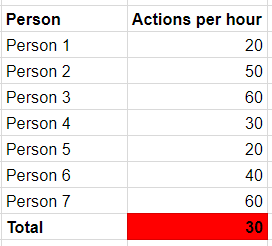
Here is an example of the table on which I am working now and the column which I should calculate. This column is a measure (actions/hours).
I tried to use this formula but ot doesnt give the correct total.
Solved! Go to Solution.


- Mark as New
- Bookmark
- Subscribe
- Mute
- Subscribe to RSS Feed
- Permalink
- Report Inappropriate Content
Hi @Anonymous,
Change you measure to something like this
Total test =
VAR Actions =
    DIVIDE ( 'General'[Actions], 'General'[Total Hours], 0 )
RETURN
    IF (
        HASONEFILTER ( 'General'[Person] ),
        Actions,
        SUMX ( ALLSELECTED ( 'General'[Person] ), Actions )
    )
Regards,
MFelix
Regards
Miguel Félix
Did I answer your question? Mark my post as a solution!
Proud to be a Super User!
Check out my blog: Power BI em Português
- Mark as New
- Bookmark
- Subscribe
- Mute
- Subscribe to RSS Feed
- Permalink
- Report Inappropriate Content
Hi @dariadb,
To wha I could get from your sample file your issue is regarding the way you calculate your measures so the best way is to create the following measures:
Actions =
IF (
    HASONEFILTER ( Table[Name] );
    DIVIDE ( [Actions Measure]; [Hours Measure]; 0 );
    SUMX (
        ALLSELECTED ( Table[Name] );
        DIVIDE ( [Actions Measure]; [Hours Measure]; 0 )
    )
)
Total hours Worked Total =
IF (
    HASONEFILTER ( Table[Name] );
    [Hours Measure];
    SUMX ( ALLSELECTED ( Table[Name] ); [Hours Measure] )
)
The Actions Measure and Hours Measure are your two base measures that you can use to make the calculations.
Regards,
MFelix
Regards
Miguel Félix
Did I answer your question? Mark my post as a solution!
Proud to be a Super User!
Check out my blog: Power BI em Português- Mark as New
- Bookmark
- Subscribe
- Mute
- Subscribe to RSS Feed
- Permalink
- Report Inappropriate Content
Hi @Anonymous,
Change you measure to something like this
Total test =
VAR Actions =
    DIVIDE ( 'General'[Actions], 'General'[Total Hours], 0 )
RETURN
    IF (
        HASONEFILTER ( 'General'[Person] ),
        Actions,
        SUMX ( ALLSELECTED ( 'General'[Person] ), Actions )
    )
Regards,
MFelix
Regards
Miguel Félix
Did I answer your question? Mark my post as a solution!
Proud to be a Super User!
Check out my blog: Power BI em Português- Mark as New
- Bookmark
- Subscribe
- Mute
- Subscribe to RSS Feed
- Permalink
- Report Inappropriate Content
- Mark as New
- Bookmark
- Subscribe
- Mute
- Subscribe to RSS Feed
- Permalink
- Report Inappropriate Content
Hi @Anonymous,
I send out a response to you message, please check it.
Regards,
Mfelix
Regards
Miguel Félix
Did I answer your question? Mark my post as a solution!
Proud to be a Super User!
Check out my blog: Power BI em Português- Mark as New
- Bookmark
- Subscribe
- Mute
- Subscribe to RSS Feed
- Permalink
- Report Inappropriate Content
Hi @dariadb,
To wha I could get from your sample file your issue is regarding the way you calculate your measures so the best way is to create the following measures:
Actions =
IF (
    HASONEFILTER ( Table[Name] );
    DIVIDE ( [Actions Measure]; [Hours Measure]; 0 );
    SUMX (
        ALLSELECTED ( Table[Name] );
        DIVIDE ( [Actions Measure]; [Hours Measure]; 0 )
    )
)
Total hours Worked Total =
IF (
    HASONEFILTER ( Table[Name] );
    [Hours Measure];
    SUMX ( ALLSELECTED ( Table[Name] ); [Hours Measure] )
)
The Actions Measure and Hours Measure are your two base measures that you can use to make the calculations.
Regards,
MFelix
Regards
Miguel Félix
Did I answer your question? Mark my post as a solution!
Proud to be a Super User!
Check out my blog: Power BI em Português

- Mark as New
- Bookmark
- Subscribe
- Mute
- Subscribe to RSS Feed
- Permalink
- Report Inappropriate Content
Hi @Anonymous
Can you share some base data or the pbix
Regards
Affan
- Mark as New
- Bookmark
- Subscribe
- Mute
- Subscribe to RSS Feed
- Permalink
- Report Inappropriate Content
Unfortunately I can't share it due to confidentiality

- Mark as New
- Bookmark
- Subscribe
- Mute
- Subscribe to RSS Feed
- Permalink
- Report Inappropriate Content
@Anonymous
What's the purpose of using hasonefilter formula? I think DIVIDE('General'[Actions],'General'[Total Hours],0) can work correct.
Thanks and BR
Ryan
Did I answer your question? Mark my post as a solution!
Proud to be a Super User!
- Mark as New
- Bookmark
- Subscribe
- Mute
- Subscribe to RSS Feed
- Permalink
- Report Inappropriate Content
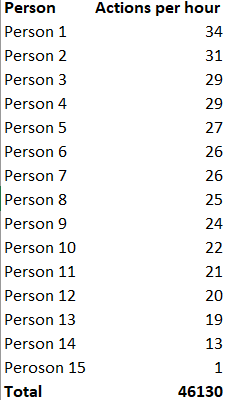
Because using just divide function it doesnt show the correct total of the column.
As there is a Person filter (for each row) I used hasonefilter to calculate total.
Helpful resources

Power BI Monthly Update - April 2026
Check out the April 2026 Power BI update to learn about new features.

New to Fabric Survey
If you have recently started exploring Fabric, we'd love to hear how it's going. Your feedback can help with product improvements.

Power BI DataViz World Championships - June 2026
A new Power BI DataViz World Championship is coming this June! Don't miss out on submitting your entry.

FabCon &SQLCon Highlights
Experience the highlights from FabCon & SQLCon, available live and on-demand starting April 14th.

| User | Count |
|---|---|
| 45 | |
| 38 | |
| 34 | |
| 21 | |
| 17 |


| User | Count |
|---|---|
| 66 | |
| 64 | |
| 31 | |
| 26 | |
| 26 |


