Join us at FabCon Atlanta from March 16 - 20, 2026, for the ultimate Fabric, Power BI, AI and SQL community-led event. Save $200 with code FABCOMM.
Register now!The Power BI Data Visualization World Championships is back! Get ahead of the game and start preparing now! Learn more
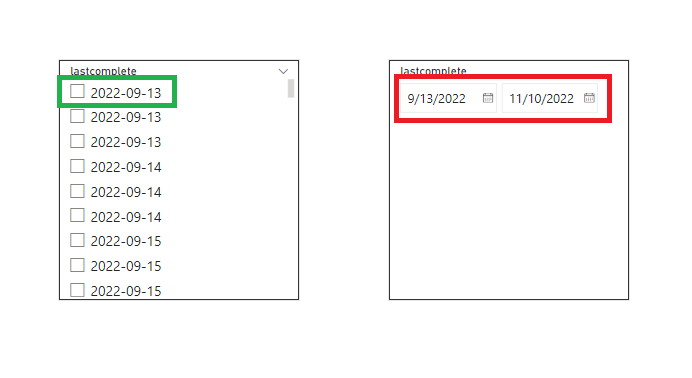
The given date format in raw data is mm-dd-yyyy and we can able to change it to yyyy-mm-dd by using transformation. As well as by applying date format (yyyy-mm-dd) into regional setting it applied for "date slicer" but the same format is not applicable for "Between date slicer"
Attached the screen shots for your reference
I have tried some of the solutions on the community as well still issue remains.
Step followed :
I have changed the date format of local system to yyyy-mm-dd > changed the short date format as well > changed the regional (country) formating as well > change date format > short date > yyyy-mm-dd
Hello Amit, Thanks for the reply. The thing you suggested has already tried out. As you mentioned, I am able to format the date column in PowerBI table & it is reflected to normal date slicer but it is not reflect to 'Between Date Slicer'. Have you seen this scenario before? Thanks!
@Parth_1 , First of try to make the data type as Date and in column tools format give format YYYY-MM-DD
or create a new column if the format is text and not converting to date
Date 1= date(( right(DD__MM__YY[date],4)), (mid(DD__MM__YY[date],4,2)) ,(left(DD__MM__YY[date],2)))
Check out the November 2025 Power BI update to learn about new features.
Advance your Data & AI career with 50 days of live learning, contests, hands-on challenges, study groups & certifications and more!
| User | Count |
|---|---|
| 58 | |
| 45 | |
| 40 | |
| 21 | |
| 18 |