Get certified for free when you join Fabric Data Days 2026 and dive into Fabric, Power BI, SQL, AI, and other essential data skills.
Join nowJuly 7 - July 17 | Round 2 of the Power BI Dataviz World Championships. Don't miss your chance! Learn more
Despiute there once being a custom solution for this available for download, Power BI seems to manage the image URL to a relatively smaller than desired size.
Does anyone have a solution how to enlarge the size of the image the URL is referencing?
Thanks.
Solved! Go to Solution.
Hi @Anonymous,
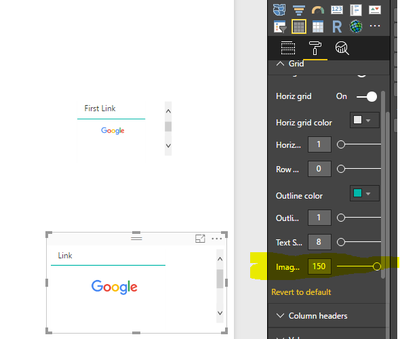
You can adjust the image by clicking the buttom under Grid on format zone. Please see the screenshot below, the top visual shows the image by default. I changed using the buttom highlighted in yellow background, it shows as the bottom image.
Best Regards,
Angelia
Hi @Anonymous,
You can adjust the image by clicking the buttom under Grid on format zone. Please see the screenshot below, the top visual shows the image by default. I changed using the buttom highlighted in yellow background, it shows as the bottom image.
Best Regards,
Angelia
Tried, this definitely worked and is a suitable solution.
Someone from the community also passed along a custom visual that was once available in the store which seems to be an excellent solution as well.
Thanks - this will be great for other members of the community as well.
Bump, also wondering about this.
Join us in Barcelona for FabCon and SQLCon, the Fabric, Power BI, SQL, and AI community event. Save €200 with code FABCMTY200.
Join Fabric Data Days 2026: 60 days of free live/on-demand sessions, challenges, study groups, and certification opportunities.
| User | Count |
|---|---|
| 22 | |
| 22 | |
| 18 | |
| 16 | |
| 13 |
| User | Count |
|---|---|
| 63 | |
| 42 | |
| 40 | |
| 40 | |
| 40 |