Huge last-minute discounts for FabCon Vienna from September 15-18, 2025
Supplies are limited. Contact info@espc.tech right away to save your spot before the conference sells out.
Get your discount- Power BI forums
- Get Help with Power BI
- Desktop
- Service
- Report Server
- Power Query
- Mobile Apps
- Developer
- DAX Commands and Tips
- Custom Visuals Development Discussion
- Health and Life Sciences
- Power BI Spanish forums
- Translated Spanish Desktop
- Training and Consulting
- Instructor Led Training
- Dashboard in a Day for Women, by Women
- Galleries
- Data Stories Gallery
- Themes Gallery
- Contests Gallery
- Quick Measures Gallery
- Notebook Gallery
- Translytical Task Flow Gallery
- TMDL Gallery
- R Script Showcase
- Webinars and Video Gallery
- Ideas
- Custom Visuals Ideas (read-only)
- Issues
- Issues
- Events
- Upcoming Events
Score big with last-minute savings on the final tickets to FabCon Vienna. Secure your discount
- Power BI forums
- Forums
- Get Help with Power BI
- Desktop
- Re: If Text.Contains element from the list then wr...
- Subscribe to RSS Feed
- Mark Topic as New
- Mark Topic as Read
- Float this Topic for Current User
- Bookmark
- Subscribe
- Printer Friendly Page


- Mark as New
- Bookmark
- Subscribe
- Mute
- Subscribe to RSS Feed
- Permalink
- Report Inappropriate Content
If Text.Contains element from the list then write... but ERROR
Hello,
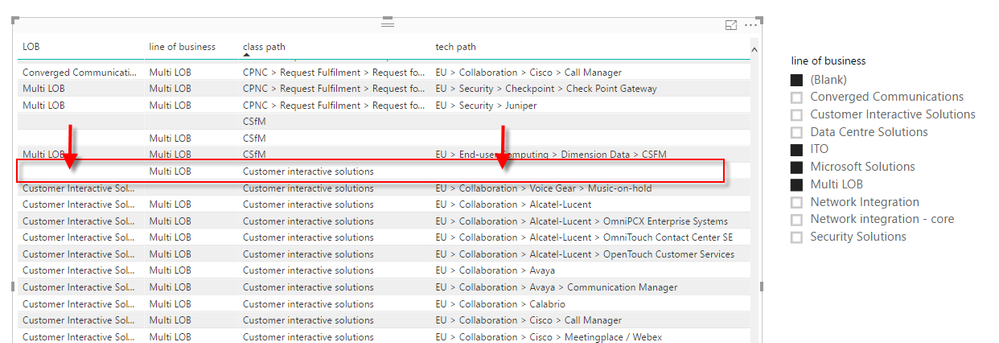
I am struggling with this problem for a while and i would trully appreciate any help. What i need is to make a column according to following conditions:
if column "line of business" is blank or "Multi LOB" or "ITO" then search values as follows>
If column "Class path" contains "Security" then write " Security Solutions"
If column "Class path" contains "Collaboration" then write " Customer Solutions"
If column "Class path" contains "Network" then write " Network Solutions"
If there is nonmatch or column "Class path' is empty, then
if If column "Tech path" contains "Security" then write " Security Solutions"
If column "Class path" contains "Collaboration" then write " Customer Solutions"
If column "Class path" contains "Network" then write " Network Solutions"
else write original value from a column "line of business"
my code is partly working. the problem is that it returns error if any of these 2 columns has null value. Maybe SWITCH is more appoprite here, but i didn't know how to implement it on multiple conditions.
Any suggestions, please?
Solved! Go to Solution.


- Mark as New
- Bookmark
- Subscribe
- Mute
- Subscribe to RSS Feed
- Permalink
- Report Inappropriate Content
Power Query has no CHOOSE function. You created your own function. Anyhow it IS Power Query, so that's good. 😉
3 issues:
- You can't refer to field [line of business] inside the function.
Instead, you can add another argument to the function. - The lookup won't work with null values, so they should be replaced by "".
- The code is overly complicated.
My suggestion would be to add a column that combines [tech path] and [class path], replacing nulls with "".
Then you can add a column without using a function.
let
    Source = #table(type table[line of business = text, tech path = text, class path = text],{{null,"MarcelBeug",null}}),
    #"Added Custom1" = Table.AddColumn(Source, "class tech path", each Replacer.ReplaceValue([class path],null,"") & Replacer.ReplaceValue([tech path],null,"")),
    #"Added Custom2" = Table.AddColumn(#"Added Custom1", "Custom", each if [line of business]=null or [line of business]="Microsoft Solutions" or [line of business]="Multi LOB" or [line of business]="ITO"
then

if Text.Contains([class tech path], "Security") then "Security Solutions"
else if Text.Contains([class tech path], "Collaboration") then "Converged Communications"
else if Text.Contains([class tech path], "Customer") then "Customer Interactive Solutions"
else if Text.Contains([class tech path], "Data C") then "Data Centre Solutions"
else if Text.Contains([class tech path], "Networking") then "Network Integration"
else [line of business] else [line of business])
in
    #"Added Custom2"
Alternative:
If you still prefer a lookup function, then my suggestion would be to use a record, instead of a lookup list.
As your lookup values are text, you can just refer to the values by using the field name.
With Record.FieldOrDefault you can also provide a default value for non-existing fields.
In the query below, field [line of business] is passed as second argument (default).
The function also takes care of replacing null values.
Function code:
let
    fnChoose_LOBCodeMB = (input, default) =>
    let
        values =
            [SS  = "Security Solutions",
             CIS = "Customer Interactive Solutions",
             NI  = "Network Integration",
             CC  = "Converged Communications",
             DCS = "Data Centre Solutions"],
        InputNonNull = if input = null then "" else input,
        Result = Record.FieldOrDefault(values,InputNonNull,default)
    in
        Result
in
    fnChoose_LOBCodeMB
Query code (close to your original query):
let
    Source = #table(type table[line of business = text, tech path = text, class path = text],{{null,"Boterberg",null}}),
    #"Added Custom" = Table.AddColumn(Source, "Custom", each if [line of business]=null or [line of business]="Microsoft Solutions" or [line of business]="Multi LOB" or [line of business]="ITO"
then

fnChoose_LOBCodeMB (

try if Text.Contains([class path], "Security") or Text.Contains([tech path], "Security") then "SS"
else if Text.Contains([class path], "Collaboration") or Text.Contains([tech path], "Collaboration")  then "CC"
else if Text.Contains([class path], "Customer") or Text.Contains([tech path], "Customer") then "CIS"
else if Text.Contains([class path], "Data C") or Text.Contains([tech path], "Data C") then "DCS"
else if Text.Contains([class path], "Networking") or Text.Contains([tech path], "Networking") then "NI"
else "X" otherwise null
,[line of business])

else [line of business])
in
    #"Added Custom"
- Mark as New
- Bookmark
- Subscribe
- Mute
- Subscribe to RSS Feed
- Permalink
- Report Inappropriate Content
Rather confusing if you are looking for a Power Query (Text.Contains) or a DAX (SWITCH) solution.
Why not share (the essential part of) your code that is not working as desired?
Then we can proceed from there.
- Mark as New
- Bookmark
- Subscribe
- Mute
- Subscribe to RSS Feed
- Permalink
- Report Inappropriate Content
Hi Marcel,
thank you for reply. Here is the code i tried. Sorry for confusion, i mean CHOOSE instead SWITCH.
 Create f-on for LOB ==>
fnChoose_LOBCode = (input) => let
values = {
{"SS", "Security Solutions"},
{"CIS", "Customer Interactive Solutions"},
{"NI", "Network Integration"},
{"CC", "Converged Communications"},
{"DCS", "Data Centre Solutions"},
{"X", [line of business]},

{input, [line of business]}
},
Result = List.First(List.Select(values, each _{0}=input)){1}
in
Result,


Create new clm===>

=if [line of business]=null or [line of business]="Microsoft Solutions" or [line of business]="Multi LOB" or [line of business]="ITO"
then

fnChoose_LOBCode (

try if Text.Contains([class path], "Security") or Text.Contains([tech path], "Security") then "SS"
else if Text.Contains([class path], "Collaboration") or Text.Contains([tech path], "Collaboration")  then "CC"
else if Text.Contains([class path], "Customer") or Text.Contains([tech path], "Customer") then "CIS"
else if Text.Contains([class path], "Data C") or Text.Contains([tech path], "Data C") then "DCS"
else if Text.Contains([class path], "Networking") or Text.Contains([tech path], "Networking") then "NI"
else "X" otherwise null
)

else [line of business]
the main problem with this code is that it returns error whenever any of lookup columns has a null value.
- Mark as New
- Bookmark
- Subscribe
- Mute
- Subscribe to RSS Feed
- Permalink
- Report Inappropriate Content
Power Query has no CHOOSE function. You created your own function. Anyhow it IS Power Query, so that's good. 😉
3 issues:
- You can't refer to field [line of business] inside the function.
Instead, you can add another argument to the function. - The lookup won't work with null values, so they should be replaced by "".
- The code is overly complicated.
My suggestion would be to add a column that combines [tech path] and [class path], replacing nulls with "".
Then you can add a column without using a function.
let
    Source = #table(type table[line of business = text, tech path = text, class path = text],{{null,"MarcelBeug",null}}),
    #"Added Custom1" = Table.AddColumn(Source, "class tech path", each Replacer.ReplaceValue([class path],null,"") & Replacer.ReplaceValue([tech path],null,"")),
    #"Added Custom2" = Table.AddColumn(#"Added Custom1", "Custom", each if [line of business]=null or [line of business]="Microsoft Solutions" or [line of business]="Multi LOB" or [line of business]="ITO"
then

if Text.Contains([class tech path], "Security") then "Security Solutions"
else if Text.Contains([class tech path], "Collaboration") then "Converged Communications"
else if Text.Contains([class tech path], "Customer") then "Customer Interactive Solutions"
else if Text.Contains([class tech path], "Data C") then "Data Centre Solutions"
else if Text.Contains([class tech path], "Networking") then "Network Integration"
else [line of business] else [line of business])
in
    #"Added Custom2"
Alternative:
If you still prefer a lookup function, then my suggestion would be to use a record, instead of a lookup list.
As your lookup values are text, you can just refer to the values by using the field name.
With Record.FieldOrDefault you can also provide a default value for non-existing fields.
In the query below, field [line of business] is passed as second argument (default).
The function also takes care of replacing null values.
Function code:
let
    fnChoose_LOBCodeMB = (input, default) =>
    let
        values =
            [SS  = "Security Solutions",
             CIS = "Customer Interactive Solutions",
             NI  = "Network Integration",
             CC  = "Converged Communications",
             DCS = "Data Centre Solutions"],
        InputNonNull = if input = null then "" else input,
        Result = Record.FieldOrDefault(values,InputNonNull,default)
    in
        Result
in
    fnChoose_LOBCodeMB
Query code (close to your original query):
let
    Source = #table(type table[line of business = text, tech path = text, class path = text],{{null,"Boterberg",null}}),
    #"Added Custom" = Table.AddColumn(Source, "Custom", each if [line of business]=null or [line of business]="Microsoft Solutions" or [line of business]="Multi LOB" or [line of business]="ITO"
then

fnChoose_LOBCodeMB (

try if Text.Contains([class path], "Security") or Text.Contains([tech path], "Security") then "SS"
else if Text.Contains([class path], "Collaboration") or Text.Contains([tech path], "Collaboration")  then "CC"
else if Text.Contains([class path], "Customer") or Text.Contains([tech path], "Customer") then "CIS"
else if Text.Contains([class path], "Data C") or Text.Contains([tech path], "Data C") then "DCS"
else if Text.Contains([class path], "Networking") or Text.Contains([tech path], "Networking") then "NI"
else "X" otherwise null
,[line of business])

else [line of business])
in
    #"Added Custom"
- Mark as New
- Bookmark
- Subscribe
- Mute
- Subscribe to RSS Feed
- Permalink
- Report Inappropriate Content
This is great. it works!
I see that i have a lot of to learn still. I was struggling with this in days, therefore i am very grateful for your help, Marcel.
thank you very much 

Helpful resources

Power BI Monthly Update - August 2025
Check out the August 2025 Power BI update to learn about new features.

Fabric Community Update - August 2025
Find out what's new and trending in the Fabric community.


