Learn from the best! Meet the four finalists headed to the FINALS of the Power BI Dataviz World Championships! Register now
Hello Everyone,
I have created a if formula and i am not getting the right result.Below is my if formula
If_Formula = IF((By_Emp[Total_hrs]<By_Emp[Avail_Hrs]),"Missing","Correct")
Difference = By_Emp[Avail_Hrs]-By_Emp[Total_hrs]
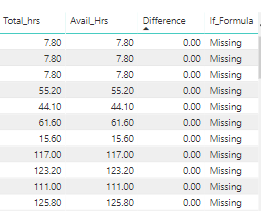
If you see the screen shot below, difference is 0. So accordig to my IF formula it shows Missing in last column. I think it should be showing Correct in last column. Am i missing something here?
Solved! Go to Solution.
Hi skanchan,
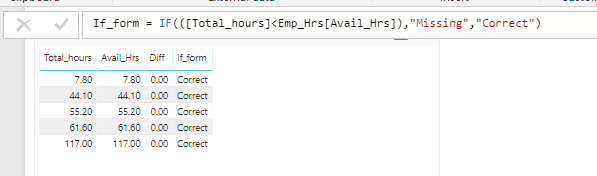
I have reproduced your issue.
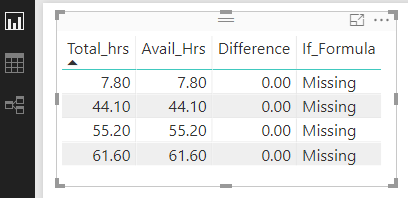
You are using a table visual like below, right?
See the original table, please check if the length of mantissa in a decimal is more than 2 because the table visual will emit several digits based on your setting which may mislead you.
To see the correct result in table visual, click Modeling->Format->Change the number of decimal places.
Regards,
Jimmy Tao
Hi skanchan,
I have reproduced your issue.
You are using a table visual like below, right?
See the original table, please check if the length of mantissa in a decimal is more than 2 because the table visual will emit several digits based on your setting which may mislead you.
To see the correct result in table visual, click Modeling->Format->Change the number of decimal places.
Regards,
Jimmy Tao
Well I tested the same at my end. Didn't find anything wrong with your formula.
Maybe you can try this If_Formula = IF([Difference]>0,"Missing","Correct") or If_Formula = IF(((By_Emp[Total_hrs]-By_Emp[Avail_Hrs])<0),"Missing","Correct")
@HardikThanks for your reply.
Strange that it work at your end.
I dont want to use the difference colume because i created that column just to help troubleshoot the issue.
@Anonymous Try this If_Formula = IF(((By_Emp[Total_hrs]-By_Emp[Avail_Hrs])<0),"Missing","Correct"), it should work.
| User | Count |
|---|---|
| 57 | |
| 43 | |
| 32 | |
| 16 | |
| 13 |
| User | Count |
|---|---|
| 84 | |
| 70 | |
| 38 | |
| 27 | |
| 24 |