This time we’re going bigger than ever. Fabric, Power BI, SQL, AI and more. We're covering it all. You won't want to miss it.
Learn moreLevel up your Power BI skills this month - build one visual each week and tell better stories with data! Get started
Hello Everyone,
I have created a if formula and i am not getting the right result.Below is my if formula
If_Formula = IF((By_Emp[Total_hrs]<By_Emp[Avail_Hrs]),"Missing","Correct")
Difference = By_Emp[Avail_Hrs]-By_Emp[Total_hrs]
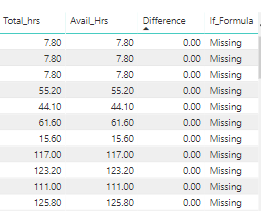
If you see the screen shot below, difference is 0. So accordig to my IF formula it shows Missing in last column. I think it should be showing Correct in last column. Am i missing something here?
Solved! Go to Solution.
Hi skanchan,
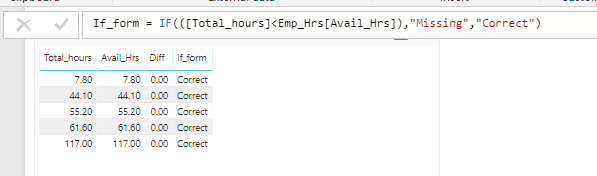
I have reproduced your issue.
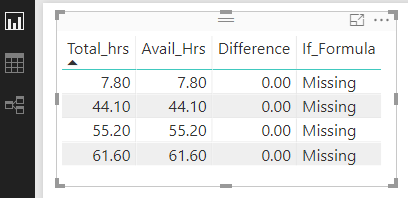
You are using a table visual like below, right?
See the original table, please check if the length of mantissa in a decimal is more than 2 because the table visual will emit several digits based on your setting which may mislead you.
To see the correct result in table visual, click Modeling->Format->Change the number of decimal places.
Regards,
Jimmy Tao
Hi skanchan,
I have reproduced your issue.
You are using a table visual like below, right?
See the original table, please check if the length of mantissa in a decimal is more than 2 because the table visual will emit several digits based on your setting which may mislead you.
To see the correct result in table visual, click Modeling->Format->Change the number of decimal places.
Regards,
Jimmy Tao
Well I tested the same at my end. Didn't find anything wrong with your formula.
Maybe you can try this If_Formula = IF([Difference]>0,"Missing","Correct") or If_Formula = IF(((By_Emp[Total_hrs]-By_Emp[Avail_Hrs])<0),"Missing","Correct")
@HardikThanks for your reply.
Strange that it work at your end.
I dont want to use the difference colume because i created that column just to help troubleshoot the issue.
@Anonymous Try this If_Formula = IF(((By_Emp[Total_hrs]-By_Emp[Avail_Hrs])<0),"Missing","Correct"), it should work.
Check out the April 2026 Power BI update to learn about new features.
Sign up to receive a private message when registration opens and key events begin.
If you have recently started exploring Fabric, we'd love to hear how it's going. Your feedback can help with product improvements.
| User | Count |
|---|---|
| 36 | |
| 29 | |
| 29 | |
| 21 | |
| 18 |
| User | Count |
|---|---|
| 69 | |
| 39 | |
| 33 | |
| 24 | |
| 23 |