cancel
Showing results for 
Search instead for 
Did you mean: 

The Power BI Data Visualization World Championships is back! Get ahead of the game and start preparing now! Learn more

Reply
Anonymous
Not applicable

Identify geographic influence

Hello guys. I'm new here and in PB. I work  for the Brazillian government in the departament of transports. We are developing a project to relate car accidents registered locations with our middle schools locations to act in those schools in order to educate and prevent our children get in these accidents. I have latitude and longitude of many accidents and of all the schools in Brazil but I can't find a way to analyse the accidents in a 100 km radius of the schools to determine the type and the amount of accidents of each type. Can you guys give me some light to solve this  ?

1 ACCEPTED SOLUTION
V-lianl-msft
Community Support
Community Support

When we want to calculate the distance between two locations, we need to know the coordinates of these two locations.

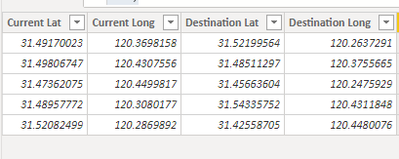
Here’s the sample data:
Vlianlmsft_0-1634879854721.png


We now have the coordinates of current locations and destinations, using below formula we could get the distance between these locations.

Distince (KM) =
12742 -- The diameter of the Earth (KM).
    * ASIN (
        -- Returns the arcsine, or inverse sine, of a number.
        SQRT (
            -- Returns the square root of a number.
            POWER (
                -- Returns the result of a number raised to a power.
                SIN ( -- Returns the sine of the given angle.
                'Table'[Current Lat] - 'Table'[Destination Lat] )
                    * PI () / 360,
                2
            ) -- PI () Returns the value of Pi, 3.14159265358979, accurate to 15 digits.
                + COS (
                    -- Returns the cosine of the given angle.
                    'Table'[Current Lat] * PI () / 180
                )
                    * COS ( 'Table'[Destination Lat] * PI () / 180 )
                    * POWER (
                        SIN ( 'Table'[Current Long] - 'Table'[Destination Long] )
                            * PI () / 360,
                        2
                    )
        )
    )

Vlianlmsft_1-1634879854591.png


View solution in original post

4 REPLIES 4
V-lianl-msft
Community Support
Community Support

When we want to calculate the distance between two locations, we need to know the coordinates of these two locations.

Here’s the sample data:

Vlianlmsft_0-1634879854721.png


We now have the coordinates of current locations and destinations, using below formula we could get the distance between these locations.

Distince (KM) =
12742 -- The diameter of the Earth (KM).
    * ASIN (
        -- Returns the arcsine, or inverse sine, of a number.
        SQRT (
            -- Returns the square root of a number.
            POWER (
                -- Returns the result of a number raised to a power.
                SIN ( -- Returns the sine of the given angle.
                'Table'[Current Lat] - 'Table'[Destination Lat] )
                    * PI () / 360,
                2
            ) -- PI () Returns the value of Pi, 3.14159265358979, accurate to 15 digits.
                + COS (
                    -- Returns the cosine of the given angle.
                    'Table'[Current Lat] * PI () / 180
                )
                    * COS ( 'Table'[Destination Lat] * PI () / 180 )
                    * POWER (
                        SIN ( 'Table'[Current Long] - 'Table'[Destination Long] )
                            * PI () / 360,
                        2
                    )
        )
    )

Vlianlmsft_1-1634879854591.png


Anonymous
Not applicable

Thank you for the tip. It worked very well.

Anonymous
Not applicable

Hi

 Pls refer this https://community.powerbi.com/t5/Desktop/Calculate-distance-between-Zip-Codes/td-p/1099351

It has the solution to calculate the distance between the locations . Use the latitude & longitude of school & accident location to derive the distance.


Thanks
Raj

Anonymous
Not applicable

Thank you for your help!

Helpful resources

Announcements
Power BI DataViz World Championships

Power BI Dataviz World Championships

The Power BI Data Visualization World Championships is back! Get ahead of the game and start preparing now!

December 2025 Power BI Update Carousel

Power BI Monthly Update - December 2025

Check out the December 2025 Power BI Holiday Recap!

FabCon Atlanta 2026 carousel

FabCon Atlanta 2026

Join us at FabCon Atlanta, March 16-20, for the ultimate Fabric, Power BI, AI and SQL community-led event. Save $200 with code FABCOMM.