We've captured the moments from FabCon & SQLCon that everyone is talking about, and we are bringing them to the community, live and on-demand. Starts on April 14th. Register now
Hi All,
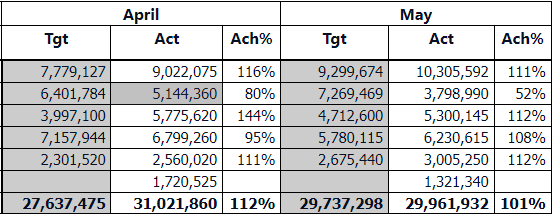
I have requirement where I need to do icon condition formatting like < 75 red and between 75 to 98 yellow and above 99 its green.
Wherever Ach% is less than 75% it conditional formatting should show red and between 76 and 98 it should show as yellow and above 99 it should show green.
Thank you.
Solved! Go to Solution.
Hey @praabburi ,
here is a great article that shows you how to get the work done.
https://exceleratorbi.com.au/conditional-formatting-using-icons-in-power-bi/
If this post was helpful may I ask you to mark it as solution and give it some kudos?
Have a nice day!
BR,
Josef
Hello @praabburi ,
You can achieve this by using "conditional formatting" of required column.
Pls refer this video from Curbal which explains it very well.
https://www.youtube.com/watch?v=MAISRa88bl0
Do let us know if it helped.
Cheers,
Kamal
Hey @praabburi ,
here is a great article that shows you how to get the work done.
https://exceleratorbi.com.au/conditional-formatting-using-icons-in-power-bi/
If this post was helpful may I ask you to mark it as solution and give it some kudos?
Have a nice day!
BR,
Josef
If you have recently started exploring Fabric, we'd love to hear how it's going. Your feedback can help with product improvements.
A new Power BI DataViz World Championship is coming this June! Don't miss out on submitting your entry.
Share feedback directly with Fabric product managers, participate in targeted research studies and influence the Fabric roadmap.
| User | Count |
|---|---|
| 54 | |
| 37 | |
| 32 | |
| 17 | |
| 15 |
| User | Count |
|---|---|
| 66 | |
| 66 | |
| 39 | |
| 34 | |
| 25 |