Join us at FabCon Atlanta from March 16 - 20, 2026, for the ultimate Fabric, Power BI, AI and SQL community-led event. Save $200 with code FABCOMM.
Register now!The Power BI Data Visualization World Championships is back! Get ahead of the game and start preparing now! Learn more
Hi All,
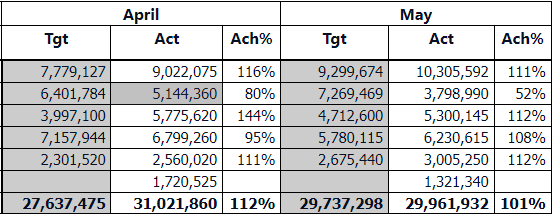
I have requirement where I need to do icon condition formatting like < 75 red and between 75 to 98 yellow and above 99 its green.
Wherever Ach% is less than 75% it conditional formatting should show red and between 76 and 98 it should show as yellow and above 99 it should show green.
Thank you.
Solved! Go to Solution.
Hey @praabburi ,
here is a great article that shows you how to get the work done.
https://exceleratorbi.com.au/conditional-formatting-using-icons-in-power-bi/
If this post was helpful may I ask you to mark it as solution and give it some kudos?
Have a nice day!
BR,
Josef
Hello @praabburi ,
You can achieve this by using "conditional formatting" of required column.
Pls refer this video from Curbal which explains it very well.
https://www.youtube.com/watch?v=MAISRa88bl0
Do let us know if it helped.
Cheers,
Kamal
Hey @praabburi ,
here is a great article that shows you how to get the work done.
https://exceleratorbi.com.au/conditional-formatting-using-icons-in-power-bi/
If this post was helpful may I ask you to mark it as solution and give it some kudos?
Have a nice day!
BR,
Josef
The Power BI Data Visualization World Championships is back! Get ahead of the game and start preparing now!
| User | Count |
|---|---|
| 41 | |
| 37 | |
| 35 | |
| 34 | |
| 28 |
| User | Count |
|---|---|
| 134 | |
| 101 | |
| 71 | |
| 67 | |
| 65 |