Join us at FabCon Atlanta from March 16 - 20, 2026, for the ultimate Fabric, Power BI, AI and SQL community-led event. Save $200 with code FABCOMM.
Register now!The Power BI Data Visualization World Championships is back! Get ahead of the game and start preparing now! Learn more
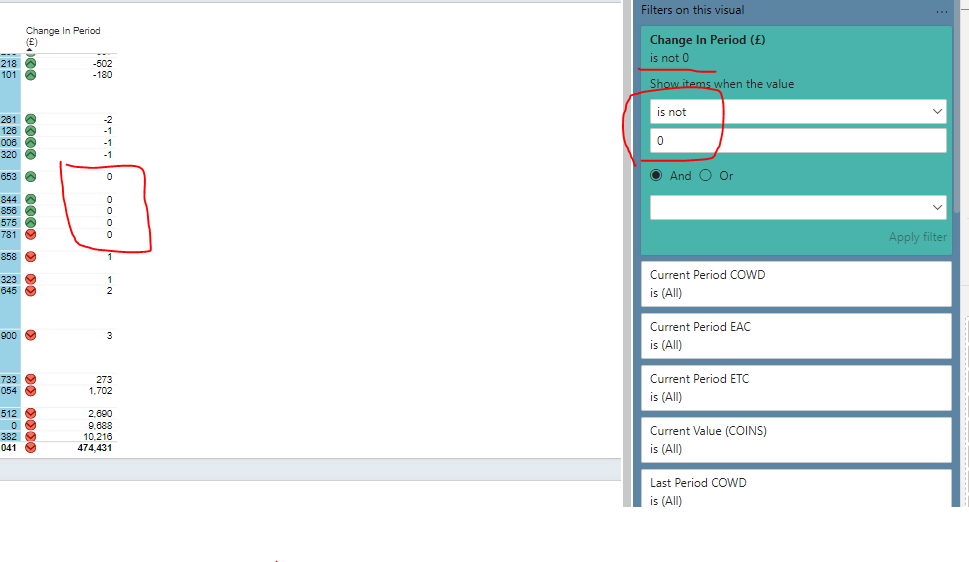
I have a measure on the visual which calculates (shown below) , I have tried to use the datatype (Currency, Whole Number, Decimal Number) and the applied filter at VISUAL LEVEL as per below .
The visual still show 0 (Zero) value,, There are no other filter applied at (Report or Page Level), How do I make this visual to filter out ZERO, I do not want the zero to be displayed at all
CMS Subcontract Period Variance EAC = CALCULATE([CMS Subcontract **bleep** Current EAC]-[CMS Subcontract **bleep** Last Period EAC])
Solved! Go to Solution.
Hi @smjzahid ,
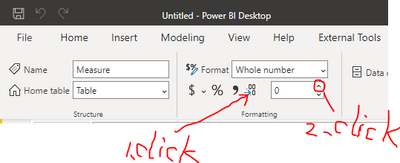
Please format the measure to retain a few more decimal places after the decimal point.
Please click measure firstly, then refer below screenshot:
Best regards,
Community Support Team_Binbin Yu
If this post helps, then please consider Accept it as the solution to help the other members find it more quickly.
Hi @smjzahid ,
Please format the measure to retain a few more decimal places after the decimal point.
Please click measure firstly, then refer below screenshot:
Best regards,
Community Support Team_Binbin Yu
If this post helps, then please consider Accept it as the solution to help the other members find it more quickly.
@smjzahid Add decimal place and check. Use column tool for that. I doubt there is a small non-zero value. Or make sure data type is whole number
Hi @amitchandak
Sorry What do you mean by Column Tool, I mean how do I check this is a measure not a column, Can you please show how Thanks for your help
The Power BI Data Visualization World Championships is back! Get ahead of the game and start preparing now!
| User | Count |
|---|---|
| 39 | |
| 38 | |
| 38 | |
| 28 | |
| 27 |
| User | Count |
|---|---|
| 124 | |
| 88 | |
| 73 | |
| 66 | |
| 65 |