cancel
Showing results for 
Search instead for 
Did you mean: 

The Power BI Data Visualization World Championships is back! Get ahead of the game and start preparing now! Learn more

Reply
Caraneda
Frequent Visitor

IRR calculation in different periods

Hi,
I need help with the XIRR calculation since inception in diferent periods.
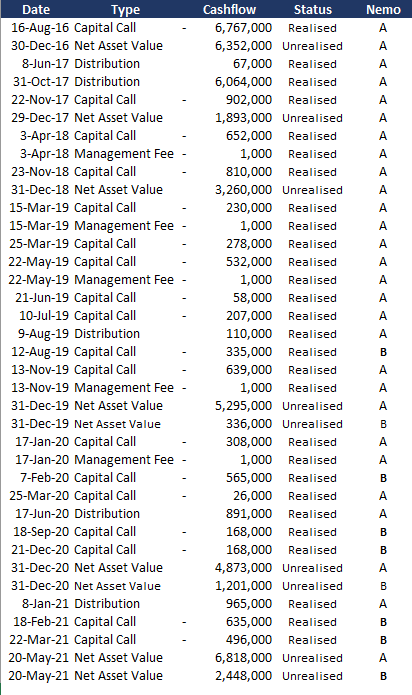
My data base looks like the table below, and I'll like to be able to know the aggregate IRR and the IRR of each 'Nemo' at different dates.
I fund some old answers in this forum, but I had trouble with the dates given that one nemo start having cashflows before the other one.


Caraneda_0-1622917412778.png


Thank you!


1 ACCEPTED SOLUTION
OwenAuger
Super User
Super User

Hi again @Caraneda Understood 🙂


First off, I went back and fixed the link on the previous post (tenant/username had changed). If you or anyone else come across one of my old OneDrive links, they can be fixed by changing owenauger_ozerconsulting_onmicrosoft_com to owen_owenaugerbi_com


On your current question, yes you can more-or-less copy the measure from that post to your model, as long as you have a suitable 'Date' table. I have attached a PBIX attempting this with the data you posted.


I would also suggest a couple of tweaks on top of the measure from the other post:

  • MaxUnrealisedDate should be calculated per Nemo, just in case the Unrealised dates don't align exactly across Nemos. (assuming this would ever happen)
  • To guard against cases where no cashflows exist (for a given set of filters), check if CashflowForIRR is empty, and only return XIRR ( ... ) if it is nonempty.

The tweaked measure is IRR as at latest Unrealised Cashflow v2:

IRR as at latest Unrealised Cashflow v2 = 
VAR MaxDate =
    MAX ( 'Date'[Date] )
VAR CashflowForIRR =
    GENERATE (
        VALUES ( 'Cashflow'[Nemo] ),
        VAR MaxUnrealisedDate =
            CALCULATE (
                MAX ( Cashflow[Date] ),
                'Date'[Date] <= MaxDate,
                Cashflow[Status] = "Unrealised"
            )
        RETURN
            CALCULATETABLE (
                ADDCOLUMNS (
                    SUMMARIZE ( Cashflow, 'Date'[Date] ),
                    "CashflowForIRR",
                        VAR StatusFilter =
                            IF ( 'Date'[Date] = MaxUnrealisedDate, "Unrealised", "Realised" )
                        RETURN
                            CALCULATE ( SUM ( Cashflow[Cashflow] ), Cashflow[Status] = StatusFilter )
                ),
                'Date'[Date] <= MaxUnrealisedDate
            )
    )
RETURN
    IF (
        NOT ISEMPTY ( CashflowForIRR ), -- can't calculate in this case
        XIRR ( CashflowForIRR, [CashflowForIRR], 'Date'[Date] )
    )

Regards,

Owen


Owen Auger
Did I answer your question? Mark my post as a solution!
Blog
LinkedIn

View solution in original post

3 REPLIES 3
OwenAuger
Super User
Super User

Hi again @Caraneda Understood 🙂


First off, I went back and fixed the link on the previous post (tenant/username had changed). If you or anyone else come across one of my old OneDrive links, they can be fixed by changing owenauger_ozerconsulting_onmicrosoft_com to owen_owenaugerbi_com


On your current question, yes you can more-or-less copy the measure from that post to your model, as long as you have a suitable 'Date' table. I have attached a PBIX attempting this with the data you posted.


I would also suggest a couple of tweaks on top of the measure from the other post:

  • MaxUnrealisedDate should be calculated per Nemo, just in case the Unrealised dates don't align exactly across Nemos. (assuming this would ever happen)
  • To guard against cases where no cashflows exist (for a given set of filters), check if CashflowForIRR is empty, and only return XIRR ( ... ) if it is nonempty.

The tweaked measure is IRR as at latest Unrealised Cashflow v2:

IRR as at latest Unrealised Cashflow v2 = 
VAR MaxDate =
    MAX ( 'Date'[Date] )
VAR CashflowForIRR =
    GENERATE (
        VALUES ( 'Cashflow'[Nemo] ),
        VAR MaxUnrealisedDate =
            CALCULATE (
                MAX ( Cashflow[Date] ),
                'Date'[Date] <= MaxDate,
                Cashflow[Status] = "Unrealised"
            )
        RETURN
            CALCULATETABLE (
                ADDCOLUMNS (
                    SUMMARIZE ( Cashflow, 'Date'[Date] ),
                    "CashflowForIRR",
                        VAR StatusFilter =
                            IF ( 'Date'[Date] = MaxUnrealisedDate, "Unrealised", "Realised" )
                        RETURN
                            CALCULATE ( SUM ( Cashflow[Cashflow] ), Cashflow[Status] = StatusFilter )
                ),
                'Date'[Date] <= MaxUnrealisedDate
            )
    )
RETURN
    IF (
        NOT ISEMPTY ( CashflowForIRR ), -- can't calculate in this case
        XIRR ( CashflowForIRR, [CashflowForIRR], 'Date'[Date] )
    )

Regards,

Owen


Owen Auger
Did I answer your question? Mark my post as a solution!
Blog
LinkedIn
OwenAuger
Super User
Super User

Hi @Caraneda 

Could you give some examples of the results you expect based on different filters?


XIRR will treat the earliest date as the 0th payment date.

You can construct a table to pass to XIRR within the measure that controls the exact dates/values to be used in the calculation.


Regards,

Owen


Owen Auger
Did I answer your question? Mark my post as a solution!
Blog
LinkedIn

Hi @OwenAuger ,

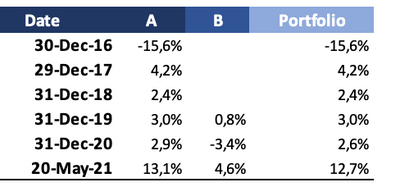
Sure!, I'll like to get the following calculations:

Caraneda_0-1622992839664.png


And for that I need to generate several tables as you can see in the following excel:
Example IRR Calculation 


I already know the XIRR will treat the earlier date as 0th payment date, and actually I need something really similar to this post you already answerd: Historic IRR Dashboard - Unrealized cashflows . But I had trouble making work the 'Date' table you mentioned (and since the link you posted is broken, I wasn't able to check that table in your example).

Thank you in advance!


Helpful resources

Announcements
Power BI DataViz World Championships

Power BI Dataviz World Championships

The Power BI Data Visualization World Championships is back! Get ahead of the game and start preparing now!

November Power BI Update Carousel

Power BI Monthly Update - November 2025

Check out the November 2025 Power BI update to learn about new features.

FabCon Atlanta 2026 carousel

FabCon Atlanta 2026

Join us at FabCon Atlanta, March 16-20, for the ultimate Fabric, Power BI, AI and SQL community-led event. Save $200 with code FABCOMM.