Join us in Barcelona for FabCon and SQLCon, September 28 - October 1, 2026.
This is best Fabric, Power BI, SQL and AI community event. How do we know? The last event sold out! Save €200 with code FABCMTY200.
Register now- Power BI forums
- Get Help with Power BI
- Desktop
- Service
- Report Server
- Power Query
- Mobile Apps
- Developer
- DAX Commands and Tips
- Custom Visuals Development Discussion
- Health and Life Sciences
- Power BI Spanish forums
- Translated Spanish Desktop
- Training and Consulting
- Instructor Led Training
- Dashboard in a Day for Women, by Women
- Galleries
- Data Stories Gallery
- Themes Gallery
- Contests Gallery
- QuickViz Gallery
- Quick Measures Gallery
- Visual Calculations Gallery
- Fabric Apps Gallery
- Notebook Gallery
- Translytical Task Flow Gallery
- TMDL Gallery
- R Script Showcase
- Webinars and Video Gallery
- Ideas
- Custom Visuals Ideas (read-only)
- Issues
- Issues
- Events
- Upcoming Events
The Fabric community is upgrading! Read all of the details including the timeline and what you can expect. Learn more
- Power BI forums
- Forums
- Get Help with Power BI
- Desktop
- Re: IF three condition.
- Subscribe to RSS Feed
- Mark Topic as New
- Mark Topic as Read
- Float this Topic for Current User
- Bookmark
- Subscribe
- Printer Friendly Page

- Mark as New
- Bookmark
- Subscribe
- Mute
- Subscribe to RSS Feed
- Permalink
- Report Inappropriate Content
IF three condition.
I have a measure in which I need depending on the percentage range, show an image that is on the web, so far only the one that showed me 1 image, does not fit into the other conditions.
I have a calculated field that brings me the utility percentage of the company.
The conditions are:
show image Green= 100% to infinity
show image Yellow= 85% to 99%
show image Red= 0% - 84%
For Example:
If the result of the operation utility is: 75% will show the image yellow
I use this measure:
Total_IMG = IF(AND([Totalutitlity %]>=0, [Totalutility%]<=.84),"https://cdn.pixabay.com/photo/2013/07/13/10/27/hand-157251_960_720.png",IF(AND([Totalutility %]>=.85,[Total pedidos %]<=.99),"http://www.clker.com/cliparts/5/2/5/8/13476359851958638477thumbs-down-icon-red-hi-hi.png","http://www.clker.com/cliparts/l/J/Q/d/1/X/yellow-thumbs-up-md.png")))
The image loads on image display on img visualitation.
Thx, for ur help!!
Solved! Go to Solution.
- Mark as New
- Bookmark
- Subscribe
- Mute
- Subscribe to RSS Feed
- Permalink
- Report Inappropriate Content
Hi @JazminMarquez,
I am not sure what is your sample data, but you can check if the following steps return your expected result.
1. Create a new table using the following formula.
image  =
UNION (
    ROW ( "state", "Green",
    "ImgURL", "https://cdn.pixabay.com/photo/2013/07/13/10/27/hand-157251_960_720.png" ),
    ROW ( "state", "Red",
    "ImgURL", "http://www.clker.com/cliparts/5/2/5/8/13476359851958638477thumbs-down-icon-red-hi-hi.png" ),
ROW ( "state", "yellow",
    "ImgURL", "http://www.clker.com/cliparts/l/J/Q/d/1/X/yellow-thumbs-up-md.png" )
)
2. Create a new measure using the following formula.
LinkedMeasure  =
SUMX (
    VALUES ( 'image '[state] ),
    IF (
        (
            [Totalutility%]>= 0 && [Totalutility%] <= 0.84
                && VALUES ( 'image '[state] ) ="Green"
        )
            || (
               [Totalutility%] >= 0.85 && [Totalutility%] <= 0.99
                    && VALUES ( 'image '[state] ) = "Red"
            )
            || (
               [Totalutility%] >=1
                    && VALUES ( 'image '[state] ) = "yellow"
            ),
        1
    )
)
3. Display image in ChicletSlicer. Image will change based on the value of [Totalutility%] Measure.
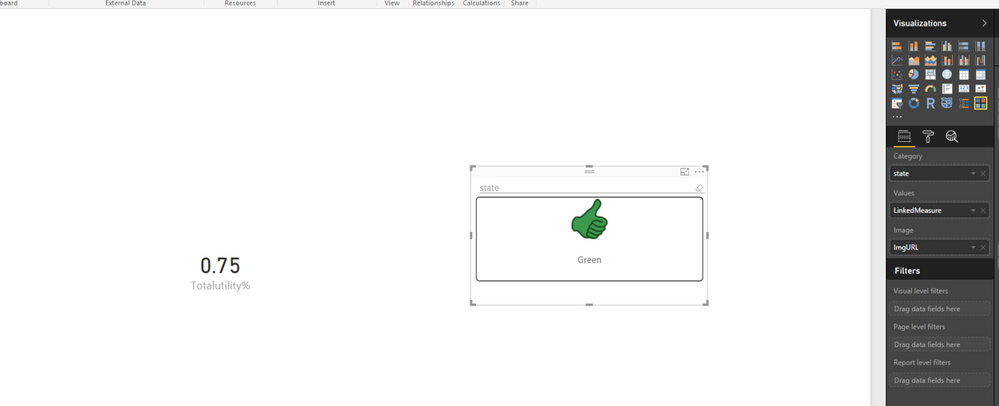
Reference:
http://sqljason.com/2015/11/custom-indicators-in-power-bi-using.html
Thanks,
Lydia Zhang


- Mark as New
- Bookmark
- Subscribe
- Mute
- Subscribe to RSS Feed
- Permalink
- Report Inappropriate Content
How about a SWITCH statement which is interannly converted into nested IFs? 
Total_IMG =
SWITCH (
    TRUE (),
    [Totalutility %] >= 0
        && [Totalutility%] <= .84, "https://cdn.pixabay.com/photo/2013/07/13/10/27/hand-157251_960_720.png",
    [Totalutility %] >= .85
        && [Total pedidos %] <= .99, "http://www.clker.com/cliparts/5/2/5/8/13476359851958638477thumbs-down-icon-red-hi-hi.png",
    "http://www.clker.com/cliparts/l/J/Q/d/1/X/yellow-thumbs-up-md.png"
)
- Mark as New
- Bookmark
- Subscribe
- Mute
- Subscribe to RSS Feed
- Permalink
- Report Inappropriate Content
Great solution, but still not working, I don't know why... 
- Mark as New
- Bookmark
- Subscribe
- Mute
- Subscribe to RSS Feed
- Permalink
- Report Inappropriate Content
Which part doesn't work?
Whats is the [Totalutility %] Measure formula?
- Mark as New
- Bookmark
- Subscribe
- Mute
- Subscribe to RSS Feed
- Permalink
- Report Inappropriate Content
Totalutility is a measure... if i only left one condition, Even though it does not work, I think it is not considering the value of the result of measure Totalutility.. bacause if i change the number por example:
IMG = IF([Totalutility %]>=1,"https://cdn.pixabay.com/photo/2013/07/13/10/27/hand-157251_960_720.png","http://www.clker.com/clipar..."),
This example only shows green always, if change the value ">=1" for "<=1" shows a green image..


- Mark as New
- Bookmark
- Subscribe
- Mute
- Subscribe to RSS Feed
- Permalink
- Report Inappropriate Content
I think your formula will only work if [TotalUtility %] is a column in your table rather than a calcualed measure.
- Mark as New
- Bookmark
- Subscribe
- Mute
- Subscribe to RSS Feed
- Permalink
- Report Inappropriate Content
The problem is that I can not make the formula, as a calculated column because it is the division of the total of 2 different tables 
- Mark as New
- Bookmark
- Subscribe
- Mute
- Subscribe to RSS Feed
- Permalink
- Report Inappropriate Content
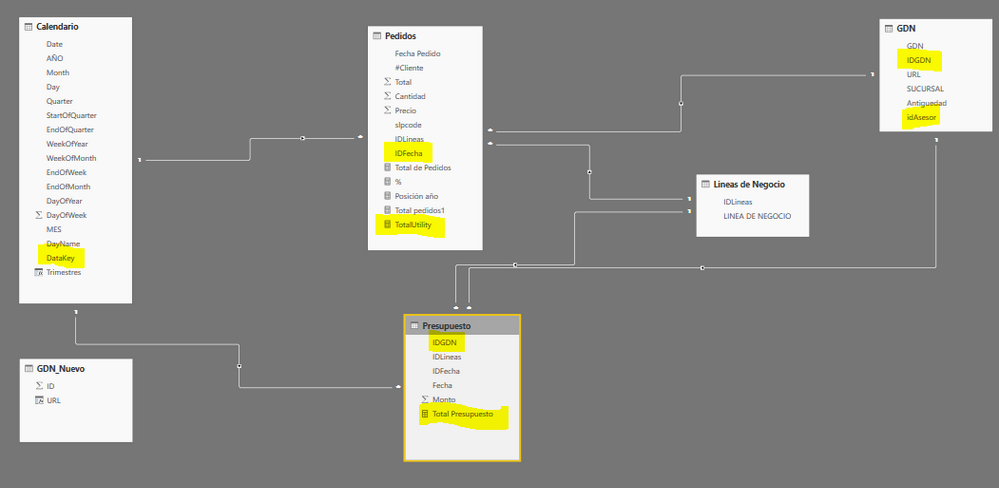
We can overcome that by creating a dynamic table that is based on two other tables.
It's a little more complex but can be done. It would help to see your two tables so we can generate the formula you need.
- Mark as New
- Bookmark
- Subscribe
- Mute
- Subscribe to RSS Feed
- Permalink
- Report Inappropriate Content
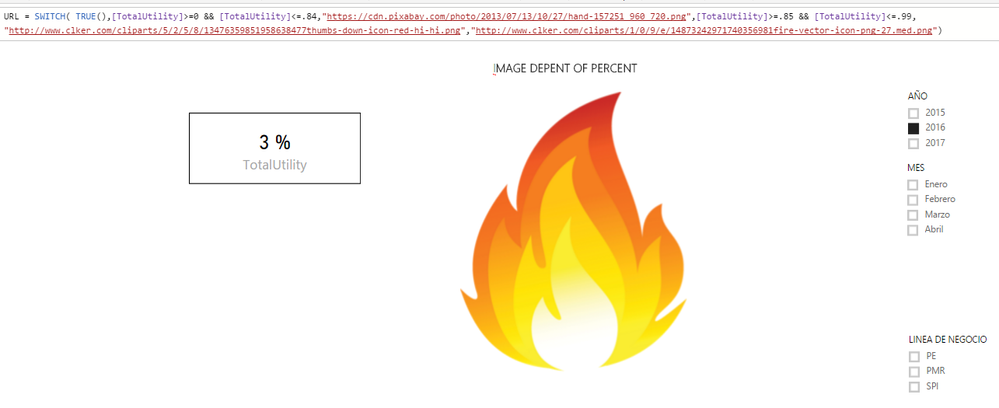
Thx for the help guys..
Any questions you have, please let me know. I am very grateful to take the time to help me, but I can not get this far
- Mark as New
- Bookmark
- Subscribe
- Mute
- Subscribe to RSS Feed
- Permalink
- Report Inappropriate Content
I finally found the way that the image works, now I can not make it work with 3 images ..
Value = SUMX(
VALUES(Images[State]),
SWITCH(Images[State],
"ThumbsMedium",
IF([TotalUtility]>= .85,1,0),
IF([TotalUtility]>= .85,0,1)))
- Mark as New
- Bookmark
- Subscribe
- Mute
- Subscribe to RSS Feed
- Permalink
- Report Inappropriate Content
Hi @JazminMarquez,
I am not sure what is your sample data, but you can check if the following steps return your expected result.
1. Create a new table using the following formula.
image  =
UNION (
    ROW ( "state", "Green",
    "ImgURL", "https://cdn.pixabay.com/photo/2013/07/13/10/27/hand-157251_960_720.png" ),
    ROW ( "state", "Red",
    "ImgURL", "http://www.clker.com/cliparts/5/2/5/8/13476359851958638477thumbs-down-icon-red-hi-hi.png" ),
ROW ( "state", "yellow",
    "ImgURL", "http://www.clker.com/cliparts/l/J/Q/d/1/X/yellow-thumbs-up-md.png" )
)
2. Create a new measure using the following formula.
LinkedMeasure  =
SUMX (
    VALUES ( 'image '[state] ),
    IF (
        (
            [Totalutility%]>= 0 && [Totalutility%] <= 0.84
                && VALUES ( 'image '[state] ) ="Green"
        )
            || (
               [Totalutility%] >= 0.85 && [Totalutility%] <= 0.99
                    && VALUES ( 'image '[state] ) = "Red"
            )
            || (
               [Totalutility%] >=1
                    && VALUES ( 'image '[state] ) = "yellow"
            ),
        1
    )
)
3. Display image in ChicletSlicer. Image will change based on the value of [Totalutility%] Measure.
Reference:
http://sqljason.com/2015/11/custom-indicators-in-power-bi-using.html
Thanks,
Lydia Zhang
- Mark as New
- Bookmark
- Subscribe
- Mute
- Subscribe to RSS Feed
- Permalink
- Report Inappropriate Content
Lydia Zhang,
I am very grateful for your response and above all for taking the time to help me, I have solved this issue. 

Helpful resources

FabCon & SQLCon – Barcelona 2026
Join us in Barcelona for FabCon and SQLCon, the Fabric, Power BI, SQL, and AI community event. Save €200 with code FABCMTY200.

Power BI DataViz World Championships - June 2026
A new Power BI DataViz World Championship is coming this June! Don't miss out on submitting your entry.

| User | Count |
|---|---|
| 24 | |
| 22 | |
| 20 | |
| 18 | |
| 14 |


| User | Count |
|---|---|
| 45 | |
| 38 | |
| 24 | |
| 21 | |
| 20 |


