Don't miss your chance to take the Fabric Data Engineer (DP-600) exam for FREE! Find out how by watching the DP-600 session on-demand now through April 28th.
Learn moreJoin the FabCon + SQLCon recap series. Up next: Power BI, Real-Time Intelligence, IQ and AI, and Data Factory take center stage. All sessions are available on-demand after the live show. Register now
Hello!
I wanted to ask you something
if i have
a mobile phone column,
a home phone column
and a other phone column
How can i create a new column where i say that if there is at least a number in any of these columns then write me 1 or if there is any numbers in these columns then write me 0.
Thank you so much, sorry for my english im italian and im starting now to discover power bi ![]()
Solved! Go to Solution.
Hi @Messy92,
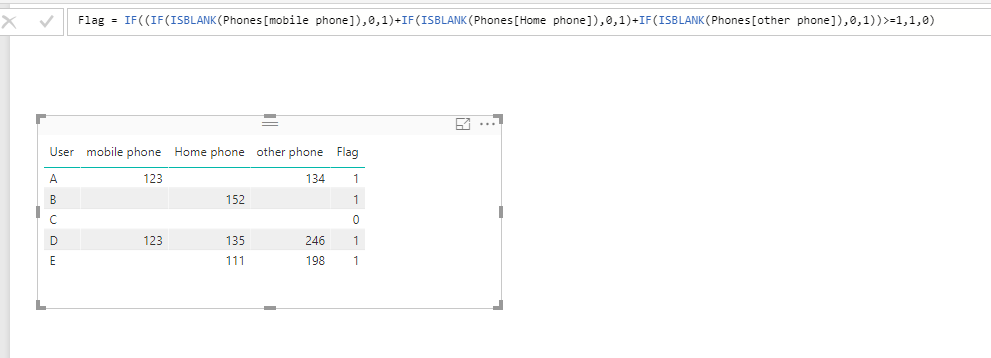
Please refer to following sample, see if it works for you:
Flag =
IF (
(
IF ( ISBLANK ( Phones[mobile phone] ), 0, 1 )
+ IF ( ISBLANK ( Phones[Home phone] ), 0, 1 )
+ IF ( ISBLANK ( Phones[other phone] ), 0, 1 )
)
>= 1,
1,
0
)
Thanks,
Xi Jin.
Hi @Messy92,
Please refer to following sample, see if it works for you:
Flag =
IF (
(
IF ( ISBLANK ( Phones[mobile phone] ), 0, 1 )
+ IF ( ISBLANK ( Phones[Home phone] ), 0, 1 )
+ IF ( ISBLANK ( Phones[other phone] ), 0, 1 )
)
>= 1,
1,
0
)
Thanks,
Xi Jin.
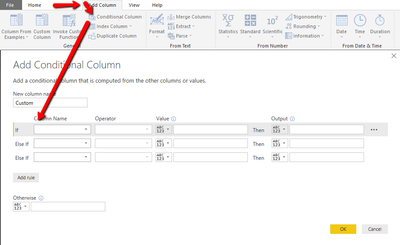
If you are doing this in the query editor rather (create a column) rather than in dax (create a measure) there is a built in feature that does not require you to know M.
You go to Add Column --> Conditional Column and then set your rules.
if mobile phone column does not equal null, then 1
else if home phone does not equal null, then 1
else if other phone does not equal null, then 1
else 0
See this page for help:
https://msdn.microsoft.com/en-us/query-bi/dax/if-function-dax
The syntax for one if statement is this: IF(logical_test>,<value_if_true>, value_if_false)
If you have more than one check - which you do - then you need something more like this example - which is also from the page above:
=IF([Calls]<200,"low",IF([Calls]<300,"medium","high"))
Check out the April 2026 Power BI update to learn about new features.
If you have recently started exploring Fabric, we'd love to hear how it's going. Your feedback can help with product improvements.
A new Power BI DataViz World Championship is coming this June! Don't miss out on submitting your entry.
| User | Count |
|---|---|
| 43 | |
| 38 | |
| 34 | |
| 20 | |
| 16 |
| User | Count |
|---|---|
| 66 | |
| 65 | |
| 30 | |
| 26 | |
| 25 |