
Don't miss your chance to take exam DP-600 or DP-700 on us!
Request nowLearn from the best! Meet the four finalists headed to the FINALS of the Power BI Dataviz World Championships! Register now
Hi All,
I am struggling to make work IF statement.
I want to use IF statement where the value equals to the some value then show me the date value, else NULL value.
Example Ext End Contract = IF('Extended Contract'[VEHICLESTATUS] = "Extended Contract",LASTDATE('Extende
d Contract'[Ext End Contract]),"Jibran")Error that I receive is "Expressions that yield variant data-type cannot be used to define calculated columns."
Many Thanks
Solved! Go to Solution.
Please try with following formula.
Example Ext End Contract =
IF (
'Extended Contract'[VEHICLESTATUS] = "Extended Contract",
FORMAT (
CALCULATE (
LASTDATE ( 'Extended Contract'[Ext End Contract] ),
ALLEXCEPT (
'Extended Contract',
'Extended Contract'[CUSTOMERNAME],
'Extended Contract'[REGISTRATIONNO],
'Extended Contract'[Fleetware Contract ID]
)
),
""
),
"Jibran"
)
Best Regards,
Herbert
Your result cannot mix data types between Date and Text. If your alternate result is "Jibran" (Text), the first result must also be Text. You can use FORMAT() to convert the date value to text: FORMAT(LASTDATE( [...] ),"Text")
Hi,
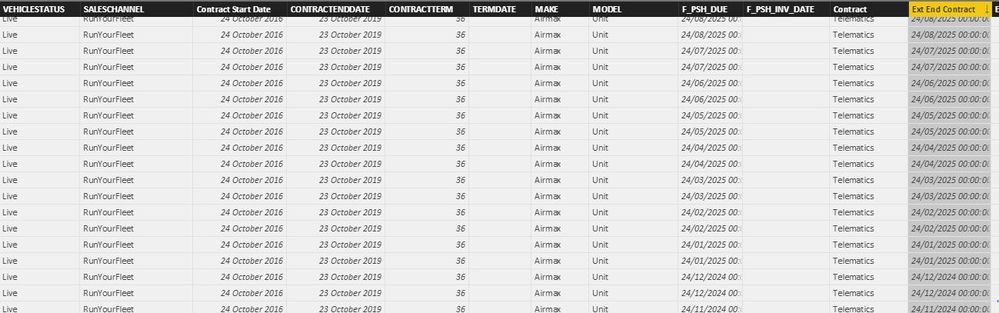
I applied the Fomat function and pass the desired string to the function as shown below, but it is displaying duplicate data.
It looks like with the inclusion of Format function the last date fuction is not working any more
Dax query is
Example Ext End Contract = IF('Extended Contract'[VEHICLESTATUS] = "Extended Contract",FORMAT(LASTDATE('Extended Contract'[Ext End Contract]), "ddd dd/MM/YYYY"),"No Date")
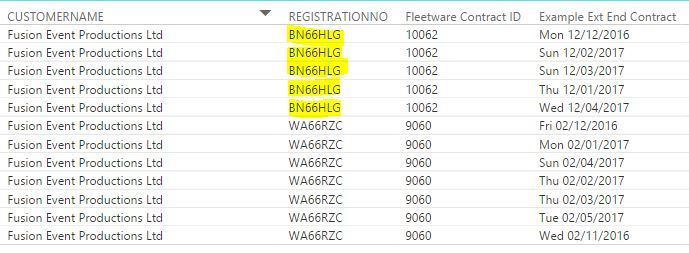
My desired result has to be something like this
Many Thanks
Hi @jibran
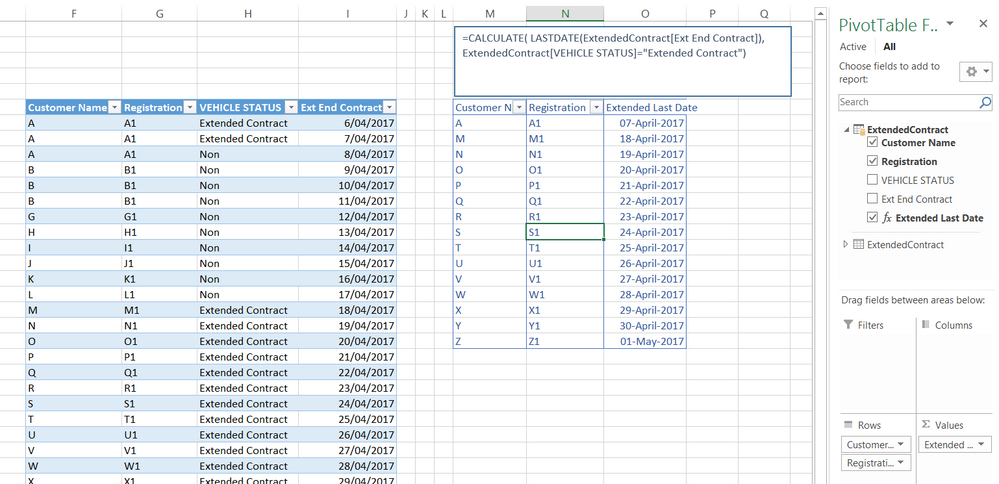
I think you can achieve what you want with a measure rather than a calculated column
Extended Last Date =CALCULATE( LASTDATE(ExtendedContract[Ext End Contract]),
ExtendedContract[VEHICLE STATUS]="Extended Contract")
Please try with following formula.
Example Ext End Contract =
IF (
'Extended Contract'[VEHICLESTATUS] = "Extended Contract",
FORMAT (
CALCULATE (
LASTDATE ( 'Extended Contract'[Ext End Contract] ),
ALLEXCEPT (
'Extended Contract',
'Extended Contract'[CUSTOMERNAME],
'Extended Contract'[REGISTRATIONNO],
'Extended Contract'[Fleetware Contract ID]
)
),
""
),
"Jibran"
)
Best Regards,
Herbert
Share feedback directly with Fabric product managers, participate in targeted research studies and influence the Fabric roadmap.
Check out the February 2026 Power BI update to learn about new features.
| User | Count |
|---|---|
| 53 | |
| 45 | |
| 38 | |
| 16 | |
| 14 |
| User | Count |
|---|---|
| 82 | |
| 69 | |
| 39 | |
| 29 | |
| 27 |