cancel
Showing results for 
Search instead for 
Did you mean: 

Data Days is here! Join us now for 60+ days of learning, challenges, and connection. Learn more

Reply
gablewithbird
Frequent Visitor

IF statement for identifying data type.

A very dumb question.

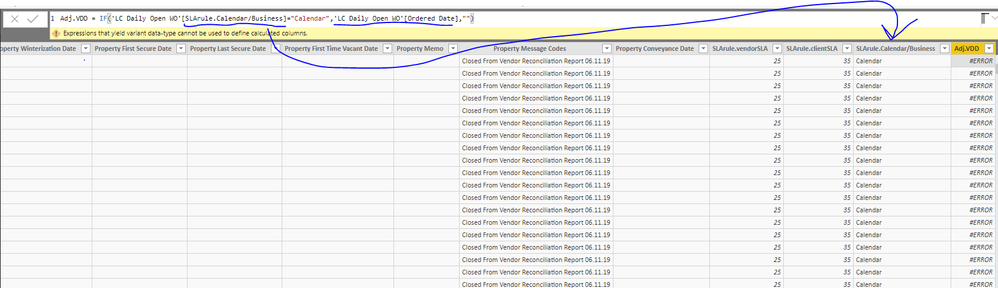
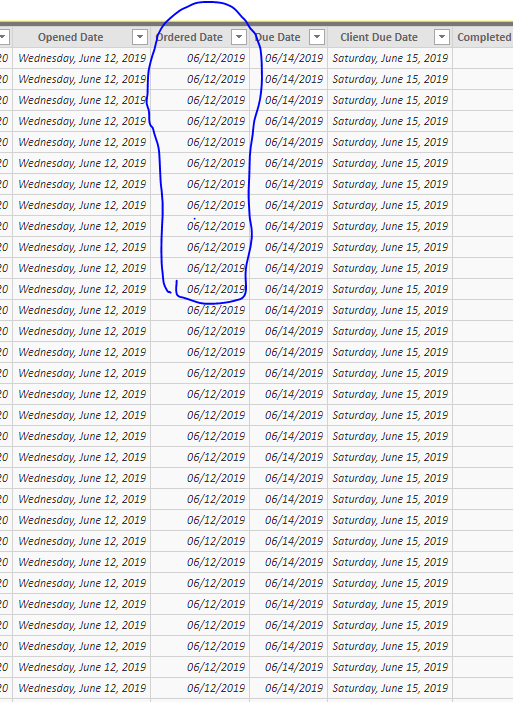
Why PowerBI couldn't return order dates when my condition is true?


Capture.PNG


Capture1.PNG


2 ACCEPTED SOLUTIONS
HotChilli
Community Champion
Community Champion

The 'IF' statement has two possible outcomes.  They must both be of the same data type.

View solution in original post

TomMartens
Super User
Super User

Hey,


this is due to the fact, IF can not return values of different data types, your statement will return a date (Ordered Date) or a string "".

You can use this instead:

Column = IF('Table1'[CheckCondition] = "Calendar" , 'Table1'[Ordered Date] , BLANK())

Instead of returning an empty string "", return BLANK(), if the IF condition equals to FALSE


Hopefully this is what you are looking for.


Regards,

Tom


Did I answer your question? Mark my post as a solution, this will help others!

Proud to be a Super User!
I accept Kudos 😉
Hamburg, Germany

View solution in original post

5 REPLIES 5
TomMartens
Super User
Super User

Hey,


this is due to the fact, IF can not return values of different data types, your statement will return a date (Ordered Date) or a string "".

You can use this instead:

Column = IF('Table1'[CheckCondition] = "Calendar" , 'Table1'[Ordered Date] , BLANK())

Instead of returning an empty string "", return BLANK(), if the IF condition equals to FALSE


Hopefully this is what you are looking for.


Regards,

Tom


Did I answer your question? Mark my post as a solution, this will help others!

Proud to be a Super User!
I accept Kudos 😉
Hamburg, Germany

yes, it's what I was looking for.

Cmcmahan
Resident Rockstar
Resident Rockstar

What is the expression used to caclulate the SLArule.Calendar/Business column?

HotChilli
Community Champion
Community Champion

The 'IF' statement has two possible outcomes.  They must both be of the same data type.

@HotChilli 

Awesome and interesting.

I learned that using BLANK(), instead of "" fixes the issue.

@Cmcmahan 

it's not output from an expression. it's just fixed text. 


thanks for your help.


Helpful resources

Announcements
Fabric Data Days is here Carousel

Fabric Data Days 2026

Don't miss out on Data Days, June 15 through August 7. Learn Fabric, Power BI, SQL, AI and more.

May Power BI Update Carousel

Power BI Monthly Update - May 2026

Check out the May 2026 Power BI update to learn about new features.

Power BI DataViz World Championships carousel

Power BI DataViz World Championships - June 2026

A new Power BI DataViz World Championship is coming this June! Don't miss out on submitting your entry.