Join us at FabCon Atlanta from March 16 - 20, 2026, for the ultimate Fabric, Power BI, AI and SQL community-led event. Save $200 with code FABCOMM.
Register now!The Power BI Data Visualization World Championships is back! It's time to submit your entry. Live now!
Hi,
I want to create a new column to show for each office its use type, following these rules:
Rule Use typeIf
any of the 3 Use columns is office Office, etc
Otherwise Other
Below is the table,
| City | Use1 | Use2 | Use3 |
| Dubai | office | residential | hotel |
| Shanghai | hotel | office | null |
| Mecca | other | hotel | null |
| New York City | office | null | null |
| Guangzhou | hotel | residential | office |
| Taipei | office | null | null |
| Shanghai | hotel | office | null |
| Hong Kong | hotel | office | null |
| Kuala Lumpur | office | null | null |
| Kuala Lumpur | office | null | null |
| Nanjing | hotel | office | null |
Thank you.
Solved! Go to Solution.
Hi @Bibeksharma
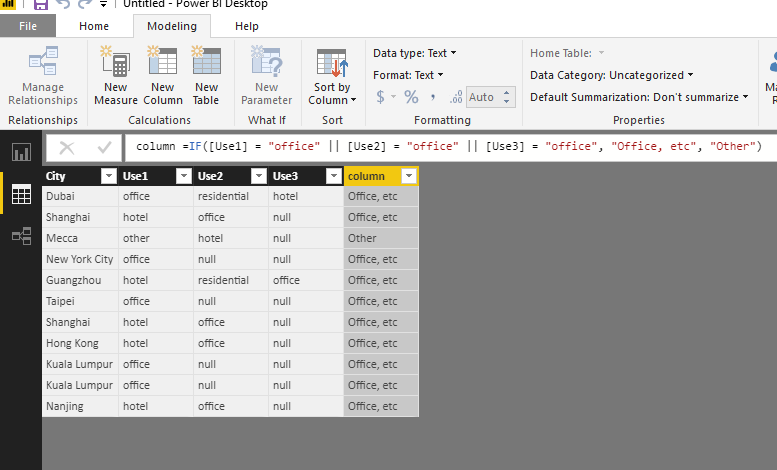
Please look at my test
Modeling->New column, paste your formula
I'm afraid you were using edit queries.
Best Regards
Maggie
I wrote the formula shown below but I get an error "Token Comma expected"
IF([Use1] = "office" || [Use2] = "office" || [Use3] = "office", "Office, etc", "Other")
Hi @Bibeksharma
Please look at my test
Modeling->New column, paste your formula
I'm afraid you were using edit queries.
Best Regards
Maggie
The Power BI Data Visualization World Championships is back! It's time to submit your entry.
| User | Count |
|---|---|
| 47 | |
| 43 | |
| 36 | |
| 33 | |
| 30 |
| User | Count |
|---|---|
| 138 | |
| 118 | |
| 59 | |
| 59 | |
| 56 |