Join us at FabCon Atlanta from March 16 - 20, 2026, for the ultimate Fabric, Power BI, AI and SQL community-led event. Save $200 with code FABCOMM.
Register now!The Power BI Data Visualization World Championships is back! It's time to submit your entry. Live now!
Hi,
I want to create a new column to show for each office its use type, following these rules:
Rule Use typeIf
any of the 3 Use columns is office Office, etc
Otherwise Other
Below is the table,
| City | Use1 | Use2 | Use3 |
| Dubai | office | residential | hotel |
| Shanghai | hotel | office | null |
| Mecca | other | hotel | null |
| New York City | office | null | null |
| Guangzhou | hotel | residential | office |
| Taipei | office | null | null |
| Shanghai | hotel | office | null |
| Hong Kong | hotel | office | null |
| Kuala Lumpur | office | null | null |
| Kuala Lumpur | office | null | null |
| Nanjing | hotel | office | null |
Thank you.
Solved! Go to Solution.
Hi @Bibeksharma
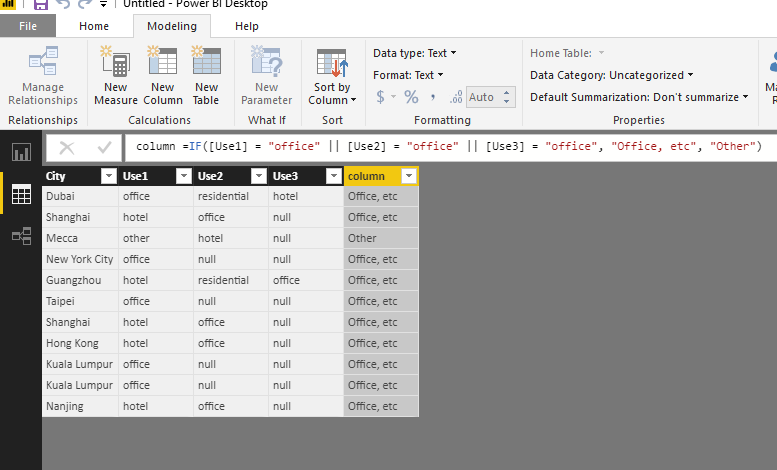
Please look at my test
Modeling->New column, paste your formula
I'm afraid you were using edit queries.
Best Regards
Maggie
I wrote the formula shown below but I get an error "Token Comma expected"
IF([Use1] = "office" || [Use2] = "office" || [Use3] = "office", "Office, etc", "Other")
Hi @Bibeksharma
Please look at my test
Modeling->New column, paste your formula
I'm afraid you were using edit queries.
Best Regards
Maggie
The Power BI Data Visualization World Championships is back! It's time to submit your entry.
Check out the January 2026 Power BI update to learn about new features.
| User | Count |
|---|---|
| 66 | |
| 45 | |
| 38 | |
| 26 | |
| 22 |
| User | Count |
|---|---|
| 136 | |
| 117 | |
| 55 | |
| 36 | |
| 30 |