cancel
Showing results for 
Search instead for 
Did you mean: 

Learn from the best! Meet the four finalists headed to the FINALS of the Power BI Dataviz World Championships! Register now

Reply
Edinson
Frequent Visitor

IF function error

Help me with this new column

Tip_RQ = IF(Consolidado_RQ[Tipo de Requerimiento] = BLANK(),"Proyecto de Negocio",Consolidado_RQ[Tipo de Requerimiento])

which is the erro here, because when there is no value for Consolidado_RQ[Tipo de Requerimiento], still show (blank).


Pleas help me!

4 REPLIES 4
v-haibl-msft
Microsoft Employee
Microsoft Employee

@Edinson


Do you have any update about it?


Best Regards,
Herbert

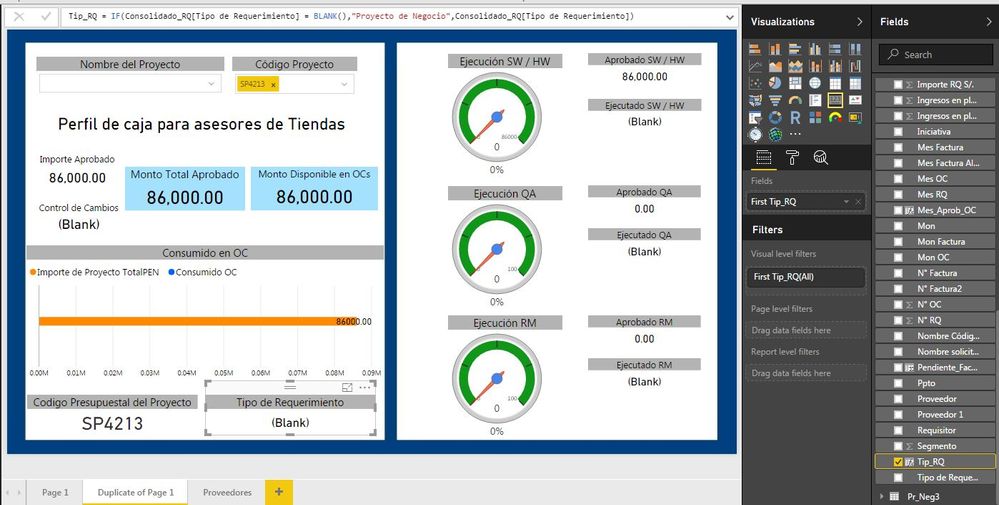
It doesn´t works. The report still show (Blank) as you can see.


problema.JPG

Vvelarde
Community Champion
Community Champion

@Edinson


Hi, Let me understand your problem.


You always have TipoRequerimiento  (Data) to every CodigoProyecto. Or they are in different tables?


I think that the blank appears because they are not matching rows with the CodigoProyecto.


What happen if you add a measure CuentaFilas=Countrows(Consolidado_RQ)+0 in a card. What is the result. I think 0.


Let me see what happen.


Regards


Victor

Lima - Peru


Lima - Peru
v-haibl-msft
Microsoft Employee
Microsoft Employee

@Edinson


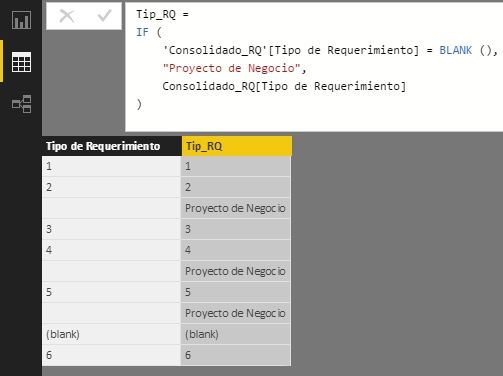
It seems that the if function works properly on my side. Do you have any sample data can be used to repro your issue? Or you can share your PBIX file through online file service like OneDrive.


IF function error_1.jpg


Best Regards,
Herbert

Helpful resources

Announcements
Power BI DataViz World Championships carousel

Power BI DataViz World Championships - June 2026

A new Power BI DataViz World Championship is coming this June! Don't miss out on submitting your entry.

Join our Fabric User Panel

Join our Fabric User Panel

Share feedback directly with Fabric product managers, participate in targeted research studies and influence the Fabric roadmap.

March Power BI Update Carousel

Power BI Community Update - March 2026

Check out the March 2026 Power BI update to learn about new features.