This is best Fabric, Power BI, SQL and AI community event. How do we know? The last event sold out! Save €200 with code FABCMTY200.
Register nowJuly 28 - August 9 | Final Round of the Power BI Dataviz World Championships. This is your chance. Learn more
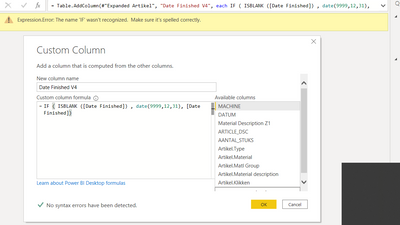
My goal is to replace empty date values in a table to a custom date value (31/12/9999 e.g.) by adding a new column where I use an IF function.
The new column should be composed out of '31/12/9999' is the value in column X is blank, while if the value in column X is not blank, the column should take the value that is in column X.
The custom column formula I use is IF ( ISBLANK ([Date Finished]) , ("31/12/9999"), [Date Finished]), but I receive the error: Expression.Error: The name 'IF' wasn't recognized. Make sure it's spelled correctly.
@Anonymous
IF ( ISBLANK ([Date Finished]) , DATE(9999,12,31), [Date Finished])
https://docs.microsoft.com/en-us/dax/date-function-dax
Refre the above link to learn about DATE function
Regards,
Manikumar
Proud to be a Super User!
I don not see where this helps my problem? 🙂
@Anonymous ,
You are trying DAX in Power query.
Please use the same DAX with Calculated column.
Regards,
Manikumar
Proud to be a Super User!
Dear, I still receive the same error. If something wrong with my settings?
Join us in Barcelona for FabCon and SQLCon, the Fabric, Power BI, SQL, and AI community event. Save €200 with code FABCMTY200.
If you love stickers, then you will definitely want to check out our community sticker challenge, Barcelona edition!
Check out the July 2026 Power BI update to learn about new features.
| User | Count |
|---|---|
| 25 | |
| 23 | |
| 19 | |
| 17 | |
| 14 |
| User | Count |
|---|---|
| 25 | |
| 23 | |
| 20 | |
| 20 | |
| 19 |