This is best Fabric, Power BI, SQL and AI community event. How do we know? The last event sold out! Save €200 with code FABCMTY200.
Register nowJuly 28 - August 9 | Final Round of the Power BI Dataviz World Championships. This is your chance. Learn more
Hello,
IF and SWITCH have their own set of rules?
IF-
Tried using the IF function, its doesnt allow to use it more than 3 times?
Error-"Too many arguments were passed to the IF function. The maximum argument count for the function is 3."
Solved! Go to Solution.
@Anonymous
Column = if(Sheet1[Month]="Jan","Fisrt",
IF(Sheet1[Month]="feb",what's the result for feb?
IF(Sheet1[Num]=2,"Second","Good",//this IF staement is completed, you can't have the below statments
IF(Sheet1[Month]="Mar","Third"))))
please make sure if statment has three parameters (condition, true, false)
SWITCH
What's the higher priority column of this? you can't put two columns in the switch. please share the sample data and explain the logic.
Work type ref 1 = SWITCH(Sheet1[Project Portfolio Name]="none",
Sheet1[Project ID]="XX1001","Vacation",
Sheet1[Project ID]="XX1002","Vacation",
Sheet1[Project ID]="XX1003","Vacation",
Sheet1[Project ID]="XX1004","Vacation",
Sheet1[Project ID]="XX1005","Vacation",
Sheet1[Project ID]="XX1006","Vacation","Non- Proj",
Sheet1[Project Portfolio Name]="Run the Business (RTB)","RTB")
maybe you can try
Column = IF(Sheet1[Project Portfolio Name]="none",SWITCH(TRUE(),Sheet1[ProjectID] in {"XX1001","XX1002","XX1003","XX1004","XX1005","XX1006"},"VACATION","NON-PROJ"),IF(Sheet1[Project Portfolio Name]="Run the Business (RTB)","RTB"))
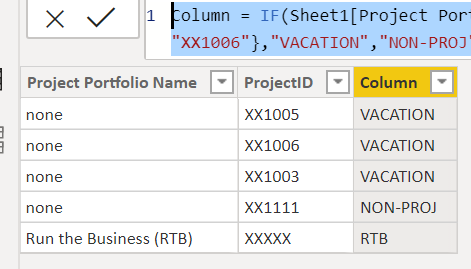
if the value of project porfolio name is blank instead of TEXT "none", you can try
Column = IF(isblank(Sheet1[Project Portfolio Name]),SWITCH(TRUE(),Sheet1[ProjectID] in {"XX1001","XX1002","XX1003","XX1004","XX1005","XX1006"},"VACATION","NON-PROJ"),IF(Sheet1[Project Portfolio Name]="Run the Business (RTB)","RTB"))
Proud to be a Super User!
@Anonymous
Column = if(Sheet1[Month]="Jan","Fisrt",
IF(Sheet1[Month]="feb",what's the result for feb?
IF(Sheet1[Num]=2,"Second","Good",//this IF staement is completed, you can't have the below statments
IF(Sheet1[Month]="Mar","Third"))))
please make sure if statment has three parameters (condition, true, false)
SWITCH
What's the higher priority column of this? you can't put two columns in the switch. please share the sample data and explain the logic.
Work type ref 1 = SWITCH(Sheet1[Project Portfolio Name]="none",
Sheet1[Project ID]="XX1001","Vacation",
Sheet1[Project ID]="XX1002","Vacation",
Sheet1[Project ID]="XX1003","Vacation",
Sheet1[Project ID]="XX1004","Vacation",
Sheet1[Project ID]="XX1005","Vacation",
Sheet1[Project ID]="XX1006","Vacation","Non- Proj",
Sheet1[Project Portfolio Name]="Run the Business (RTB)","RTB")
maybe you can try
Column = IF(Sheet1[Project Portfolio Name]="none",SWITCH(TRUE(),Sheet1[ProjectID] in {"XX1001","XX1002","XX1003","XX1004","XX1005","XX1006"},"VACATION","NON-PROJ"),IF(Sheet1[Project Portfolio Name]="Run the Business (RTB)","RTB"))
if the value of project porfolio name is blank instead of TEXT "none", you can try
Column = IF(isblank(Sheet1[Project Portfolio Name]),SWITCH(TRUE(),Sheet1[ProjectID] in {"XX1001","XX1002","XX1003","XX1004","XX1005","XX1006"},"VACATION","NON-PROJ"),IF(Sheet1[Project Portfolio Name]="Run the Business (RTB)","RTB"))
Proud to be a Super User!
@Anonymous , like this try SWITCH true
SWITCH(true(), Sheet1[Project Portfolio Name]="none","Vacation",
Sheet1[Project ID]="XX1001","Vacation",
Sheet1[Project ID]="XX1002","Vacation",
Sheet1[Project ID]="XX1003","Vacation",
Sheet1[Project ID]="XX1004","Vacation",
Sheet1[Project ID]="XX1005","Vacation",
Sheet1[Project ID]="XX1006","Vacation","Non- Proj",
Sheet1[Project Portfolio Name]="Run the Business (RTB)","RTB")
Stilll the same 😞
Join us in Barcelona for FabCon and SQLCon, the Fabric, Power BI, SQL, and AI community event. Save €200 with code FABCMTY200.
If you love stickers, then you will definitely want to check out our community sticker challenge, Barcelona edition!
Check out the July 2026 Power BI update to learn about new features.
| User | Count |
|---|---|
| 25 | |
| 23 | |
| 19 | |
| 17 | |
| 14 |
| User | Count |
|---|---|
| 25 | |
| 23 | |
| 20 | |
| 20 | |
| 19 |