Get certified for free when you join Fabric Data Days 2026 and dive into Fabric, Power BI, SQL, AI, and other essential data skills.
Join nowJuly 7 - July 17 | Round 2 of the Power BI Dataviz World Championships. Don't miss your chance! Learn more
Hello everybody,
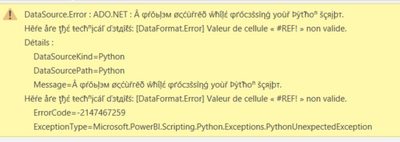
It's the first time I try to run a python code on power BI. Actually I have an Excel file as a data source and I want to do some transformations on the original data source but when ever I run the python code I get this error :
even if it's just a simple instruction like this
does anyone have any idea about the issue. thanks in advance
Solved! Go to Solution.
Hi @Anonymous
Thanks for reaching out to us.
Please set up according to this tutorial and check if the previous settings are set correctly, Run Python Scripts in Power BI Desktop - Power BI | Microsoft Learn
Best Regards,
Community Support Team _Tang
If this post helps, please consider Accept it as the solution to help the other members find it more quickly.
I got the same error and fixed it by installing the pandas packaging in the anaconda prompt under my environment.
Hi @Anonymous
Thanks for reaching out to us.
Please set up according to this tutorial and check if the previous settings are set correctly, Run Python Scripts in Power BI Desktop - Power BI | Microsoft Learn
Best Regards,
Community Support Team _Tang
If this post helps, please consider Accept it as the solution to help the other members find it more quickly.
Join us in Barcelona for FabCon and SQLCon, the Fabric, Power BI, SQL, and AI community event. Save €200 with code FABCMTY200.
Join Fabric Data Days 2026: 60 days of free live/on-demand sessions, challenges, study groups, and certification opportunities.
| User | Count |
|---|---|
| 23 | |
| 19 | |
| 18 | |
| 17 | |
| 13 |
| User | Count |
|---|---|
| 60 | |
| 52 | |
| 47 | |
| 40 | |
| 38 |