
cancel
Showing results for 
Search instead for 
Did you mean: 

July 7 - July 17 | Round 2 of the Power BI Dataviz World Championships. Don't miss your chance! Learn more

Reply
HenryJS
Post Prodigy
Post Prodigy

Hyperlink DAX code

Hi all,


I'm trying to create a hyperlink for a report but when inputting the below DAX I receive an error saying the CandidateREf cannot be determined?


1.


Link Error.PNG


Thanks,


Henry

1 ACCEPTED SOLUTION
Anonymous
Not applicable

Hi @HenryJS ,


Please check the following steps as below.

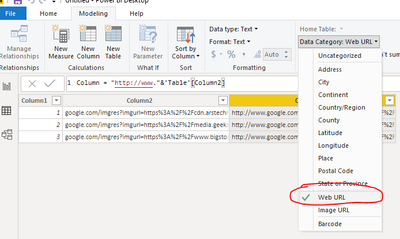
1# Select the calculated column and turn the Data category to Web URL.

1.PNG

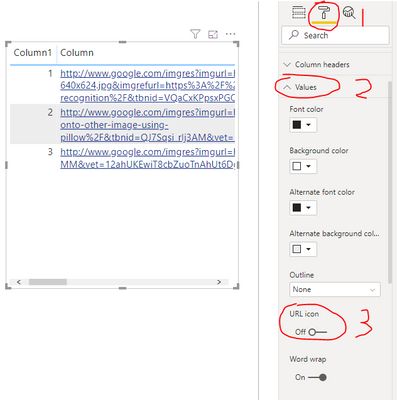
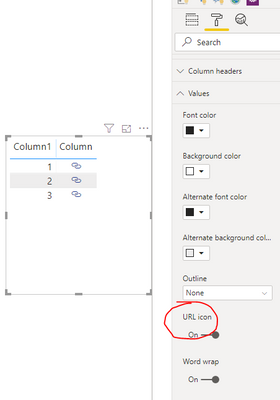
2# Select the visual and select Format -> Values turn the URL icon to On.

2.PNG3.PNG

For more details please check the document below.

https://docs.microsoft.com/en-us/power-bi/power-bi-hyperlinks-in-tables#display-a-hyperlink-icon-ins....


Best Regards,

Jay

Community Support Team _ Jay Wang

If this post helps, then please consider Accept it as the solution to help the other members find it more quickly.

View solution in original post

4 REPLIES 4
Anonymous
Not applicable

Hi @HenryJS ,


You are creating a Measure instead of a Calculated column, please modify the DAX to

FORMAT(SELECTEDVALUE('table name'[column name]))

Or please right-click on the table or any column of the table and select new column to create a Calculated Column.

For more details about Measure and Calculated Column, please refer to the video below.

https://www.youtube.com/watch?v=SVEGfqCTodc.


Best Regards,

Jay

Community Support Team _ Jay Wang

If this post helps, then please consider Accept it as the solution to help the other members find it more quickly.

Hi,


The calculated column now works and creates the desired hyperlink.


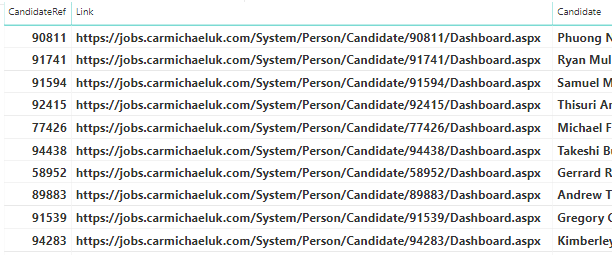
How do I create a button and link to the hyperlink as per image 2? At the moment it is just displaying image 1.


1.

Hyperlink 2.PNG


2.

Hyperlink.PNG


Thanks,


Henry

Anonymous
Not applicable

Hi @HenryJS ,


Please check the following steps as below.

1# Select the calculated column and turn the Data category to Web URL.

1.PNG

2# Select the visual and select Format -> Values turn the URL icon to On.

2.PNG3.PNG

For more details please check the document below.

https://docs.microsoft.com/en-us/power-bi/power-bi-hyperlinks-in-tables#display-a-hyperlink-icon-ins....


Best Regards,

Jay

Community Support Team _ Jay Wang

If this post helps, then please consider Accept it as the solution to help the other members find it more quickly.

az38
Community Champion
Community Champion

Hi @HenryJS 

you are trying to create measure, not caculated column. measure requires some calculaion. try new column


do not hesitate to give a kudo to useful posts and mark solutions as solution


do not hesitate to give a kudo to useful posts and mark solutions as solution
LinkedIn

Helpful resources

Announcements
FabCon and SQLCon Barcelona 2026

FabCon & SQLCon – Barcelona 2026

Join us in Barcelona for FabCon and SQLCon, the Fabric, Power BI, SQL, and AI community event. Save €200 with code FABCMTY200.

60 days of Data Days Carousel

Data Days 2026

Join Data Days 2026: 60 days of free live/on-demand sessions, challenges, study groups, and certification opportunities.

Power BI DataViz World Championships carousel

Power BI DataViz World Championships - June 2026

A new Power BI DataViz World Championship is coming this June! Don't miss out on submitting your entry.

Top Solution Authors