
Don't miss your chance to take the Fabric Data Engineer (DP-700) exam on us!
Learn moreWe've captured the moments from FabCon & SQLCon that everyone is talking about, and we are bringing them to the community, live and on-demand. Starts on April 14th. Register now
Hi all,
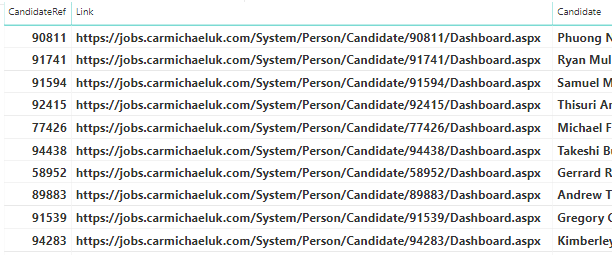
I'm trying to create a hyperlink for a report but when inputting the below DAX I receive an error saying the CandidateREf cannot be determined?
1.
Thanks,
Henry
Solved! Go to Solution.
Hi @HenryJS ,
Please check the following steps as below.
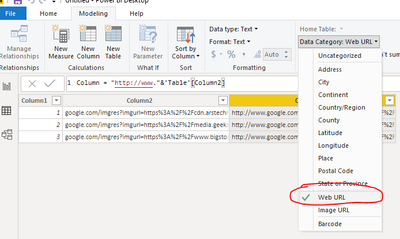
1# Select the calculated column and turn the Data category to Web URL.
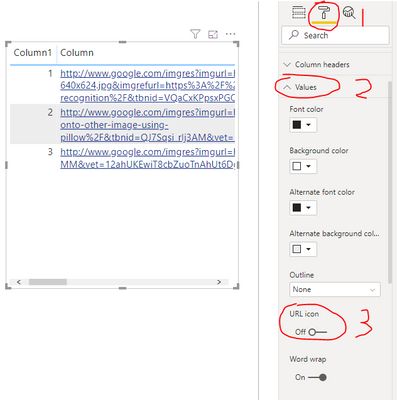
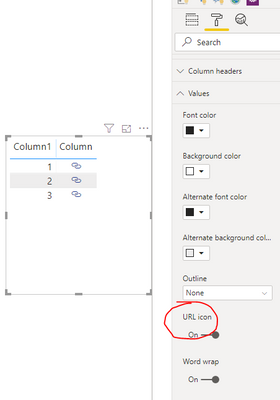
2# Select the visual and select Format -> Values turn the URL icon to On.
For more details please check the document below.
Best Regards,
Jay
Community Support Team _ Jay Wang
If this post helps, then please consider Accept it as the solution to help the other members find it more quickly.
Hi @HenryJS ,
You are creating a Measure instead of a Calculated column, please modify the DAX to
FORMAT(SELECTEDVALUE('table name'[column name]))Or please right-click on the table or any column of the table and select new column to create a Calculated Column.
For more details about Measure and Calculated Column, please refer to the video below.
https://www.youtube.com/watch?v=SVEGfqCTodc.
Best Regards,
Jay
Community Support Team _ Jay Wang
If this post helps, then please consider Accept it as the solution to help the other members find it more quickly.
Hi,
The calculated column now works and creates the desired hyperlink.
How do I create a button and link to the hyperlink as per image 2? At the moment it is just displaying image 1.
1.
2.
Thanks,
Henry
Hi @HenryJS ,
Please check the following steps as below.
1# Select the calculated column and turn the Data category to Web URL.
2# Select the visual and select Format -> Values turn the URL icon to On.
For more details please check the document below.
Best Regards,
Jay
Community Support Team _ Jay Wang
If this post helps, then please consider Accept it as the solution to help the other members find it more quickly.
If you have recently started exploring Fabric, we'd love to hear how it's going. Your feedback can help with product improvements.
A new Power BI DataViz World Championship is coming this June! Don't miss out on submitting your entry.
Share feedback directly with Fabric product managers, participate in targeted research studies and influence the Fabric roadmap.
| User | Count |
|---|---|
| 52 | |
| 37 | |
| 35 | |
| 19 | |
| 17 |
| User | Count |
|---|---|
| 73 | |
| 70 | |
| 39 | |
| 34 | |
| 23 |