cancel
Showing results for 
Search instead for 
Did you mean: 

Join the FabCon + SQLCon recap series. Up next: Power BI, Real-Time Intelligence, IQ and AI, and Data Factory take center stage. All sessions are available on-demand after the live show. Register now

Reply
Jeanxyz
Power Participant
Power Participant

How to write a custom function

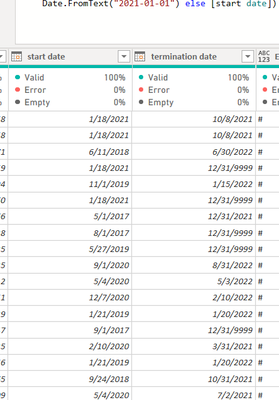
I have a table with start date and termination date as below. 

start date.PNG


I would like to replace the [start date] if it is before the first day of current year. 


So I have create a custom function as below. 

let
GetYearStart = () =>
if [start date]< #date(Date.Year(DateTime.LocalNow()),1,1)
and [termination date] < #date(Date.Year(DateTime.LocalNow()),1,1) then null else if [start date]< #date(Date.Year(DateTime.LocalNow()),1,1) then #date(Date.Year(DateTime.LocalNow()),1,1) else [start date]

in GetYearStart


 I  then create a new column by invoking the custom function, I got an error . How can I correct the custom function?

1 ACCEPTED SOLUTION
PhilipTreacy
Super User
Super User

HI @Jeanxyz 


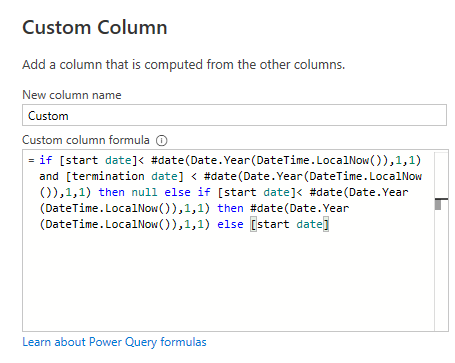
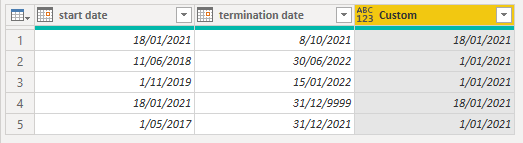
You don't need to write a custom function for this, just use your logic in a new Custom Column

ccol1.png

ccol2.png


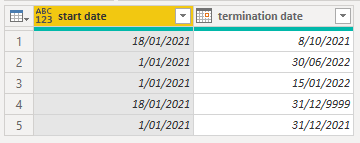
Then delete the original start date column, rename the new column and rearrange columns 

ccol3.png


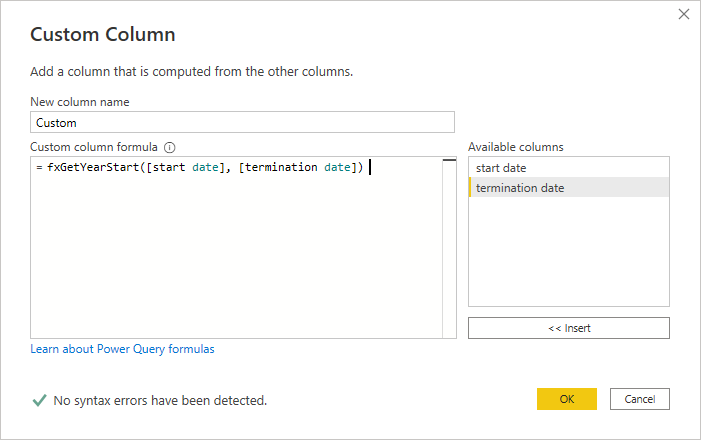
If you really want to use a custom function, you need to modify the code so that you are passing in 2 argumenst to it, the start date and termination date, here's the code


let
    GetYearStart = (start_date, termination_date) =>

    if start_date < #date(Date.Year(DateTime.LocalNow()),1,1)
    and termination_date < #date(Date.Year(DateTime.LocalNow()),1,1) then null else if start_date < #date(Date.Year(DateTime.LocalNow()),1,1) then #date(Date.Year(DateTime.LocalNow()),1,1) else start_date

in 
    GetYearStart


You then call that function in a new Custom Column supplying the [start date] and [termination date] columns as the two function arguments

ccol4.png


Regards


Phil


Did I answer your question? Then please mark my post as the solution.
If I helped you, click on the Thumbs Up to give Kudos.


Blog :: YouTube Channel :: Connect on Linkedin


Proud to be a Super User!


View solution in original post

1 REPLY 1
PhilipTreacy
Super User
Super User

HI @Jeanxyz 


You don't need to write a custom function for this, just use your logic in a new Custom Column

ccol1.png

ccol2.png


Then delete the original start date column, rename the new column and rearrange columns 

ccol3.png


If you really want to use a custom function, you need to modify the code so that you are passing in 2 argumenst to it, the start date and termination date, here's the code


let
    GetYearStart = (start_date, termination_date) =>

    if start_date < #date(Date.Year(DateTime.LocalNow()),1,1)
    and termination_date < #date(Date.Year(DateTime.LocalNow()),1,1) then null else if start_date < #date(Date.Year(DateTime.LocalNow()),1,1) then #date(Date.Year(DateTime.LocalNow()),1,1) else start_date

in 
    GetYearStart


You then call that function in a new Custom Column supplying the [start date] and [termination date] columns as the two function arguments

ccol4.png


Regards


Phil


Did I answer your question? Then please mark my post as the solution.
If I helped you, click on the Thumbs Up to give Kudos.


Blog :: YouTube Channel :: Connect on Linkedin


Proud to be a Super User!


Helpful resources

Announcements
April Power BI Update Carousel

Power BI Monthly Update - April 2026

Check out the April 2026 Power BI update to learn about new features.

New to Fabric survey Carousel

New to Fabric Survey

If you have recently started exploring Fabric, we'd love to hear how it's going. Your feedback can help with product improvements.

Power BI DataViz World Championships carousel

Power BI DataViz World Championships - June 2026

A new Power BI DataViz World Championship is coming this June! Don't miss out on submitting your entry.

FabCon and SQLCon Highlights Carousel

FabCon &SQLCon Highlights

Experience the highlights from FabCon & SQLCon, available live and on-demand starting April 14th.