cancel
Showing results for 
Search instead for 
Did you mean: 

View all the Fabric Data Days sessions on demand. View schedule

Reply
kdaya
Helper I
Helper I

How to view trends over time for first n number for days

Hi


How do i get a line graph to show the first n number of days rather than actually a date range


Please can someone help me out,


Thanks

Kunal

1 ACCEPTED SOLUTION
Eric_Zhang
Microsoft Employee
Microsoft Employee


@kdaya wrote:

Hi


How do i get a line graph to show the first n number of days rather than actually a date range


Please can someone help me out,


Thanks

Kunal


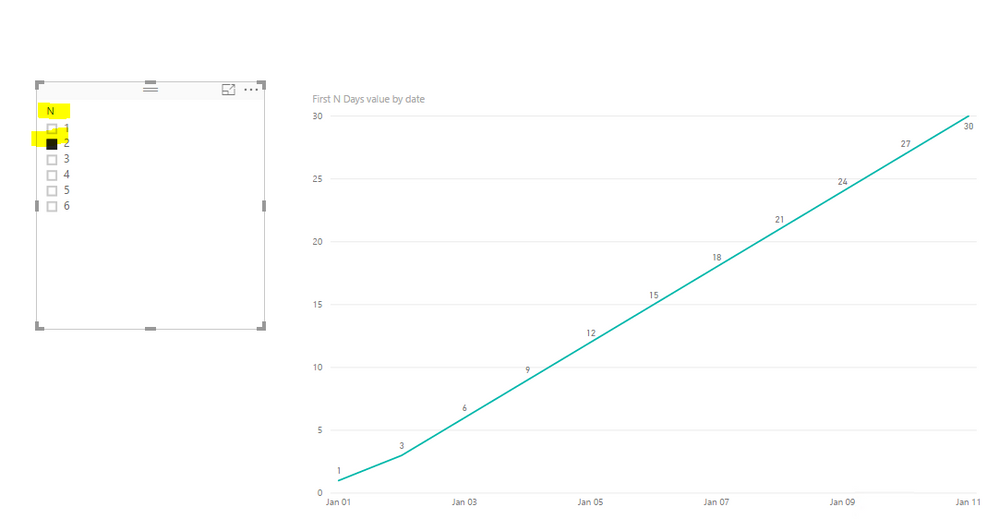
A measure as below for your reference, the measure varies according to the N days in a slicer. See more details in the attached pbix file.

First N Days value =
SUMX (
    FILTER (
        ALL ( 'values' ),
        'values'[date] <= MAX ( 'values'[date] )
            && 'values'[date]
                >= MAX ( 'values'[date] ) - MAX ( 'First N Days'[N] )
    ),
    'values'[values]
)

Capture.PNG

View solution in original post

2 REPLIES 2
Eric_Zhang
Microsoft Employee
Microsoft Employee


@kdaya wrote:

Hi


How do i get a line graph to show the first n number of days rather than actually a date range


Please can someone help me out,


Thanks

Kunal


A measure as below for your reference, the measure varies according to the N days in a slicer. See more details in the attached pbix file.

First N Days value =
SUMX (
    FILTER (
        ALL ( 'values' ),
        'values'[date] <= MAX ( 'values'[date] )
            && 'values'[date]
                >= MAX ( 'values'[date] ) - MAX ( 'First N Days'[N] )
    ),
    'values'[values]
)

Capture.PNG

Omega
Impactful Individual

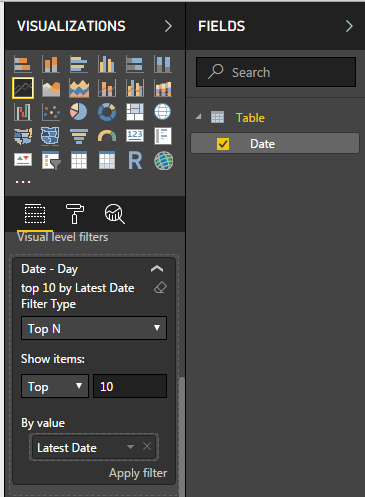
You can apply a visual filter. 


Click on the line chart -> Go to filter section under your visuals -> Change the Filter Type to Top N -> Drag your date column to By Value and enter the number of day you want to see. 


TOP N Dates.PNG

Helpful resources

Announcements
November Power BI Update Carousel

Power BI Monthly Update - November 2025

Check out the November 2025 Power BI update to learn about new features.

Fabric Data Days Carousel

Fabric Data Days

Advance your Data & AI career with 50 days of live learning, contests, hands-on challenges, study groups & certifications and more!

FabCon Atlanta 2026 carousel

FabCon Atlanta 2026

Join us at FabCon Atlanta, March 16-20, for the ultimate Fabric, Power BI, AI and SQL community-led event. Save $200 with code FABCOMM.

Top Solution Authors
Top Kudoed Authors