Join us at FabCon Atlanta from March 16 - 20, 2026, for the ultimate Fabric, Power BI, AI and SQL community-led event. Save $200 with code FABCOMM.
Register now!View all the Fabric Data Days sessions on demand. View schedule
Hi
How do i get a line graph to show the first n number of days rather than actually a date range
Please can someone help me out,
Thanks
Kunal
Solved! Go to Solution.
@kdaya wrote:
Hi
How do i get a line graph to show the first n number of days rather than actually a date range
Please can someone help me out,
Thanks
Kunal
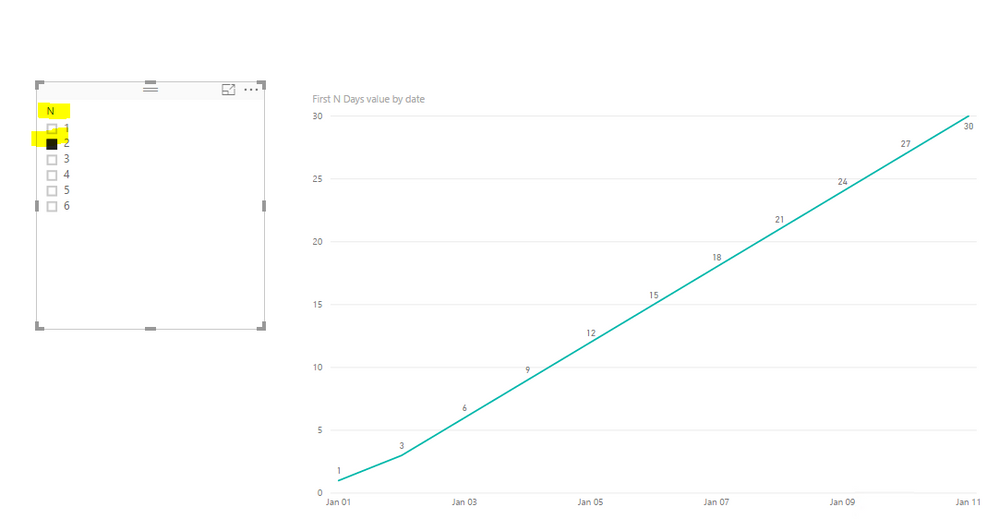
A measure as below for your reference, the measure varies according to the N days in a slicer. See more details in the attached pbix file.
First N Days value =
SUMX (
FILTER (
ALL ( 'values' ),
'values'[date] <= MAX ( 'values'[date] )
&& 'values'[date]
>= MAX ( 'values'[date] ) - MAX ( 'First N Days'[N] )
),
'values'[values]
)
@kdaya wrote:
Hi
How do i get a line graph to show the first n number of days rather than actually a date range
Please can someone help me out,
Thanks
Kunal
A measure as below for your reference, the measure varies according to the N days in a slicer. See more details in the attached pbix file.
First N Days value =
SUMX (
FILTER (
ALL ( 'values' ),
'values'[date] <= MAX ( 'values'[date] )
&& 'values'[date]
>= MAX ( 'values'[date] ) - MAX ( 'First N Days'[N] )
),
'values'[values]
)
You can apply a visual filter.
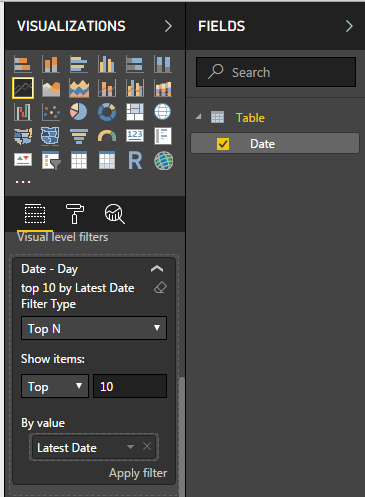
Click on the line chart -> Go to filter section under your visuals -> Change the Filter Type to Top N -> Drag your date column to By Value and enter the number of day you want to see.
Check out the November 2025 Power BI update to learn about new features.
Advance your Data & AI career with 50 days of live learning, contests, hands-on challenges, study groups & certifications and more!