cancel
Showing results for 
Search instead for 
Did you mean: 

View all the Fabric Data Days sessions on demand. View schedule

Reply
charlie77
Helper II
Helper II

How to use the result of a slicer in a new column

Hi

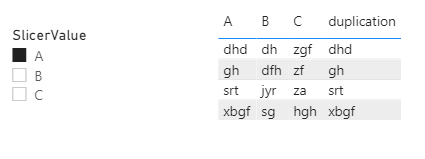
I have a data table with three columns with headings of "A", "B", and "C", respectively, and a slicer with "A", "B" and "C" three options. I wish to create a forth column which deplicates "A", "B", or "C" depending on the selection of the slicer e.g. if select "A" in the slicer, the 4th column of the table will be a duplication of column "A". Is there anyone who could provide a solution?


Many thanks

Charlie77


1 ACCEPTED SOLUTION
Anonymous
Not applicable

Hi @charlie77 ,

According to my understand, the calculated column could not be dynamical ,so use the following measure instead:


duplication =
SWITCH (
    SELECTEDVALUE ( ForSlicer[SlicerValue] ),
    "A", MAX ( 'DuplicationTable'[A] ),
    "B", MAX ( 'DuplicationTable'[B] ),
    "C", MAX ( 'DuplicationTable'[C] )
)

9.9.3.1.png

Did I answer your question ? Please mark my reply as solution. Thank you very much.

If not, please upload some insensitive data samples and expected output.


Best Regards,

Eyelyn Qin

View solution in original post

4 REPLIES 4
Anonymous
Not applicable

Hi @charlie77 ,

According to my understand, the calculated column could not be dynamical ,so use the following measure instead:


duplication =
SWITCH (
    SELECTEDVALUE ( ForSlicer[SlicerValue] ),
    "A", MAX ( 'DuplicationTable'[A] ),
    "B", MAX ( 'DuplicationTable'[B] ),
    "C", MAX ( 'DuplicationTable'[C] )
)

9.9.3.1.png

Did I answer your question ? Please mark my reply as solution. Thank you very much.

If not, please upload some insensitive data samples and expected output.


Best Regards,

Eyelyn Qin

Hi Eyelyn

Thank you so much for the ingenious solution. Yes, it's exactly what I wanted. 

Thanks again. 

Charlie77

amitchandak
Super User
Super User

@charlie77 , The information you have provided is not making the problem clear to me. Can you please explain with an example.

Check if these can help


measure slicer
https://radacad.com/change-the-column-or-measure-value-in-a-power-bi-visual-by-selection-of-the-slic...
https://community.powerbi.com/t5/Desktop/Slicer-MTD-QTD-YTD-to-filter-dates-using-the-slicer/td-p/50...


Dynamically change chart axis in Power BI
https://www.youtube.com/watch?v=6jeSIRpjv0M
https://www.youtube.com/watch?v=vlnx7QUVYME


Appreciate your Kudos.


Share with Power BI Enthusiasts: Full Power BI Video (20 Hours) YouTube
Microsoft Fabric Series 60+ Videos YouTube
Microsoft Fabric Hindi End to End YouTube


Helpful resources

Announcements
November Power BI Update Carousel

Power BI Monthly Update - November 2025

Check out the November 2025 Power BI update to learn about new features.

Fabric Data Days Carousel

Fabric Data Days

Advance your Data & AI career with 50 days of live learning, contests, hands-on challenges, study groups & certifications and more!

FabCon Atlanta 2026 carousel

FabCon Atlanta 2026

Join us at FabCon Atlanta, March 16-20, for the ultimate Fabric, Power BI, AI and SQL community-led event. Save $200 with code FABCOMM.

Top Solution Authors
Top Kudoed Authors