Get certified for free when you join Fabric Data Days 2026 and dive into Fabric, Power BI, SQL, AI, and other essential data skills.
Join nowData Days is here! Join us now for 60+ days of learning, challenges, and connection. Learn more
Hi
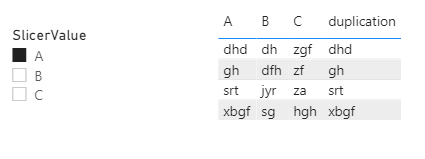
I have a data table with three columns with headings of "A", "B", and "C", respectively, and a slicer with "A", "B" and "C" three options. I wish to create a forth column which deplicates "A", "B", or "C" depending on the selection of the slicer e.g. if select "A" in the slicer, the 4th column of the table will be a duplication of column "A". Is there anyone who could provide a solution?
Many thanks
Charlie77
Solved! Go to Solution.
Hi @charlie77 ,
According to my understand, the calculated column could not be dynamical ,so use the following measure instead:
duplication =
SWITCH (
SELECTEDVALUE ( ForSlicer[SlicerValue] ),
"A", MAX ( 'DuplicationTable'[A] ),
"B", MAX ( 'DuplicationTable'[B] ),
"C", MAX ( 'DuplicationTable'[C] )
)Did I answer your question ? Please mark my reply as solution. Thank you very much.
If not, please upload some insensitive data samples and expected output.
Best Regards,
Eyelyn Qin
Hi @charlie77 ,
According to my understand, the calculated column could not be dynamical ,so use the following measure instead:
duplication =
SWITCH (
SELECTEDVALUE ( ForSlicer[SlicerValue] ),
"A", MAX ( 'DuplicationTable'[A] ),
"B", MAX ( 'DuplicationTable'[B] ),
"C", MAX ( 'DuplicationTable'[C] )
)Did I answer your question ? Please mark my reply as solution. Thank you very much.
If not, please upload some insensitive data samples and expected output.
Best Regards,
Eyelyn Qin
Hi Eyelyn
Thank you so much for the ingenious solution. Yes, it's exactly what I wanted.
Thanks again.
Charlie77
@charlie77 , The information you have provided is not making the problem clear to me. Can you please explain with an example.
Check if these can help
measure slicer
https://radacad.com/change-the-column-or-measure-value-in-a-power-bi-visual-by-selection-of-the-slic...
https://community.powerbi.com/t5/Desktop/Slicer-MTD-QTD-YTD-to-filter-dates-using-the-slicer/td-p/50...
Dynamically change chart axis in Power BI
https://www.youtube.com/watch?v=6jeSIRpjv0M
https://www.youtube.com/watch?v=vlnx7QUVYME
Appreciate your Kudos.
Thanks, amitchandak for responding. I did bit search and learnt that underpinning data tables cannot be influenced by visuals on the fly.
Don't miss out on Data Days, June 15 through August 7. Learn Fabric, Power BI, SQL, AI and more.
Check out the May 2026 Power BI update to learn about new features.
| User | Count |
|---|---|
| 23 | |
| 23 | |
| 21 | |
| 17 | |
| 13 |
| User | Count |
|---|---|
| 58 | |
| 50 | |
| 38 | |
| 29 | |
| 24 |