cancel
Showing results for 
Search instead for 
Did you mean: 

The Power BI Data Visualization World Championships is back! Get ahead of the game and start preparing now! Learn more

Reply
taimaizumi
Helper I
Helper I

How to use EARLIER function

HI, all


I need your help about how to use EARLIER function.

The detail is below.


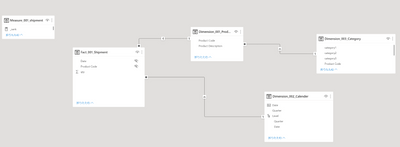
<data model>

taimaizumi_0-1657074287458.png


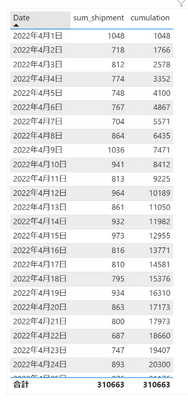
<What I realize>

To calculate sum of shipment by date as below using EARLIER function in order to understand how EARLIER function works


taimaizumi_1-1657074492923.png


<What I tried>

I write down dax below, but it didin't work with error message


cumulation2 = CALCULATE('Measure_001_shipment'[sum_shipment], 'Dimension_002_Calender'[Date] >= EARLIER('Dimension_002_Calender'[Date]))
 
<Remarks>
・I believe that in this case, by using EARLIER function , I could reffer Dimension_002_Calender'[Date]  which is unfiltered
・I can't understand why error has occured , because measure is calculated every time when visualizaion and then only when dax is written , whether context leve exists or not can't be known.
 
 
1 ACCEPTED SOLUTION
amitchandak
Super User
Super User

@taimaizumi , if you are creating a measure then try like , assuming sum_shipment is a measure


cumulation2 = CALCULATE('Measure_001_shipment'[sum_shipment], filter(allselected('Dimension_002_Calender') , 'Dimension_002_Calender'[Date] >= max('Dimension_002_Calender'[Date])) )


or


cumulation2 = CALCULATE('Measure_001_shipment'[sum_shipment], filter(allselected('Dimension_002_Calender') , 'Dimension_002_Calender'[Date] <= max('Dimension_002_Calender'[Date])) )


You can use all in place of allselected


Earlier we will use in case same table operation in a new column

Share with Power BI Enthusiasts: Full Power BI Video (20 Hours) YouTube
Microsoft Fabric Series 60+ Videos YouTube
Microsoft Fabric Hindi End to End YouTube

View solution in original post

4 REPLIES 4
taimaizumi
Helper I
Helper I

@amitchandak 

I really appreciate your kind help again!


Earlier we will use in case same table operation in a new column

->I'm afraid I can't understand this. Do you mean that 'EARLIER' function can't be used for measure calculation but only for creating new column ?


And I'm sorry to trouble you , but I have one additional question about your ansewer.

I can't understand why ""max('Dimension_002_Calender'[Date]) "" can refer "date" which is visualized (= filtered) altough due to allselected('Dimension_002_Calender') , filte is removed .


Anonymous
Not applicable

Hi @taimaizumi ,


//Do you mean that 'EARLIER' function can't be used for measure calculation but only for creating new column?

Although we usually use EARLIER in computed columns, that doesn't mean EARLIER can only be used in computed columns. EARLIER requires two layers of iterators to build the environment required by EARLIER(For example, two levels of row contexts are constructed using the iterative functions ADDCOLUMNS and FILTER.), which is cumbersome.


//I can't understand why "max('Dimension_002_Calender'[Date]) "" can refer to "date" which is visualized (= filtered) although due to allselected('Dimension_002_Calender'), filter is removed.

The [Date] column has an external filter with only one fixed value per row, and MAX is used to obtain this value. Using MIN has the same effect.


Please read this Blog hope it can help you.

行上下文嵌套和EARLIER


Best Regards,
Gao

Community Support Team


If there is any post helps, then please consider Accept it as the solution to help the other members find it more quickly. If I misunderstand your needs or you still have problems on it, please feel free to let us know. Thanks a lot!

How to get your questions answered quickly -- How to provide sample data

@Anonymous 

Dear Gao-san

I appreciate your support.

What concerns about 'EARLIER', I will learn more based on your advice

What concerns about second question, I uderstand partly but I may misunderstand the way 'FILTER' function work.


My understand about


filter(allselected('Dimension_002_Calender') , 'Dimension_002_Calender'[Date] <= max('Dimension_002_Calender'[Date]))


is below


  1. Call table from argument 1,which in this case is 'allselected('Dimension_002_Calender')'
  2. By 'ALLSELCTED' function, external filter is removed.
  3. Then, argument 2 is reffered , which in this case is ''Dimension_002_Calender'[Date] <= max('Dimension_002_Calender'[Date])'
  4. At this point, Dimension_002_Calender'[Date] is table which has only one columns , [Date] and its filter is expanded to selected dates
  5. Therefore max('Dimension_002_Calender'[Date])' may be literally max of table Dimension_002_Calender'[Date]

Pleae correct me because I may misunderstand in what order function works


amitchandak
Super User
Super User

@taimaizumi , if you are creating a measure then try like , assuming sum_shipment is a measure


cumulation2 = CALCULATE('Measure_001_shipment'[sum_shipment], filter(allselected('Dimension_002_Calender') , 'Dimension_002_Calender'[Date] >= max('Dimension_002_Calender'[Date])) )


or


cumulation2 = CALCULATE('Measure_001_shipment'[sum_shipment], filter(allselected('Dimension_002_Calender') , 'Dimension_002_Calender'[Date] <= max('Dimension_002_Calender'[Date])) )


You can use all in place of allselected


Earlier we will use in case same table operation in a new column

Share with Power BI Enthusiasts: Full Power BI Video (20 Hours) YouTube
Microsoft Fabric Series 60+ Videos YouTube
Microsoft Fabric Hindi End to End YouTube

Helpful resources

Announcements
Power BI DataViz World Championships

Power BI Dataviz World Championships

The Power BI Data Visualization World Championships is back! Get ahead of the game and start preparing now!

December 2025 Power BI Update Carousel

Power BI Monthly Update - December 2025

Check out the December 2025 Power BI Holiday Recap!

FabCon Atlanta 2026 carousel

FabCon Atlanta 2026

Join us at FabCon Atlanta, March 16-20, for the ultimate Fabric, Power BI, AI and SQL community-led event. Save $200 with code FABCOMM.