This time we’re going bigger than ever. Fabric, Power BI, SQL, AI and more. We're covering it all. You won't want to miss it.
Learn moreLevel up your Power BI skills this month - build one visual each week and tell better stories with data! Get started
I have two product codes grouped in two columns. Each Product Code came from a separate query but only one of them contains the true value. In column “C,” I want my “Result” column to return the following values:
Results =If Product Code 1 value is blank or not equal to Product Code 2, return the value in Product Code 2, Otherwise Return the value in Product Code 1
| Product Code 1 | Product Code 2 | Results |
| 3950807 | 3950807 | |
| 3982242 | 3982242 | |
| 3982252 | ||
| 4076327 | 4076327 | |
| 4080010 | 4080010 | |
| 4080031 | 4080031 | |
| 3971405 | 3971405 | |
| 3971510 | 3971510 | |
| 4008225 | 4008225 | |
| 4081284 | 4081284 | |
| 4081286 | 4081286 | |
| 4081322 | 4081322 | |
| 3977477 | 3977477 | |
| 3971727 | 3971727 | |
| 3983696 | ||
| 3971410 | 3971410 | |
| 4081239 | 4081239 | |
| 3976141 | ||
| 4070436 | 4070436 |
Solved! Go to Solution.
Hi @mdrammeh,
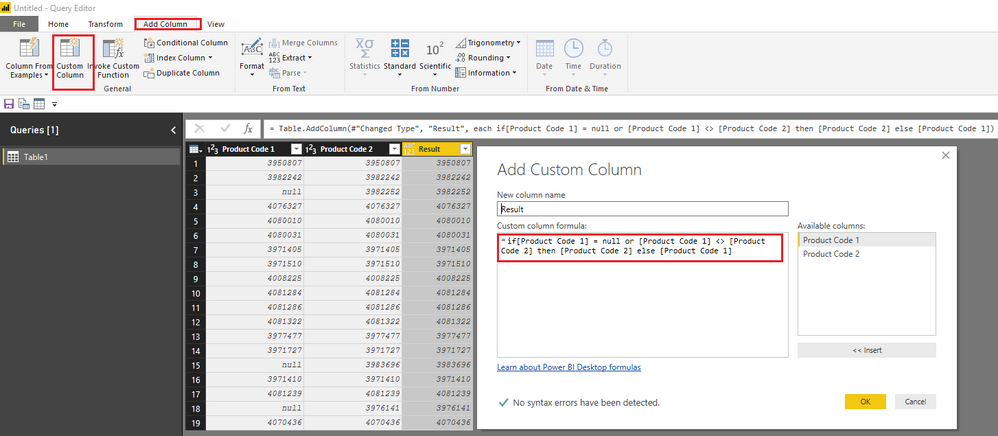
Based on my test, you should be able to use the following power query(M) to add a new custom column under Query Editor > Add Column tab. ![]()
Result = if[Product Code 1] = null or [Product Code 1] <> [Product Code 2] then [Product Code 2] else [Product Code 1]
Regards
How about...
Results =
IF (
ISBLANK ( 'Table1'[Product Code 1] )
|| 'Table1'[Product Code 1] <> 'Table1'[Product Code 2],
'Table1'[Product Code 2],
'Table1'[Product Code 1]
)
Hi #Sean,
Thanks for getting back to me. Is this a Power Query formula or Power BI formula? The reason I ask is am using Power Query for this solutions.
Thanks again!
Hi @mdrammeh,
Based on my test, you should be able to use the following power query(M) to add a new custom column under Query Editor > Add Column tab. ![]()
Result = if[Product Code 1] = null or [Product Code 1] <> [Product Code 2] then [Product Code 2] else [Product Code 1]
Regards
The optimiser in me thinks i should suggest:
Results =
IF (
'Table1'[Product Code 1] = 'Table1'[Product Code 2],
'Table1'[Product Code 1],
'Table1'[Product Code 2]
)
The reason i dropped the "BLANK" requirement is there isn't a scenario where you can get blank incorrectly. Because if Product Code 1 is blank, then it cannot equal product code 2 unless it is also blank. So unless i'm missing something, we only need to check if both are equal.
Thanks for the help #Ross73312 but what am trying to do here is to return a value for the blank rows in "Product Code 1". The reason is Product Code 1 has incomplete values that are present in Product Code 2.
The second question is, would this formula work with Power Query? It looks more like a PowerBI formula. Please advice.
Thanks!
Sign up to receive a private message when registration opens and key events begin.
If you have recently started exploring Fabric, we'd love to hear how it's going. Your feedback can help with product improvements.
| User | Count |
|---|---|
| 31 | |
| 23 | |
| 22 | |
| 20 | |
| 15 |
| User | Count |
|---|---|
| 64 | |
| 41 | |
| 27 | |
| 22 | |
| 20 |