Get certified for free when you join Fabric Data Days 2026 and dive into Fabric, Power BI, SQL, AI, and other essential data skills.
Join nowData Days is here! Join us now for 60+ days of learning, challenges, and connection. Learn more
I have two product codes grouped in two columns. Each Product Code came from a separate query but only one of them contains the true value. In column “C,” I want my “Result” column to return the following values:
Results =If Product Code 1 value is blank or not equal to Product Code 2, return the value in Product Code 2, Otherwise Return the value in Product Code 1
| Product Code 1 | Product Code 2 | Results |
| 3950807 | 3950807 | |
| 3982242 | 3982242 | |
| 3982252 | ||
| 4076327 | 4076327 | |
| 4080010 | 4080010 | |
| 4080031 | 4080031 | |
| 3971405 | 3971405 | |
| 3971510 | 3971510 | |
| 4008225 | 4008225 | |
| 4081284 | 4081284 | |
| 4081286 | 4081286 | |
| 4081322 | 4081322 | |
| 3977477 | 3977477 | |
| 3971727 | 3971727 | |
| 3983696 | ||
| 3971410 | 3971410 | |
| 4081239 | 4081239 | |
| 3976141 | ||
| 4070436 | 4070436 |
Solved! Go to Solution.
Hi @mdrammeh,
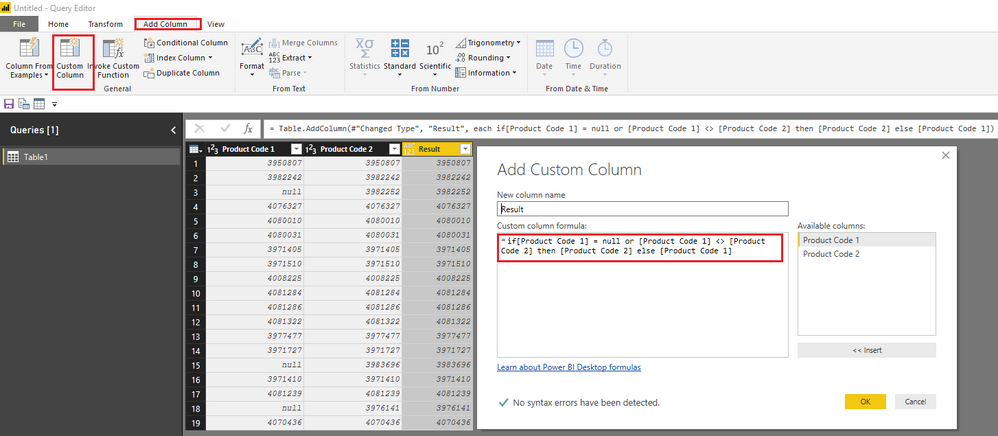
Based on my test, you should be able to use the following power query(M) to add a new custom column under Query Editor > Add Column tab. ![]()
Result = if[Product Code 1] = null or [Product Code 1] <> [Product Code 2] then [Product Code 2] else [Product Code 1]
Regards
How about...
Results =
IF (
ISBLANK ( 'Table1'[Product Code 1] )
|| 'Table1'[Product Code 1] <> 'Table1'[Product Code 2],
'Table1'[Product Code 2],
'Table1'[Product Code 1]
)
Hi #Sean,
Thanks for getting back to me. Is this a Power Query formula or Power BI formula? The reason I ask is am using Power Query for this solutions.
Thanks again!
Hi @mdrammeh,
Based on my test, you should be able to use the following power query(M) to add a new custom column under Query Editor > Add Column tab. ![]()
Result = if[Product Code 1] = null or [Product Code 1] <> [Product Code 2] then [Product Code 2] else [Product Code 1]
Regards
The optimiser in me thinks i should suggest:
Results =
IF (
'Table1'[Product Code 1] = 'Table1'[Product Code 2],
'Table1'[Product Code 1],
'Table1'[Product Code 2]
)
The reason i dropped the "BLANK" requirement is there isn't a scenario where you can get blank incorrectly. Because if Product Code 1 is blank, then it cannot equal product code 2 unless it is also blank. So unless i'm missing something, we only need to check if both are equal.
Thanks for the help #Ross73312 but what am trying to do here is to return a value for the blank rows in "Product Code 1". The reason is Product Code 1 has incomplete values that are present in Product Code 2.
The second question is, would this formula work with Power Query? It looks more like a PowerBI formula. Please advice.
Thanks!
Don't miss out on Data Days, June 15 through August 7. Learn Fabric, Power BI, SQL, AI and more.
Check out the May 2026 Power BI update to learn about new features.
| User | Count |
|---|---|
| 23 | |
| 21 | |
| 20 | |
| 19 | |
| 13 |
| User | Count |
|---|---|
| 58 | |
| 52 | |
| 37 | |
| 31 | |
| 27 |