Join us at FabCon Atlanta from March 16 - 20, 2026, for the ultimate Fabric, Power BI, AI and SQL community-led event. Save $200 with code FABCOMM.
Register now!Get Fabric Certified for FREE during Fabric Data Days. Don't miss your chance! Request now
Hi,
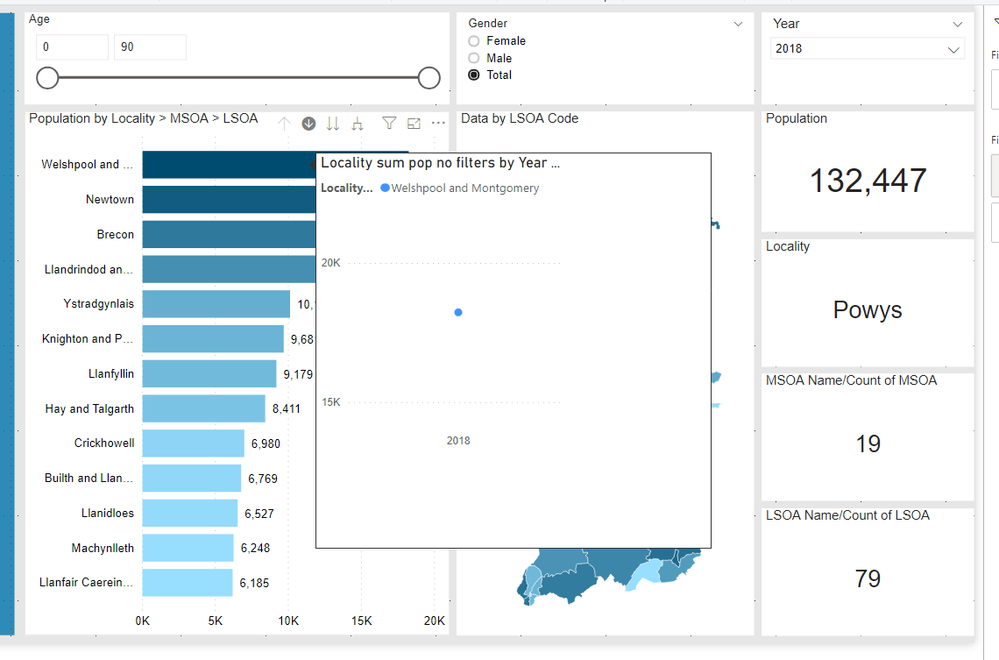
I have a report looking at Population at low levels, I have created a tooltip page that could show this data over time when you hover over a particular area in a line graph. However, the tooltip is being affected by the year selection on the report page.
Is there a way that the tooltip page can ignore the year slicer on the report page? As you can see below the line graph only shows the 2018 data as that is what is selected on the report slicer 😞
Solved! Go to Solution.
Hi!
You'll be amazed how easy this solution is!
In the tooltip page, you'll find a toggle button under "tooltip"
"Keep all filters"
Turn this off and your problem is solved
Hi!
You'll be amazed how easy this solution is!
In the tooltip page, you'll find a toggle button under "tooltip"
"Keep all filters"
Turn this off and your problem is solved
Thanks @RobbeVL,
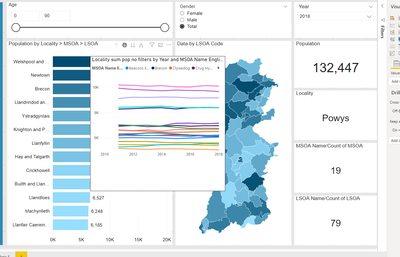
I only want to turn off the year filter though (apologies I have said in the original post all filters).....so when you hover you can see the historical data for that area only? If i turn them all off it looks like this 😞
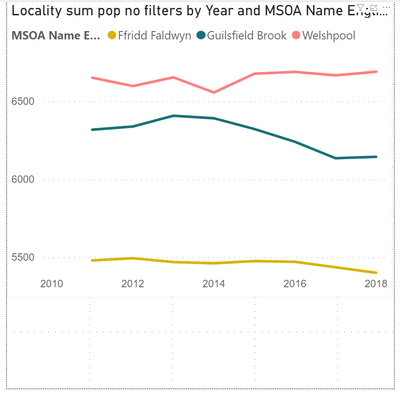
when it should look like this for that area.....
Check out the November 2025 Power BI update to learn about new features.
Advance your Data & AI career with 50 days of live learning, contests, hands-on challenges, study groups & certifications and more!