Learn from the best! Meet the four finalists headed to the FINALS of the Power BI Dataviz World Championships! Register now
I have my report .pbix definition currently connected to Azure SQL. I a have the same tables in a SQL instance. What is the best way to replace the connection but keep the report and tables? Is this possible?
Solved! Go to Solution.
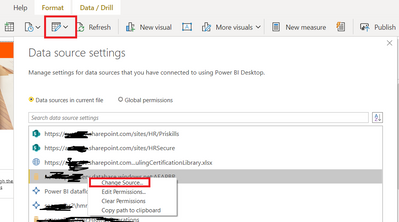
If you only want to change the connection string or point to a new SQL instance, then you can do it under data source settings as well.
I'm not sure on the specifics of the connection steps in this case, but in general, you can change any data source as follows
1. Do not delete the current loaded table
2. Load the new table from the new source from scratch. Make sure the final table is identical to the original
3. In the new table query (2 above), go into Advanced Editor and copy all the code
4. Go into advanced editor for the original table (1 above) and paste the code from 2 in place of original code.
take a backup copy first.
If you have recently started exploring Fabric, we'd love to hear how it's going. Your feedback can help with product improvements.
A new Power BI DataViz World Championship is coming this June! Don't miss out on submitting your entry.
Share feedback directly with Fabric product managers, participate in targeted research studies and influence the Fabric roadmap.
| User | Count |
|---|---|
| 57 | |
| 33 | |
| 33 | |
| 19 | |
| 18 |
| User | Count |
|---|---|
| 68 | |
| 67 | |
| 45 | |
| 30 | |
| 28 |